
Introduction
If you've built and deployed a B2B SaaS product, customer integrations are likely tying up more engineering resources than initially expected. Your devs are managing auth, handling webhooks, and debugging a Salesforce sync that failed sometime last night. And they are probably doing OK. After all, you hired talented engineers who know how to write software, and building integrations is just more code, right? This assumption is common and costly.
Why building an integration platform feels like the natural choice
But we understand this perspective first-hand. Software companies build software. It's in your DNA. When you encounter a technical challenge, your instinct is to solve it with the capabilities you have at hand. Why wouldn't you? You already have version control, CI/CD pipelines, staging environments, and a team that ships code daily.
Building your own integrations feels natural. Tailor them to your customers, keep full control over the tech stack, and avoid adding more dependencies into critical systems.
Why trusting others can be difficult
If you buy a third-party integration platform instead, you're putting a critical part of your customer experience into someone else's hands. You depend on the vendor's uptime, security practices, and product roadmap. You trust that the platform will be around in five or 10 years and that pricing won't become prohibitive as you scale. You accept that you'll be waiting on an outside support team when something breaks, rather than fixing it yourself. These aren't trivial concerns.
Choosing a third-party integration platform introduces risks.
How the industry has previously handled infrastructure
Yet despite these concerns, the software industry has repeatedly landed on “buy” for infrastructure that appeared at one time to be perfect candidates for building in-house.
Take authentication, for example. Twenty years ago, most software companies built their own auth systems from scratch. It seemed simple, and keeping it in-house meant complete control.
But as security requirements multiplied (multifactor authentication, OAuth, and SSO), and the cost of getting auth wrong skyrocketed (breaches, penalties, and lost customer trust), companies began to shift toward solutions like Auth0. Today, few argue that building an authentication system from scratch is a wise use of engineering resources, even though it introduces a third-party dependency into an extremely sensitive part of your product.
The same is true with payment processing (Stripe), email delivery (SendGrid), monitoring and observability (Datadog and New Relic), and infrastructure management (AWS, Azure, and GCP). In each case, the "buy" decision meant accepting dependency risk in exchange for specialization, reliability, and freeing up engineering resources to focus on the core product.
We won't claim that buying is always right or building is always wrong.
What we believe
We believe that integration platforms for B2B SaaS customer integrations represent yet another system that should be a "buy" decision for most companies.
There is no universal answer
However, the correct answer to your build vs buy question depends on your company's stage, technical capabilities, customer requirements, strategic priorities, and more. Some companies absolutely should build. Others should buy. And some will find themselves in the messy middle with a hybrid solution.
Whether you build, buy, or land somewhere in between, we aim to help you make that choice with your eyes wide open.
Building integrations ≠ building an integration platform
Before we examine the details of the build vs buy equation for B2B SaaS integrations, a quick prerequisite: building an integration and building an integration platform are fundamentally different goals. You must not confuse the two.
When you build an integration, you're solving one integration scenario. When you build an integration platform, you're solving every integration scenario.
When SaaS teams commit to building integrations in-house, they usually agree to a far longer and more complex project than they realize. The integration itself – the obvious code that connects your product with external systems – represents perhaps 20% of what is necessary for an integration to function reliably at scale.
Most teams approach their first integration confidently. They read the API docs, estimated things would take a few development sprints, and dove in. The integration works when tested and ships to production. Everything is fine – until the support tickets start arriving. The next thing you know, your devs are building error handling, retry logic, webhook infrastructure, and more. What started with "connect to this API" has somehow evolved into an entire integration platform.
What lies beneath
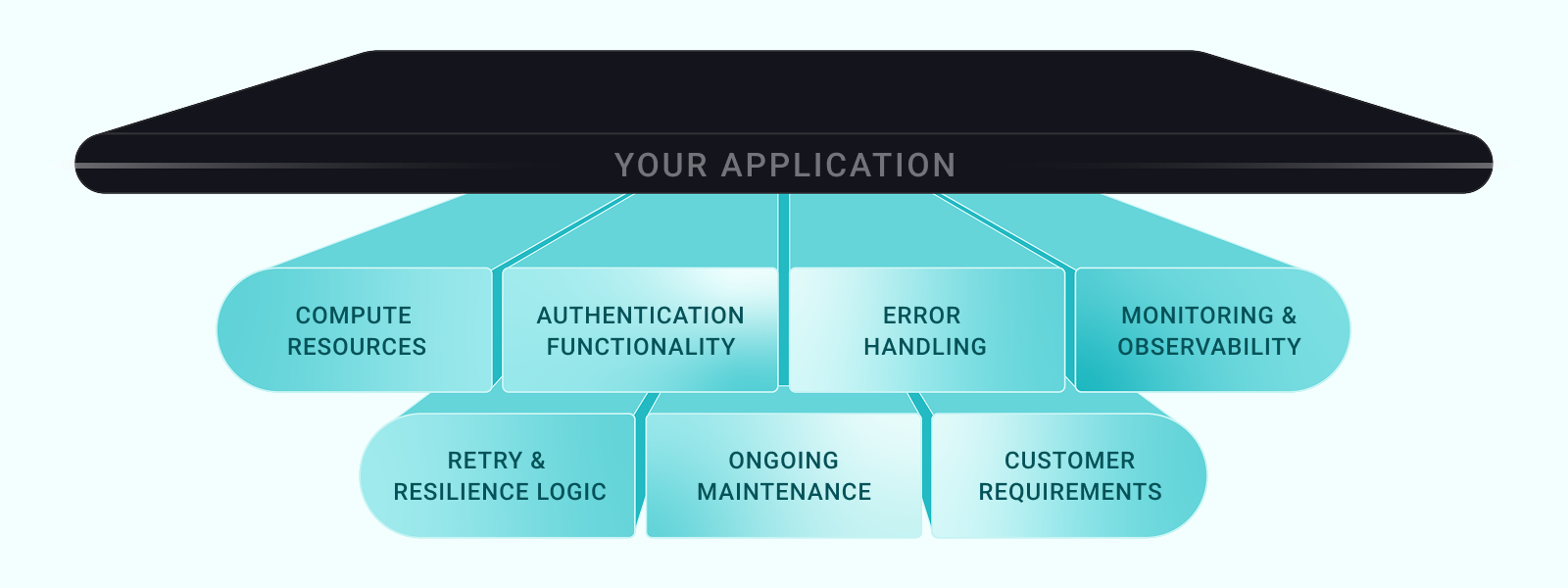
That's where the other 80% comes from. It's all the parts of an integration that are behind the scenes, things such as:
- Compute resources to handle highly variable loads and not fall over when one of your customers bursts to thousands of requests per minute.
- Authentication functionality to securely store and refresh OAuth tokens for hundreds or thousands of customers, each with different flows and token expiration rules.
- Error handling to intelligently catch API rate limits, timeouts, and connection failures and respond appropriately without data loss or duplicate records.
- Monitoring and observability to alert you when integrations fail and provide the troubleshooting tools your support team needs to understand why Customer X's Salesforce sync failed for the third time this week.
- Retry and resilience logic to manage network failures gracefully, respects API rate limits, and maintains data integrity when external systems don't follow expectations.
- Ongoing maintenance that addresses every API version change, deprecated endpoint, and tech partner update – multiplied by every integration you build for every customer you have.
- Customer requirements such as customizable field mappings, audit logs, bulk data handling, webhook infrastructure, and security documentation.
And everything else that is necessary behind the scenes to ensure that your integrations can move data from app A to app B successfully.
The surprise product
The fact that an integration involves so much more than it appears at first glance may also catch you by surprise. Consider a typical scenario: your team commits to building a Salesforce integration. Nine months in, you realize:
- You've built a second product.
- One you didn't plan to build.
- One that's consuming engineering resources that were allocated to your core product.
- One that will never be as reliable, secure, or scalable as a purpose-built platform.
You wanted integration features, but you now have an integration product.
If you set out from day one to create an in-house integration platform to handle all your integrations, that's one thing. But if you did that, you're not surprised at what it takes.
An integration platform is a must-have – the absolutely critical back-end that enables your integrations to run reliably and securely at scale.
However, most SaaS engineering teams don't expect to build an integration platform. For them, the surprise is real and hugely disruptive.
The better approach? Partner with an embedded iPaaS vendor like Prismatic. Prismatic handles the platform while the engineering team focuses on coding features that create customer value and differentiate the product in the market.
Lets examine what you gain by buying instead of building.
Get the pdf of this guide to share with your team and keep the build vs buy discussion going. Includes a completely functional version of the Build vs Buy quiz and details for each of the five possible quiz outcomes.
Why buy an embedded iPaaS for your SaaS?
Here are the primary reasons to buy an embedded iPaaS and how doing so allows you to optimize resources and establish a product and integration strategy for the long term.
Focus on core product development
Your engineering team's most valuable contribution isn't coding your integration infrastructure – it's evolving and advancing your product's value proposition. With Prismatic, your onboarding and support teams can handle much of the integration workload. Non-devs can build integrations with the low-code integration designer and prebuilt connectors, while devs can extend those capabilities by writing reusable custom connectors for industry-specific logic. For the greatest flexibility, devs can build in code with their favorite IDEs.

Cofactr, a supply chain platform, used Prismatic to move from dedicating 25% of engineering resources to integrations to having zero engineering involvement in integration work.
Prismatic provides a secure, scalable infrastructure out of the box, so your devs don't need to manage integration servers or databases. Meanwhile, your support team has visibility into integrations to solve customers' issues, without needing to get engineering involved most of the time.
Accelerated time to market
Speed is the defining characteristic of winners in B2B SaaS. When prospects ask about integrations during evaluation, responding with "we'll build that in six months" might mean losing the deal. Prismatic enables you to deliver integrations in days or weeks instead of months, dramatically accelerating your response to prospect and customer requirements.
Teams that combine well-defined integration requirements with Prismatic can speed time-to-market, reduce development and support costs, and nurture customer satisfaction. The platform provides everything necessary to build, deploy, and manage productized integrations, removing the need for your devs to create integrations from scratch. Flexible integration configuration ensures that you can build one integration and deploy it to many customers, providing a tailored experience for each of them. In addition, instead of building integrations sequentially – each taking months of development time – you can deliver multiple integrations in parallel.

Yoti, a digital identity platform, used Prismatic to build over 100 integrations in a year based on a massive reduction in development time per integration compared to its prior in-house strategy.
Faster customer onboarding and implementation
New customer onboarding is critical for the customer lifecycle. Extended implementation timelines frustrate customers, delay time-to-value, and increase the probability of early churn. Too often, integrations are a significant source of risk and delay in customer onboarding.
Integrations built with Prismatic are reusable and configurable, with powerful deployment tools making it easy for onboarding teams to configure and deploy integrations for individual customers without involving engineering. For even greater flexibility, let your customers self-activate integrations via an integration marketplace.
Reduced maintenance and operational overhead
The hidden cost of in-house integrations isn't in the initial work – it's in the maintenance that never ends. Third-party APIs change constantly, authentication evolves, rate limits change, data formats shift, and code releases keep coming. Integration infrastructure requires ongoing monitoring of all these and more, tying up additional engineering bandwidth.
Prismatic tracks third-party API changes for prebuilt connectors, applies security patches, and updates for its platform, eliminating a whole category of maintenance concerns.
Prismatic offers a unique approach to deploying automation across multiple clients. With Prismatic's error logs and execution logs, we can easily monitor the status of our automation.
Without robust logging and monitoring tools, integrations are black boxes, requiring senior devs to dig through server logs by hand when failures occur. Prismatic's built-in monitoring, logging, and alerting capabilities let you get ahead of integration issues, often before customers know there's a problem.
Lower customer churn risk
Integration failures represent significant churn risk. When a customer's critical data sync breaks – whether it's orders flowing to an ERP or leads syncing with their CRM – they experience immediate pain. In addition, while your customers are often the first to know when an integration fails, your support staff may lack detailed visibility into the integration and its status, frustrating customers and delaying resolution times.

Sisu, a real estate operating system, watched monthly churn drop by 3% after it used Prismatic to fuel its integration strategy.
Prismatic provides higher reliability and uptime for integrations than in-house solutions, thanks to secure, scalable infrastructure, monitoring, and incident response capabilities. Automated retry functionality handles transient issues with third-party apps without manual intervention, reducing customer-facing disruptions.
When integrations fail, Prismatic's detailed error logging and support dashboards enable faster resolution. Customers can identify and resolve many issues themselves, and your support team can efficiently handle the rest. And, when your product provides oversized value by being deeply connected with customers' tech stacks, they won't be in any hurry to move on to competitors.
Reduced engineering team size/hiring needs
Engineering talent is expensive. Every role you need to hire represents months of recruiting effort, significant salary costs, and ongoing overhead. Building and maintaining in-house integrations requires dedicated engineering resources, often more than initially anticipated.
Using Prismatic eliminates hiring specialized engineers to handle integration development and maintenance. With its low-code integration designer and prebuilt components, Prismatic shifts integrations from senior software engineers to solutions architects and technical product managers. Instead of building a dedicated integrations team with several devs – a common requirement for companies with integration needs – you can allocate existing resources to higher-value work.
Yoti, a digital identity platform, implemented Prismatic and saved 95% of the engineering time that previously went to building, deploying, and managing integrations.
Most companies don't have many integration devs, and even those that do are constrained by engineering capacity and product roadmaps. Prismatic empowers teams across your entire company to quickly build integrations for your customers and support them well. This allows you to achieve greater integration velocity and breadth while significantly reducing the time engineering spends on integrations.
Built-in scalability and performance
Integration compute loads are hugely unpredictable. Some of your customers need to sync thousands of records per day, while others need to handle millions. Some will execute integrations hourly or daily, while others depend on near-real-time updates. Loads can spike unexpectedly when your customers run bulk operations or connected systems get hammered by requests.
Prismatic provides enterprise-grade infrastructure that scales automatically to handle variable workloads, eliminating the need to provision, monitor, and scale integration infrastructure in-house. It manages compute resources so you don't have to, and ensures consistent performance across stacks.
After evaluating numerous embedded iPaaS vendors, Prismatic emerged as the clear leader for scaling customer integrations. Their comprehensive toolset not only enables access to diverse data sources but empowers our customers to build, deploy, and manage their own integrations with confidence.
Scalability extends to geographic distribution as well. Prismatic operates in multiple regions, enabling you to serve customers globally with low-latency integration execution and residency-based data compliance.
Security and compliance certification
Increasingly, your customers must meet robust security and compliance standards. They need SOC 2 reports, penetration testing results, GDPR compliance documentation, or industry-specific certifications such as HIPAA or CJIS. Gaining and maintaining these certifications is expensive and time-consuming.
Prismatic has met the requirements for SOC 2, GDPR, HIPAA, and other regulatory and compliance frameworks. When a prospect asks about your integration infrastructure's security posture, you can reference Prismatic's certifications as part of your answer.
Cofactr, a supply chain platform, needed GovCloud capabilities for aerospace and defense customers with stringent data security requirements, something Prismatic included out of the box.
Leveraging Prismatic's compliance is particularly helpful for SaaS companies that lack dedicated security and compliance teams. By starting with what we've already built, you can serve enterprise customers earlier in your product's lifecycle than would otherwise be possible.
Prismatic implements security best practices for authentication, data encryption, access controls, and audit logging – infrastructure that would require substantial engineering effort if you build and maintain it in-house.
Predictable upfront and long-term costs
Building integrations in-house requires substantial upfront investment, an investment that comes months before you have integrations to provide to your customers. You must hire engineers, provision infrastructure, design processes and frameworks, develop your first integrations, and create management tools. In-house integration development involves unpredictable costs for cloud infrastructure, monitoring tools, CI/CD pipelines, and ongoing developer time.
With Prismatic, you can launch your first integrations within days or weeks, generating customer value almost immediately. And the platform usage fees are based on the number of deployed integration instances, allowing your costs to scale with your revenue. For most companies, a Prismatic subscription costs a fraction of in-house integration development and maintenance expenses.

STRMS, an AI automation platform, implemented Prismatic for integrations and saw a 50% increase in new customer acquisition.
Customer self-service capabilities
Your customers probably expect integrations to be self-service. They want to configure, monitor, and even troubleshoot their integrations without submitting support tickets or waiting for your team's assistance.
Prismatic's white-label integration marketplace lets your customers activate and configure integrations with just a few clicks, without involving your team. Customers are empowered, reducing onboarding and support costs as your teams spend less time fielding tickets and more time growing relationships.
Once integrations are up and running, customers can access integration logs and enable alerts for regular integration status updates. These tools allow them to perform first-level troubleshooting and resolve simpler issues without involving support. Self-service also benefits from custom configuration at scale to meet varying data mapping and sync frequency requirements.
[Our customers] are happy. They feel in control. They feel empowered. And [Prismatic] opens up even more opportunities that our customers haven't even thought about. They came in wanting integration X and they see it there and they're like, oh, look, it's integration Y and Z. Let's also enable those.
For the ultimate end-user experience, customers can use Prismatic's embedded workflow builder. With templates and custom connectors, you can enable customers to quickly create custom one-off workflows with the builder. They can authenticate their connections, map fields, and activate data flows without waiting on your team.
Reduced technical debt
Technical debt frequently accompanies code for in-house integrations. Early integrations get built quickly to meet immediate needs, often with shortcuts and assumptions that seemed reasonable. As a result, every custom-built integration becomes legacy infrastructure you must continually own, update, and manage; that is, code that quickly becomes technical debt.
Using Prismatic keeps integration logic together rather than scattered throughout your application code. By running customer integrations on Prismatic, you outsource platform maintenance, stopping the accumulation of integration-related debt in your codebase. As an indirect benefit, this separation of concerns makes your core product easier to refactor, test, and improve.
The technical debt reduction extends to infrastructure and operational tooling. You don't need to build and maintain internal tools for monitoring, error handling, retry management, or customer self-service since Prismatic provides these capabilities out of the box. This means fewer internal systems to maintain and less complexity in your technology stack.
Prismatic has really, I think, found a nice balance in where our engineers are able to get in and actually still write code and control things a little bit more, but we can offload a lot of the maintenance and scalability [for] each of those integrations.
Revenue expansion via the integration ecosystem
Integrations aren't only a competitive requirement – they're a revenue opportunity.
Customers who integrate deeply with your product gain greater value, use it more frequently, and are more likely to expand their usage over time. Integrations can also justify higher contract prices by showcasing clear ROI through faster time-to-value and long-term time savings.
Sisu, a real estate operating system, increased revenue by 5x per subscription when it implemented Prismatic for its integrations.
Prismatic enables a robust integration ecosystem that lets you capture additional revenue in multiple ways: higher-tier pricing for integration access, usage-based pricing for integrations, and increased expansion revenue from customers with multiple integrations. Integrations are now product features, and while customers increasingly expect them, properly designed integrations can drive measurable ROI for you and your customers.
Prismatic can also help you broaden your market, driving additional revenue streams. This occurs when integrations for niche industries or customer segments help make your product attractive to previously inaccessible markets.
Access to vendor expertise and proven solutions
Building first-class B2B SaaS integrations requires specialized knowledge of API design patterns, authentication protocols, error handling strategies, rate limiting approaches, webhook management, and more. Much of this expertise isn't gained quickly and is distinct from general software engineering skillsets.
When you use Prismatic, you gain access to a team of experts who live and breathe integration challenges and have helped their customers build thousands of integrations. When you encounter complex integration challenges – like handling Salesforce's bulk API for large data volumes or managing Microsoft's OAuth delegation model – you can draw on Prismatic's experience to arrive at solutions faster.

With Prismatic, you're not just buying a software subscription; but leveraging years of integration know-how.
Monitoring and visibility
You need good visibility into your integrations to maintain reliability and respond quickly when needed. Without sound insights, integrations become black boxes where you can’t understand why failures occur or what's happening with your customers' data.
Prismatic transforms how you support integrations. Instead of treating every integration hiccup as an engineering-worthy crisis, support has real-time access to every integration, allowing it to resolve common issues quickly. Instead of guessing about integration performance, you work from solid data about what's doing fine and what needs improvement.
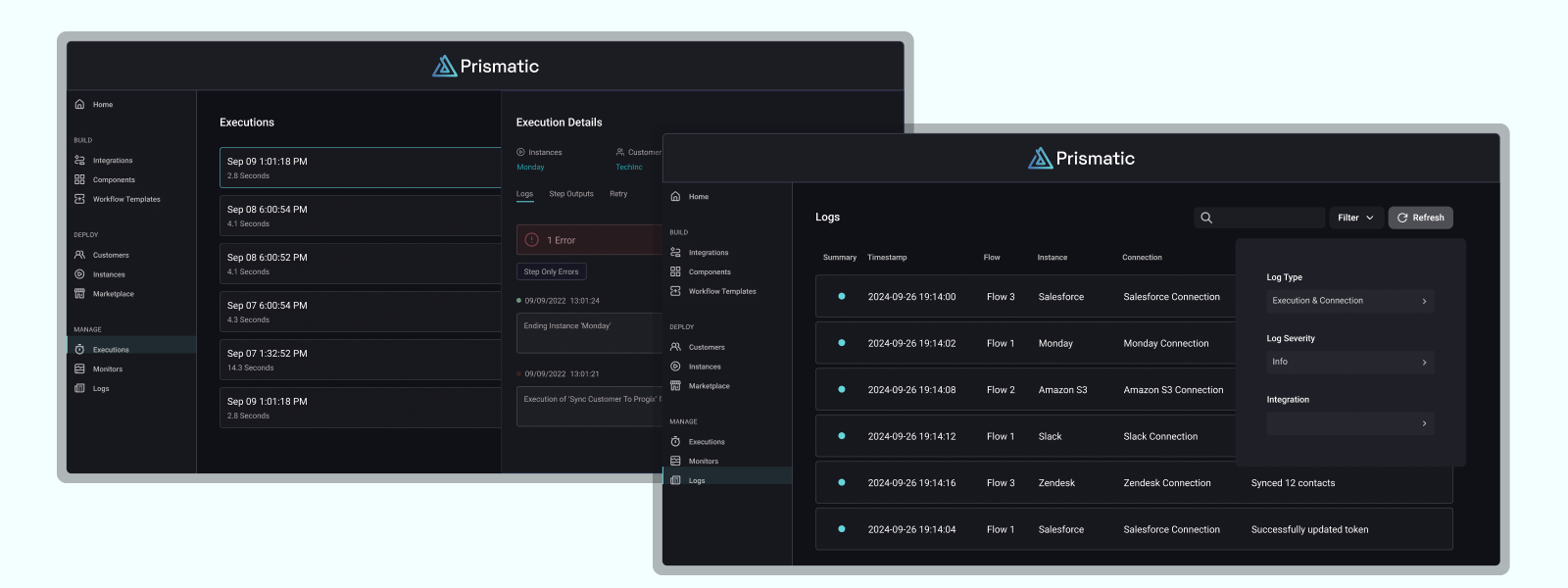
This visibility also extends to your customers. Prismatic provides customer-facing dashboards that allow your customers to see their integration execution history and status and determine why an integration ran (or failed to run).
Set up custom dashboards to display critical metrics, filter execution logs by customer or integration type, and track performance trends over time. When you need deeper analysis, export logs or stream them to external logging platforms like Datadog or New Relic.
Why build an in-house integration platform for your SaaS?
As we've discussed, not everyone should buy an integration platform, though that's the correct answer for most SaaS companies.
However, the reasons a team might build an integration platform in-house only hold true if the team is doing everything necessary to ensure the platform is complete, from compute resources to security to UI to customer self-service.
Building 50% of an integration platform will cost you more than building or buying one that is 100% functional.
Building a platform that falls short of this either negates the benefits directly or ensures that those benefits are more than offset by the friction and frustration of attempting to build, deploy, and manage integrations with a half-baked integration platform.
That said, here are the primary reasons for building an in-house integration platform and how doing so allows a company to exercise complete control over the entire integration lifecycle.
Roadmap ownership
An in-house integration platform enables control over technical and strategic roadmaps. The company defines everything from the features to the technology stack, perfectly synced with its stated vision and priorities. The platform can evolve with the core product, enabling both near-term needs and long-term initiatives.
This allows the company full flexibility in determining which integrations it should build, update, and sunset. As a result, the team can move faster to execute critical integration features necessary to win or retain customers.
Deep product integration and architectural consistency
Building an integration platform in-house allows a B2B SaaS company to align the integration layer directly with its core product architecture, ensuring consistent design patterns and data models. This approach avoids the constraints and abstraction layers inherent in third-party tools that may not fully support essential services or internal development standards.
The result is a single system where integrations function as product features rather than external add-ons, streamlining and simplifying development and maintenance.
Engineering value and revenue alignment
Building an integration platform in-house allows a company to align engineering output with revenue growth. Instead of being a cost center, integrations become assets that drive adoption, retention, and expansion. Every engineering improvement to the integration layer contributes to higher ARR, improved customer value, and faster sales cycles.
The company can also prioritize the integrations that provide the most value instead of being constrained by a vendor's roadmap. This helps ensure that integrations support goals like increasing upsells and reducing churn.
Comprehensive data ownership
Comprehensive data ownership means controlling how customer data moves and is handled across systems. This is particularly critical for companies in regulated industries like healthcare, finance, or government, where data residency requirements are stringent. Third-party integration platforms may route data through their servers, creating potential privacy or security issues. This can introduce unnecessary risk for companies constrained by strict residency or sovereignty standards (such as GDPR or HIPAA).
Owning the end-to-end data process provides greater visibility into integration performance, uptime, and usage. Analytics derived from this data can become a strategic asset, enabling teams to identify problem areas, adjust priorities, and make data-driven updates.
Tailored customization
Building an integration platform in-house allows a software company to deliver deeply customized solutions that align with its product and meet customer needs. Unlike third-party tools, which generally offer we'll-get-you-most-of-the-way-there functionality, an internal platform can be tailored to handle every requirement.
Owning the integration layer completely means the underlying product can evolve without practical limits. As customers' needs evolve and new technology standards emerge, the integration platform can be updated immediately, without relying on vendor support.
Competitive and market positioning
A proprietary integration platform can give a B2B SaaS company a competitive advantage as its integrations allow it to differentiate. Such a platform can enable a company to embed domain-specific capabilities, logic, and workflows that organically grow out of the company's expertise and market understanding.
Full ownership of the integration layer allows the company to define precisely how this connectivity supports its market positioning and enables the platform to become a data hub for its category, strengthening customer buy-in and stickiness.
Optimized UX/DevX
When relying on third-party platforms, devs can face confusing interfaces, inconsistent design patterns, and unnecessary complexity. Building integration management in-house enables an entirely consistent UX between the product and the developer environment. Customers can access integrations via familiar onboarding processes and configurations, instead of switching among various third-party applications.
For devs, an internal platform provides a better DevX with domain-specific APIs, libraries, and logging tools built for the existing product. They can align integration code, doc, and CI/CD pipelines with existing engineering standards to accelerate development and deployment.
Faster innovation
An entirely in-house integration platform removes many vendor dependencies. Instead of waiting on a third-party platform, teams can quickly move to implement new auth or AI-related standards. As a result, integration development follows the same cycle as the core product. New integrations and enhancements can ship on the company's release schedule, keeping integrations in sync with the core product.
Rapid prototyping and continuous improvement are often simpler with an internal platform. Devs can quickly extend existing functionality, update integrations to match core product R&D efforts, and respond to new market opportunities.
Robust security and compliance
Owning the integration platform can make security and compliance that much easier. With an in-house integration platform, teams can directly implement frameworks such as SOC 2, CJIS, HIPAA, and GDPR. And they can implement data encryption, authentication, and permission scopes that precisely fit the company's security and compliance needs.
Building an in-house integration platform can also streamline audits since security controls can be purpose-built for the company's operational requirements.
No vendor lock-in
Building integrations via an in-house platform can eliminate vendor lock-in and preserve the company's control over its integration strategy. With an internal integration platform, a company retains full ownership of all the integration code. This makes it straightforward for teams to evolve systems, implement new tools, and modify integrations as needed.
This autonomy ensures the integration strategy remains a core competency instead of an outsourced dependency. The in-house approach protects the company's product stack, costs, and development velocity.
Ultimate performance optimization
An in-house platform enables granular control over performance-critical integration metrics such as data throughput, latency, caching, and resource preparation/allocation. Engineering teams can tune the system for specific workload characteristics and infrastructure requirements, instead of accepting the compromises generally present in third-party integration platforms.
This focused optimization allows for efficient use of APIs, reduces bottlenecks, and speeds response times. The ability to adjust everything – from API calls to data processing – translates into superior customer UX and highly predictable costs.
Cost optimization over time
Building an integration platform in-house requires a substantial upfront investment but can deliver significant long-term cost advantages. Third-party integration platforms typically charge recurring license or usage fees for API calls or data throughput. These costs can become unpredictable as a company scales its customer base.
By owning the infrastructure, companies fully control costs. To reduce expenses, teams can optimize functionality such as hosting, caching, and connectors. And external licensing and usage fees can be replaced with more predictable salaries and infrastructure costs.
Direct customer relationship and support control
Owning the integration platform ensures all technical and support interactions remain under direct company oversight. Support can diagnose issues holistically with full access to data and metadata (such as logs), rather than being limited by external vendors with unknown troubleshooting processes. This visibility reduces MTR and enables faster, more personalized answers.
Customer feedback can rapidly translate into platform improvements, aligning engineering priorities with real-world needs. The company retains all integration usage and error data as proprietary insights for product development.

Answer 13 questions to help you make an eyes-wide-open decision regarding the integration platform that best serves you and your customers. See how your specific mix of resources and requirements can lead you to the best solution for your integration platform.
What is Prismatic?
Prismatic is the integration platform purpose-built for B2B software companies to deliver integrations that don't break at scale.
Unlike traditional workflow automation tools, universal APIs, and other integration platforms, Prismatic lets you build integrations once and deploy them to many customers with individualized configuration, authentication, and monitoring, embedded natively within your product.
Prismatic's embedded iPaaS includes:
- A low-code integration designer that empowers your non-devs to build productized integrations to be configured and deployed to multiple customers.
- A code-native integration building experience that enables your devs to use their favorite IDEs to code productized integrations to be configured and deployed to multiple customers.
- A library of built-in components that reduces effort by providing connectivity to common SaaS apps and standard logic functions without writing any code.
- An integration marketplace that provides a self-activated, in-app integration experience for your customers when embedded and white-labelled in your product.
- An embedded workflow builder that enables your customers to build one-off workflows between your product and the customers' other apps.
- Configuration and deployment tools that enable your onboarding team to configure and deploy customers' integrations without engineering involvement.
- Monitoring and management tools that enable your support team to monitor and troubleshoot customers' integrations without engineering involvement.
- Customer self-serve support tools that empower your customers to configure, activate, monitor, and troubleshoot their integrations without support or engineering involvement.
All this incorporated into a cloud-native platform that handles scaling, security, and compliance.