Introduction
There's a version of this conversation that happened in hundreds of B2B SaaS companies last year, and it probably happened in yours as well.
You lose a deal to a competitor. The prospect's reason? "They integrate with our CRM." Or maybe it's a renewal call where a customer says they're evaluating alternatives, not because your product failed them, but because they've had to hire someone to move data between it and their ERP every week by hand. Or maybe it's your product roadmap review, where two of your top ten priorities are integration projects that engineering has pushed back for six months, while the backlog of new integration requests keeps expanding.
This is the integration problem. And for many B2B SaaS companies, it isn't a technology problem. It's a strategy problem.
Look closer, though, and "integration problem" is too narrow a label for what's actually going on. The same customers who want your product to connect to their CRMs also want to build their own workflows inside it, automate what happens when something changes, and eventually point an AI agent at it and have that agent do productive things. Connectivity is one piece of a bigger need: they want your product to be extensible and able to flex to their business, not just synced to their other tools.
Most B2B SaaS leaders already understand that customers expect native connectivity, and that integrations they don't have contribute to lost deals. What they underestimate is the harder question underneath:
"What is our repeatable, scalable integration strategy?"
Not which integrations should we build next, but how will we make our product extensible at scale – delivering integrations, workflows, and agent-ready tools in a way that drives predictable business outcomes rather than consuming an increasing portion of engineering resources.
Increasingly, that question is about extensibility: integrations are only one lever, alongside embedded workflows your customers build themselves, and the agentic flows that let AI act on their behalf. The old tactical playbook (prioritization matrices, reactive builds, and pricing integrations as add-ons) assumes you've already solved that harder question.
This guide replaces that collection of tactics with an executive framework. It is written for product leaders, CTOs, and heads of customer success at Series B and beyond who want to realize the full value of integrations. We cover:
- The four dimensions every integration strategy must address: the business, the engineering, the operation, and the experience of integrations.
- Why in-house custom work is the natural starting point (and why it fails at scale), without rehashing the full Build vs Buy analysis.
- The four modern delivery strategies (productized, bespoke, customer-created, and agentic), and how the hybrid "all-of-the-above" model is what we pick for the win.
- A maturity model and decision framework to help you choose and evolve your approach as your business grows.
- How a modern embedded iPaaS (built for product extensibility and not just connectivity) makes every strategy executable on a single platform, with AI adding value to your team, your customers, and your integrations themselves.
By the end, the four delivery strategies in this guide won't read as four separate integration tactics. They're four facets of the same goal: making your product extensible. That's also, not coincidentally, how we now define a modern embedded iPaaS – the foundation for product extensibility, spanning productized and bespoke integrations, embedded workflows, and agentic interactions on one platform, handling everything that breaks at scale so your team can focus on what differentiates your product.
You'll gain the language and tools to brief your board, align your product and engineering teams, and build an extensible product that undergirds your competitive advantage.

We'll send a link for the PDF version of this guide straight to your inbox.
Four dimensions of an integration strategy
Before you choose your delivery model, however, you need a clear-eyed view of the full scope of what you'll be managing. Integrations are not purely a build problem, though many teams set their initial focus there. Integrations are simultaneously a business problem, an engineering problem, an operations problem, and an experience problem.
A strong integration strategy spans all of these. Companies that optimize for one and neglect the others consistently find themselves surprised (and not in a good way).
Dimension 1: The business of integrations
The highest-performing integration teams treat them with the same commercial intent applied to any other product: prioritization frameworks, monetization strategy, go-to-market planning, and metrics that tie integration investments to business outcomes.
Which integrations help close deals? Which ones drive the deepest engagement and lowest churn? Which tech partnerships create the most leverage? Not all integrations are equal. Some are true differentiators while others are table stakes. Your investment focus should clearly reflect that distinction.
Monetization is a key piece of this. Options range from included in product pricing (drives adoption, builds stickiness) to tiered (captures additional value from power users and enterprise buyers). The highest-ROI model for most companies is productized self-service via an embedded marketplace. For this model, more integrations lead to higher stickiness, which drives expansion revenue, which funds the next wave of integration development.
Here's something that's often missing: integration prioritization should factor in sales impact, customer value, and build economics. Whoever is loudest on Slack shouldn't necessarily be given priority for integration requests. Scoring integrations along the lines of (Potential ARR + Strategic Account Value - Initial Build Cost) divided by (Annual Maintenance Costs) yields a clear, objective answer.
Dimension 2: The engineering of integrations
Integration development appears deceptively simple. But, in practice, every integration involves complexities such as authentication, rate limiting, data transformation, error handling, retry logic, webhooks, monitoring, and third-party APs. A single Salesforce sync can burn months of engineering time.
AI's role in integrations is significant but frequently misunderstood. Generative AI and agentic tools now let developers generate code, components, and even full workflows from natural-language prompts, cutting initial build time by 80–90%. Prismatic's own AI build tools (MCP dev server, Prismatic Skills, and AI-assisted code-first development) let teams go from idea to deployed integration in minutes for many common use cases.
AI tools let developers cut initial build time by up to 90%.
But, for those teams working without an embedded integration platform, AI only expedites the first 20% of an integration build. It doesn't solve everything else:
- API volatility and deprecations still require ongoing maintenance, regardless of build steps.
- Multi-tenant security, compliance (SOC 2, HIPAA, GDPR, etc.), and data residency remain platform-level concerns that can't be solved with prompts.
- Operational scale for thousands of concurrent workflows, customer-specific configurations, and alert management – these all require architectural decisions.
- Agentic AI workflows themselves depend on reliable integrations, creating a new dependency layer that affects integration quality.
The thought that "We can just use AI to build this faster" is understandable, and in the early stages, it may well be correct. But it doesn't change the fact that every integration built is a commitment to maintain it indefinitely against a moving target. AI-assisted custom integration builds still hit the same scalability wall that has existed for years. It may just arrive a little later and, sometimes, with more integrations to maintain.
The strategic question in the engineering dimension is not, “Can we build this?” but “Is this the best use of our engineering capacity?” Karbon, the practice management platform for accounting firms, needed a four-to-six-person engineering squad and a full quarter of calendar time for each custom integration. After restructuring around a platform model, the company scaled from 30 to 75 integrations in a few months with no increase in team size. Yoti, the digital identity company, reduced integration build time from an average of 2 months to under 2 weeks, achieving a 95% reduction in engineering time.
Dimension 3: The operation of integrations
Once built, you must monitor, troubleshoot, and support those integrations. This is the part that catches many teams off guard, and the resulting costs compound at scale.
Without self-service dashboards, centralized logging, proactive alerting, and customer-visible status, support teams become integration firefighters. Engineering is pulled off the roadmap to diagnose issues that, with better tooling, customer success could have resolved on its own. When a customer reports a broken integration, and your non-devs have no visibility into the details, that's a trigger for customer frustration and churn risk.
Excellence in integration operations means most issues are either prevented through proactive monitoring or resolved through customer self-service. Customers get real-time visibility into their integration status. Your team gets detailed logs when something does require investigation, and the tools to diagnose it quickly without escalating to engineering most of the time.
Duro Labs, a PLM platform for hardware companies, found that after redesigning its integration strategy, it was able to hand large portions of integration onboarding and support to customer service, thereby enabling faster response and resolution times without engineering involvement. STRMS shifted from spending roughly half its time on maintenance to focusing 85–90% of its efforts on new development, a transformation driven by using the platform to improve operations.
The key is to design for scale before you need it: organizational structures, tooling choices, and customer-facing capabilities that allow your integration catalog (and integration deployment numbers) to grow without growing the support team to match.
Dimension 4: The experience of integrations
Integration UX is related to operations but deserves its own treatment. How customers discover, activate, configure, and use your integrations reflects how seriously your company takes them.
An integration experience that requires a support ticket to activate makes a different statement than one with a self-serve configuration wizard inside your app. An integration that appears in a white-labeled marketplace provides a different signal than one that opens a third-party app in a new browser tab.
And experience isn't only about the look and feel. Self-service activation reduces onboarding friction and time-to-value. Built-in monitoring gives customers the freedom to track what they want. And an integration experience that feels native to your product reinforces the idea that integrations are first-class features of your product (or products in their own right).
When Hatch moved from custom-built integrations to a productized, self-serve marketplace model, the response was immediate: customers were "excited that they could now configure and self-activate their integrations in the embedded marketplace. This was faster and more accurate than waiting for the Hatch team to do the setup." That change in the customer experience drove positive outcomes: fewer support tickets, shorter onboarding times, and improved retention.

The starting place many companies share
Nearly every B2B SaaS company begins its integration journey with custom, in-house development. This is not irrational. In the early stages, it's often the right call. But it is a starting point that almost always creates problems as the company scales. Understanding why it fails is essential to choosing a better way.
Why everyone begins there
Custom in-house integration development makes sense for several reasons.
You're a software company. Your engineers build software. When a prospect or customer asks for an integration, the natural response is to build it. There's no need for a procurement process, no new platform to learn, and no vendor relationship to manage. Your engineers know your product's API. The first integration ships in a few weeks. The customer is happy.
The perception of control matters too. Full ownership of the integration layer means no dependency on a third-party vendor for sensitive, regulated, or otherwise mission-critical data flows. For security-conscious or compliance-heavy organizations, this is a real consideration, not just a preference.
And today, AI-assisted coding has reinforced this approach. If a developer can stub out an API client in minutes with an AI coding assistant, the perceived cost of the initial build has dropped significantly. The reasoning goes: if building integrations is this easy, why wouldn't we keep building them ourselves?
What changes as you scale
The problem with custom in-house integrations usually doesn't arrive with the first or the fifth. But it will show up as the number of integrations grows. The breakdown happens in three interconnected areas: people, processes, and platform.
People
Engineering spend on integrations routinely eats up a substantial portion of the team's total capacity as the integration catalog expands. At Karbon, 20% of engineering resources went to integrations before implementing an embedded iPaaS. At Raven, that number reached 70%.
At Hatch, it was 30–40%. These were completely predictable consequences of maintaining multiple custom integrations, each with its own dependencies and maintenance requirements. Even with AI code generation, the maintenance and support load does not shrink proportionally. AI speeds up the build, but it doesn't make maintenance easier, improve monitoring, or make customer support more efficient.
Processes
Every API change, configuration request, or compliance update requires rework. Sales and customer success teams lose confidence in their ability to commit to integration delivery timelines. Engineering is perpetually behind on integration requests while also maintaining existing ones. And roadmaps often become completely derailed.
Platform
Without deliberate architectural decisions, custom integrations typically lack retry logic, consistent error handling, multi-tenant isolation, and customer self-service capabilities. As a result, integrations run on infrastructure that was never designed for integration loads. Alert fatigue becomes the norm, and customers' integrations stop working for no known reason.
Sisu's CRO Frank Felice describes the moment when the platform problem became undeniable, after Sisu launched one of its integrations and deployed it to 200 customers:
[The integration] literally was just dying. We were spinning up more servers. We were constraining the rest of the platform because the integration wasn't built in a manner that would allow it to scale.
When in-house development makes sense
None of this means in-house integration development is always the wrong choice. There are scenarios where it is appropriate.
If an integration involves proprietary logic that is core to your product's differentiation (not just the connectivity layer, but substantive business logic that represents intellectual property), building it in-house and maintaining full ownership is a legit strategy.
If you are at a very early stage (pre-product-market fit, a handful of customers, a sprinkling of integrations), the overhead of adopting third-party integration platform isn't justified. Speed and simplicity matter more than scalability when you're still learning what customers actually need.
Or, if your integration surface is small and you expect it to remain so, the investment in a scalable platform may not be warranted.
However, these are edge cases for most B2B SaaS companies at the growth stage and beyond. The more common situation is a company that started in-house, has built a sizable catalog of custom integrations, and is now feeling the downsides of that approach in ways hard to ignore.
The strategic inflection point
There's a moment, easiest to identify in retrospect, when in-house development stops being a reasonable choice and starts being a liability. The signals are consistent:
- The integration backlog is growing faster than you can address it.
- Delivery timelines on new integrations regularly slip.
- Support tickets related to integrations keep increasing.
- Your engineers spend more time maintaining integrations than building core product functionality.
- You are rewriting similar authentication, error-handling, and transformation logic with little to no reuse.
When these signals appear together, you need to move on from "Can we build this?" (Your engineers can build almost anything given enough time.) Rather, the question should be, "Is this how we want to spend our engineering capacity?"

For the full context you may need for that decision (including total cost of ownership analysis and the 13-question diagnostic that pressure-tests your current state), see our Build vs Buy Guide. The rest of this guide assumes you've cleared that hurdle and are now asking what your integration delivery strategy should look like.
Four integration delivery strategies
Here is the core of this guide. Once you've decided that your integration approach needs a more deliberate plan than "have engineering build whatever customers ask for," four delivery strategies are available.
These are not competing options. They are complementary pieces of a complete extensibility strategy. The most advanced integration teams use all four together, tuned appropriately for the types of requests they're handling and the business needs they are solving.
But before we get to that all-of-the-above model, let's understand each piece on its own terms: what it is, when it's the right choice, what it costs and yields, and what it means for your organization.
- Productized integrations – Build once. Deploy many. Make it native to your app.
- Bespoke integrations – Build for the specific customer. Win the specific deal. Manage the relationship deliberately.
- Embedded workflows – Empower your customers to build what they need. Stop being the bottleneck.
- In-app agentic functionality – Turn integrations into tools that AI agents can invoke reliably, securely, and at scale.
1. Productized integrations
Build once. Deploy to many. Make it native to your app.
A productized integration is built as a first-class feature of your product. It is designed from the ground up for self-service activation across your entire customer base. Any customer who needs it can discover, configure, and enable it themselves, without opening a support ticket or waiting in a queue. It looks and functions like a native part of your product. Customers can't tell where your product ends and the integration begins.
This architectural distinction is the key difference between a productized integration and a custom one. A custom integration is built for a single customer. A productized integration is built for a solution – a need that recurs across your customer base. It is then deployed to individual customers with custom configs and credentials.
The delivery mechanism is an embedded integration marketplace: a white-labeled, in-product experience where customers browse available integrations, understand what each one does, and activate the ones they need through a guided config wizard. Implemented properly, this experience ensures that your integrations look and feel like the rest of your product.
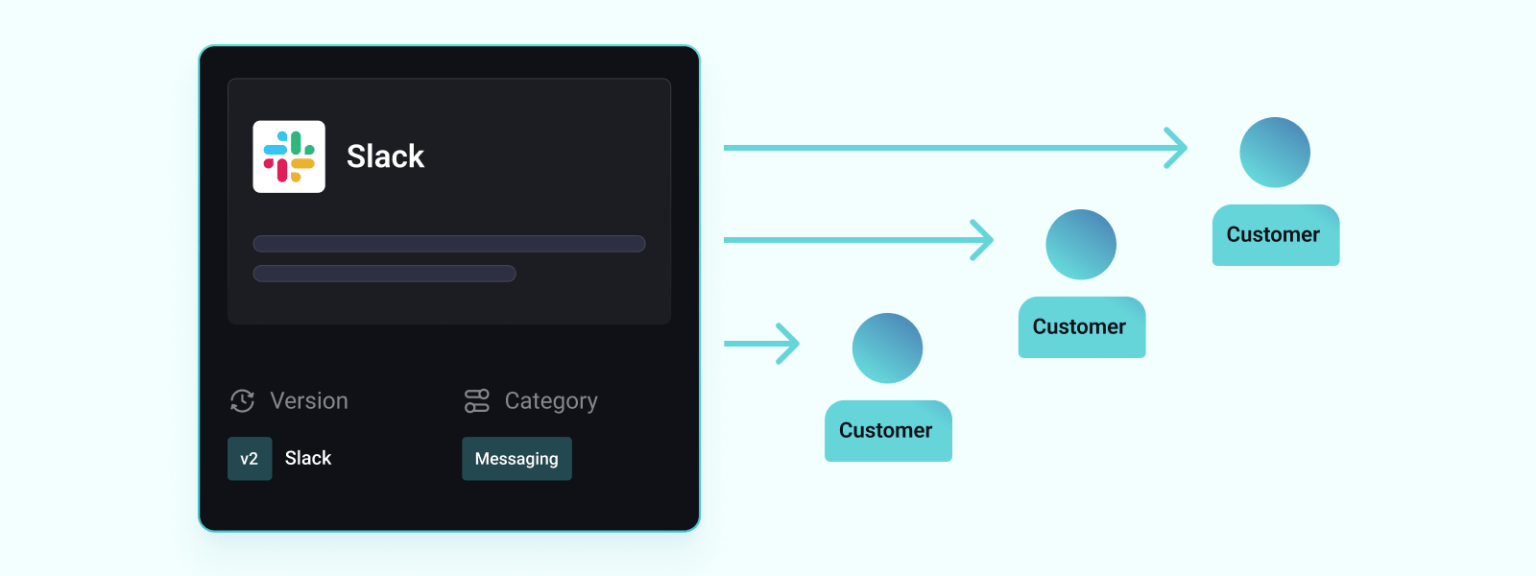
The delivery mechanism is an embedded integration marketplace: a white-labeled, in-product experience where customers browse available integrations, understand what each one does, and activate the ones they need through a guided config wizard. Implemented properly, this experience ensures that your integrations look and feel like the rest of your product.
Why productized integrations change the economics
The business case for productized integrations rests on this: the marginal cost of deploying a productized integration to an additional customer approaches zero. Once an integration is built and tested, enabling it for the hundredth customer requires no additional engineering. Customer success handles deployments when customers don't.
Compare that to the economics of custom integrations, where each new deployment requires some degree of engineering involvement: reviewing requirements, customizing the implementation, and testing in the customer's specific environment. As your customer base grows, that per-deployment cost quickly kills engineering momentum.
Productized integrations shift integration delivery from a linear cost model to a near-fixed cost model. You make a one-time investment in building the integration. After that, deployment and support costs are significantly lower than those of a custom equivalent.
The business impact is huge. Prismatic customers routinely ship 50 to 100 productized integrations with the same team they previously used to maintain a fraction of that. Karbon scaled from 30 to 75 integrations in a matter of months with zero team growth. The productivity multiplier is the difference between "build once, deploy many" and "build for each."
The customer experience advantage
Beyond economics, productized integrations improve the customer experience. Self-service activation means customers don't have to wait. Guided config wizards reduce setup errors and support calls. Consistent implementations mean fewer reliability issues. Built-in monitoring and alerting provide customers with real-time visibility into integration status.
Hatch saw this directly after moving from custom to productized integrations: customers were excited to configure and self-activate integrations in the embedded marketplace, finding the process faster and more accurate than before.
When to prioritize productized integrations
Productized integrations are the default for integrations with high-frequency demand, those that appear repeatedly across your customers and your sales pipeline. These are your top 10+ most-requested integrations. They are always showing up in sales calls, customer success reviews, and support tickets. They connect your product to your customers' CRMs, accounting systems, and communication platforms – the apps your customers rely on day in and day out.
The qualifying test for a productized integration is whether it can be designed with config options that cover the normal variation in how different customers will use it, while keeping the core implementation consistent. Most broadly applicable integrations pass this test since the variation between customers (including things like which fields to sync, which direction, and how often) isn't structural.
Organizational implications for productized integrations
The productized strategy shifts the burden of integrations from engineering to product and customer success. Product owns the integration roadmap and prioritization. Engineering builds and maintains the integrations (or at least the integration connectors and components). Customer success (or customers themselves), handles deployment and configuration. Engineering doesn't need to touch integrations once they are in production.
This is the integration approach that unlocks scaling. It's what allowed Karbon to add 45 integrations without adding headcount, and what allowed Sisu's engineers to "focus on developing" while customer success handled the rest.
2. Bespoke (custom) integrations
Build for the specific customer. Win the specific deal. Manage the relationship deliberately.
Despite the power of the productized model, there will always be customers whose integration needs don't fit. A large enterprise customer runs a niche industry-specific ERP. Another has a proprietary internal system. A third has standard applications but requires integration logic so specific to its business processes that a productized (configurable) one won't work.
These are bespoke integration scenarios. The integration is purpose-built for a customer's specific requirements. It is not designed to be replicated across your customer base.
Bespoke integrations, handled well, are not the same as the ad-hoc custom integrations we described earlier. The difference is discipline and platform. When a bespoke integration is built on an embedded integration platform (with the same connectors, auth handling, and monitoring and deployment infrastructure as your productized integrations), the ongoing maintenance cost is substantially lower than a standalone custom build in your codebase. There is an additional cost, but it's manageable when the integration shares DNA and a platform with your productized integrations.
When bespoke is the right choice
Bespoke integrations are justified when the use case is unique: not just specific, but unlikely to recur across a meaningful portion of your customer base. And you also need the relationship or deal value to be significant enough to warrant the investment.
Here's a practical test: if you built this integration and deployed it to 100 customers, would they find it useful as-is, or would it require significant re-engineering for each? If the answer is "significant re-engineering," you're in bespoke territory. If the answer is "most would find it useful with configuration," the integration should be productized.
Enterprise customers with complex, proprietary, or highly customized environments are the most common source of legitimate bespoke requests. Being able to say "yes" to their specific integration requirements is frequently the difference between winning and losing those deals. Raven describes this directly: after developing the capability to deliver high-quality, tailored integrations, it was possible to serve enterprise customers that had previously been out of reach.
Bespoke integrations also serve a secondary strategic function: they are R&D for future productized integrations. If you build a bespoke integration for one enterprise customer and then receive two more requests for something similar, you have evidence that a productizable use case is hiding inside what looked like a one-off request. The bespoke integration, built on your embedded integration platform, gives you a head start on developing the productized one.
The bespoke risk and how to avoid it
The primary risk with bespoke integrations is creep. This is an expansion of the bespoke category to cover requests that could and should be handled another way. If every integration request gets routed to bespoke (because it's easier than investing in making the productized model more flexible, or because sales is certain that this one is special), you eventually recreate the custom in-house scaling problem, just on your new integration platform.
Bespoke integrations should be limited to a relatively small fraction of your total integration volume, 10% or less. Every bespoke request should be evaluated against the question: could this be addressed by a more configurable productized integration, or by giving the customer the tools to build it themselves? And bespoke work should always be treated as something that could potentially move to the productized roadmap.
Managed properly, bespoke integrations can be a high-margin upsell mechanism.
Organizational implications of bespoke integrations
Bespoke integrations often require more engineering involvement than productized ones. Someone needs to build and maintain implementations that a generic template won't serve. But when managed within the embedded iPaaS, the ongoing maintenance burden is substantially lower than for in-house custom integrations.
Customer success typically plays a larger role in bespoke integration delivery than in productized delivery. They understand the specific customer's requirements and serve as the bridge between the customer's operational needs and the implementation. The bespoke relationship is very much a customer relationship.
3. Embedded workflows (customer-created)
Empower your customers to build what they need. Stop being the bottleneck.
The third strategy is the most transformative, and for many companies, the least fully realized. An embedded workflow builder is exactly what it sounds like: a white-labeled, fully branded integration-building experience inside your product that enables your customers to create custom workflows between your platform and the other apps they use.
This strategy provides a fundamentally different answer to the long-tail integration problem. Instead of asking, "How do we build all the integrations our customers want?" it asks, "How do we give our customers the tools to build what they specifically need?" That reframing is critical.
When implemented properly, the embedded workflow builder offers a powerful, self-service creation experience for engineering users and an accessible one for business users who aren't technical. Prismatic's embedded workflow builder gives customers access to a library of pre-built connectors and logic components directly inside your product. They can start from scratch or from templates your team provides. The builder is styled to match your product and is experienced as a native functionality.

Prismatic's AI Copilot for the embedded workflow builder allows customers to describe a workflow in plain language and watch it take shape on the canvas in real time. "When a deal closes in Salesforce, create a project in Asana, notify Slack, and update Acme with the contract details." The AI generates the workflow from that description, available for visual review and refinement. This ensures that the embedded workflow builder is accessible to every user.
How customer-created workflows provide a competitive advantage
The significance of an embedded workflow builder becomes clear when you map the full range of integration requests you receive. Some portion (perhaps the top 30% most common needs) are good candidates for productized integrations. A much smaller number are bespoke cases. But the long tail of requests (the "we just need this specific workflow, but don't want to pay for custom development") doesn't fit in either of those.
Without an embedded workflow builder, these requests generally end up in one of two places: your engineering backlog or an apology from your team. With an embedded workflow builder, there's a third destination: the customers themselves.
This changes the enterprise sales conversation in important ways. When a large prospect says, "We need to connect your app with our proprietary internal system," the old answer was, “We'll get back to you on that.” The new answer is, “OK. Here's how you do it yourself, right inside our product." That is a materially different position: one that signals confidence, platform maturity, and a commitment to meeting customers where they are.
The retention and stickiness effect
When customers build their own workflows inside your product, they've made a meaningful investment. They've designed those workflows around their specific business logic. They've trained their teams to use them. The workflows live in your product. Switching to a competitor doesn't just mean evaluating a new core product; it means rebuilding every workflow they've created. That's a cost that is both real and personal for those who built the workflows.
This is a deeper form of stickiness than product features alone can create, because it is based on the customer's own work embedded in your platform.
When to use the embedded workflow builder
The embedded workflow builder becomes most valuable when:
- Your customers have diverse or rapidly evolving integration needs that don't fit a productized template.
- You're dealing with a long tail of one-off requests that your team doesn't have the bandwidth to address.
- You're in enterprise markets where customers have technical resources and want control over their own workflows.
- You want to position your product as an extensible ecosystem rather than a closed tool.
It's also the right answer when you want to expand your pricing model. The embedded workflow builder is a natural upper-tier feature.
Organizational implications of the embedded workflow builder
The good news is that implementing the embedded workflow builder can move a significant number of workflows from your team to your customers. However, you need to plan that transition. And your team needs to define the guardrails: which connectors are available in the builder, what templates are provided, and what governance and security constraints apply.
With an embedded workflow builder, customer success shifts from a delivery function to an enablement function, helping customers design and build effective workflows rather than simply handing over completed integrations. Engineering's involvement in these drops to almost nothing, freeing capacity for the other things they should work on.
4. In-app agentic functionality
Turn integrations into tools that AI agents can invoke reliably, securely, and at scale.
The first three strategies in this framework (productized integrations, bespoke integrations, and the embedded workflow builder) are designed for a world where humans initiate and interact with integrations. Customers activate Salesforce syncs. Admins configure ERP connections. End users build workflows from a template.
That world is still here. At the same time, your customers are deploying AI agents inside their businesses at an accelerating pace. They're using them to handle customer support, process documents, enrich records, draft proposals, and increasingly to act across the suite of tools they depend on.
Here's what changes the integration conversation: for those AI agents to act, they need to reach into the apps your customers use – the same systems your integrations talk to.
That creates a new integration delivery requirement. It's just not a human customer anymore. It's an AI agent that's handed a request to "Issue payment for Invoice 12345" or "Sync this support ticket to the CRM," and your integrations ensure that it happens, reliably, against real customer data, in a way that is secure, auditable, and works every time.
This is the fourth delivery strategy: in-app agentic functionality. Your integrations are exposed as structured, deterministic tools that AI agents can discover and invoke.
How this is different from the other strategies
In-app agentic functionality looks similar to productized integrations. You are, after all, building integration flows that run on behalf of many customers. But the delivery mechanism, the consumer, and the design requirements are different.
With a productized integration, a human activates the integration, reviews the configuration, and decides when it runs. The integration is triggered on a schedule or by a defined event. The customer is in the loop.
With in-app agentic functionality, an AI agent (operating within a chat interface, a workflow assistant, or an autonomous background process within your product) decides to invoke an integration flow to fulfill a user's intent. The agent determines when to invoke the integration and what parameters to pass. The integration flow has become the agent's tool.
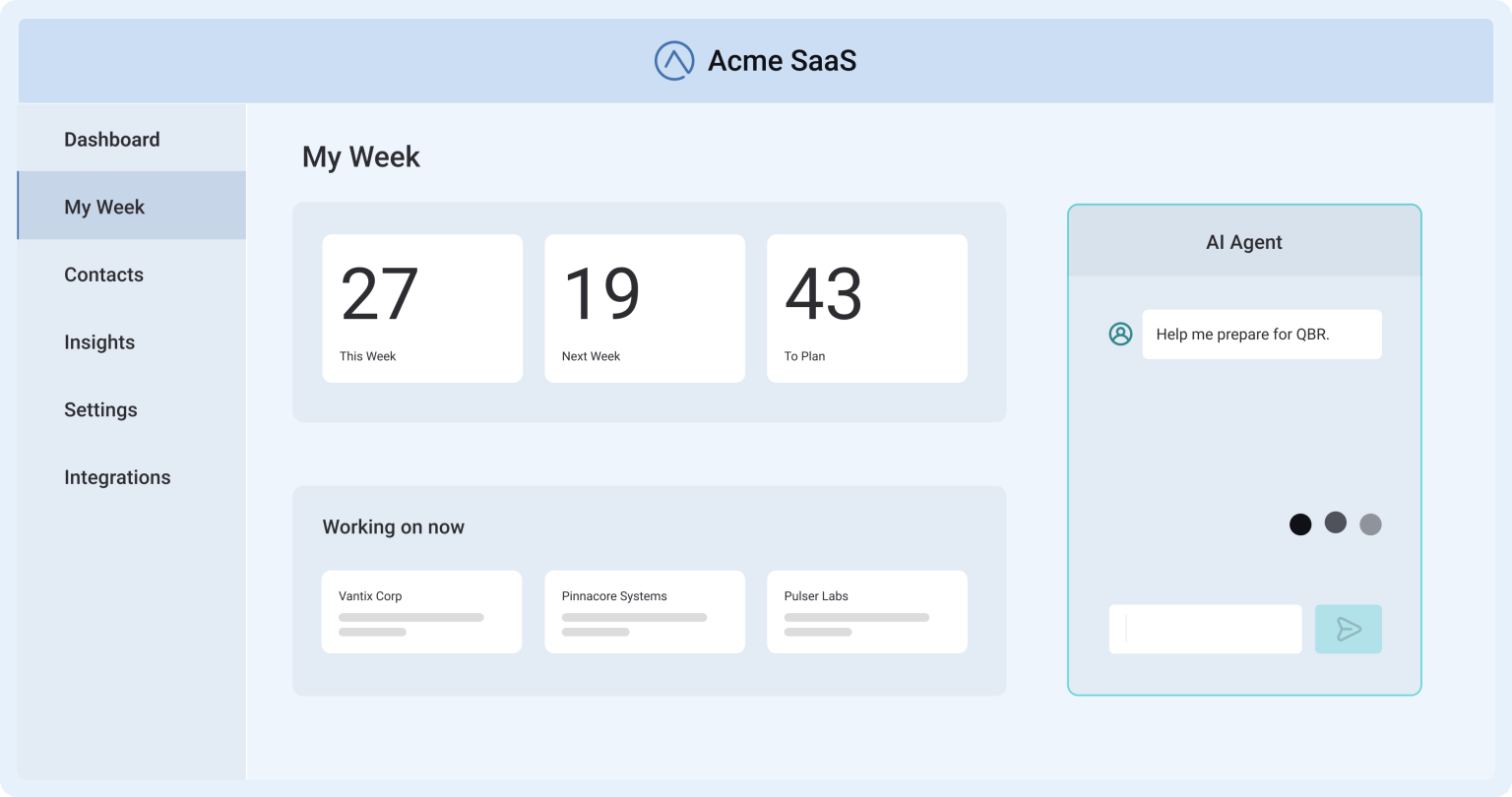
This changes what the integration must do. It must be callable from an AI context with a single, well-described invocation. It must be deterministic. That is, the agent needs to know what will happen, not discover it through trial and error. Complexity (authentication, error handling, data transformation, etc.) must be handled internally by the integration, so the agent doesn't have to deal with it. And it must be safe to run at production scale against real customer data, with proper multi-tenant isolation, full observability, and audit logs.
The problem with the obvious answer
The obvious approach to connecting AI agents to customer data is to expose individual API endpoints as tools and have the AI call your customers' APIs directly. This is how many teams' first implementations work. However, doing this for real (in production) leads to serious issues.
An AI agent making individual API calls to fulfill a task like "sync this support ticket to Acme" might need to make several sequential calls: authenticate, look up the contact record, check for duplicates, create or update the record, handle the response, and log the action. Each step requires a correctly created prompt and a correctly interpreted response. Each step is a possible point of failure. And failures are sure to happen: authentication tokens expire, rate limits are reached, or the LLM misinterprets an API response and takes the wrong next action. What should be a reliable process becomes anything but.
In fact, without proper guardrails, an AI agent with direct API access can cause real damage. Incorrect records are updated, and sensitive data is exposed. This is why many AI agent implementations are stuck in read-only sandbox mode. They are too risky to trust with write access to production systems.
The result is the same gap that exists with custom integration development: hard-to-maintain implementations that work in demos but don't stand up to the rigors of production. The AI makes the initial capability feel fast to build. The operational reality says that they don't work any faster (or better) in production.
Structured flows as agent tools
Prismatic's approach to in-app agentic functionality is grounded in the same insight that makes productized integrations work: define the logic once, make it reliable, and let others invoke it without needing to understand what's behind the scenes.
The mechanism is the Prismatic MCP flow server. It exposes your deployed integration flows as structured tools that AI agents can discover and invoke via Model Context Protocol (MCP). Instead of calling dozens of individual API endpoints, an agent makes a single call to a named, documented integration flow. Prismatic's platform handles everything inside that flow (authentication, retries, data transformation, error handling, etc.) exactly as you've defined it.
The key distinction is the level at which the agent interacts with the system. Rather than exposing granular API actions and relying on the LLM to sequence them correctly, you expose complete task-level flows: "Update Contact," "Sync Support Ticket," "Enrich Lead," or "Create Customer Proposal." The AI agent operates at a defined level of intent. The integration platform handles the implementation.
This is the difference, as Prismatic's engineering team describes it, between "playing 20 Questions with APIs" (the agent making call after call, hoping it gets the sequence right) and "making a single call to a tested, production-ready workflow that handles the rest."
As Prismatic's CTO Tanner Burson described the design intent at launch:
The MCP flow server gives AI agents the guardrails and structure they need to operate reliably in production. Prismatic is empowering product teams to move beyond clever prototypes to dependable automation that delivers real business value.
How agentic workflows function
Product teams define agentic flows in Prismatic the same way they build any other integration, by using code-first TypeScript or the low-code designer. The difference is in how the flow is marked and exposed.
Any integration flow can be designated as "agentic," meaning it is intended to be invoked by an AI agent rather than triggered by a schedule or a direct user action. Once marked, those flows are registered as tools in Prismatic's MCP flow server and are described with the metadata an AI agent needs to know.
Your customer's AI agent connects to the MCP flow server endpoint. The agent discovers the available tools (your agentic flows), understands what each one does from its description, and invokes the appropriate flow when prompted. Authentication, multi-tenancy, and customer-specific configuration are all handled by the platform: each customer's agent operates with its associated credentials and connected systems, isolated from other customers.
The full stack of what Prismatic handles in this model includes auth, rate limiting, retry logic, data transformation between systems, execution logging and monitoring, error handling and alerting, and multi-tenant isolation. None of that is the agent's concern. The agent focuses on intent. Prismatic handles the execution.
Where agentic flows fit into the framework
In-app agentic functionality is its own strategy, but it depends on the three strategies we've just covered. The flows you've already built for productized integrations can be exposed as agentic tools with minimal additional work: you define which flows should be callable by agents, describe what they do in terms an AI can interpret, and register them with the MCP flow server. The investment you've already made in building reliable integrations is the foundation for your AI-native product capabilities.
The implications for product leaders are significant: the B2B SaaS companies that will rise to the top of their categories in the next few years are those building AI-native product experiences that deliver real value. The gap between "can tell you what to do" and "can do it for you" runs directly through the integration layer. Companies whose integrations are already consistent and reliable will quickly close that gap. Those whose integrations are based on non-platform-based custom code will find it much harder.
When to prioritize this strategy
In-app agentic functionality is the right investment when:
- You are building or have built an AI-powered feature inside your product (a copilot, an assistant, or a workflow automation), and you want it to take actions beyond generating text responses to questions.
- Your customers are deploying AI agents in their own operations and are asking how those agents can interact with your product.
- Your productized integration library is mature enough to serve as the foundation for agentic tools. That is, you have reliable, tested flows that can be safely called with production data.
- Enterprise buyers are evaluating your AI readiness as a product criterion, and the ability to demonstrate reliable, auditable AI-driven automation is essential.
In-app agentic functionality is easier to build and safer to deploy when your underlying integrations are already structured around reliable, deterministic flows, which result from taking the productized strategy seriously. The companies that invest in that foundation now have a significant head start on the AI-native product capabilities their customers are expecting.
Organizational implications of in-app agentic functionality
In-app agentic functionality sits at the intersection of your integration team and your AI product team. And in most organizations today, those teams don't yet have a clear working relationship. Establishing that relationship is one of the most valuable organizational investments you can make.
A big part of that? Your integration team needs to understand which flows are candidates for agentic exposure and design those flows with agentic invocation in mind. This includes clear descriptions, well-defined inputs and outputs, and robust error handling for the unexpected inputs an AI agent might pass. Your AI product team needs to understand what the integration layer can do, so they don't design AI features that depend on integration capabilities that don't or won't exist.
The governance question also deserves early attention. Agentic flows that interact with customers' production data (generating/updating records, sending notifications, etc.) create different risks than do read-only operations. Defining which flows are safe for autonomous-agent invocation versus those that require human-in-the-loop approval before execution, and how you audit what the agent did and why, is work that's easier to do before the integration is in production.
Prismatic's platform also supports human-in-the-loop approval patterns in integrations. You can build integrations that send notifications to approvers, who then provide approval/rejection, giving users the appropriate level of control over what the AI does on their behalf.
The hybrid model, or all of the above
Orchestrate all four strategies as a single movement. Match each delivery model to the demand it was designed to serve.
Productized integrations, bespoke integrations, the embedded workflow builder, and in-app agentic functionality are not competing but complementary pieces of a complete integration program. The companies that win in integrations are the ones that deploy all four deliberately in combination, with clear logic for when each strategy is chosen.
This is the hybrid model. It is what we recommend for every B2B SaaS company that is serious about integrations as a business driver and a true competitive advantage.
Stacking the strategies
The hybrid model stacks these strategies on top of each other, each one addressing a different segment of your integration demand:
- Productized – Broad coverage, high efficiency, and scalable deployment. Serves the largest portion of integration demand across your customer base. These are the common integrations that show up repeatedly in sales calls, onboarding conversations, and support tickets. Low marginal cost per deployment. Self-serve customer experience via an embedded marketplace.
- Bespoke – High-value differentiation for strategic customers with unique requirements. Higher engineering investment per integration, but reserved for times where the deal size or relationship value justifies it. Limited volume, carefully governed to prevent bespoke creep.
- Embedded workflows – Long-tail coverage with near-zero engineering cost per workflow. Empowers customers to build the one-off, niche, or highly specific workflows that serve individual customers rather than the broader base. Scales without proportional headcount growth.
- In-app agentic functionality – Your products' AI layer (or a customer's AI agent) is given the integration tools it needs. Integration flows are exposed as structured, deterministic MCP tools that AI agents can invoke reliably at scale.
Together, these four strategies give you a credible answer to any integration requirement your customers bring.
How the strategies interact
Productized is the foundation. Your catalog of reliable, well-tested integrations is the asset that everything else builds on. Bespoke integrations built on the same platform infrastructure feed that catalog over time, since a bespoke integration that works well for one enterprise customer can be the start of a productized integration for the broader market.
The embedded workflow builder extends the reach of your connectors and templates, letting customers assemble their own workflows from the same building blocks your team uses. And agentic flows are, in most cases, productized integration flows designated as callable by AI agents. So, the investment in productized integrations directly enables agentic integrations with minimal additional work.
As you can see, these strategies reinforce each other. A mature, productized catalog enables faster bespoke delivery, because the connectors and patterns already exist. A mature, productized, and bespoke library makes the embedded workflow builder more powerful, by giving customers more building blocks to work with. And a mature integration library across all three makes the agentic functionality immediately valuable, because the flows your customers need to invoke already exist and are production-ready.
Visualizing the strategies
Here's a simple view of everything at once:
| What it serves | Who builds it | Engineering cost | |
|---|---|---|---|
| Productized | Common demand across customers | Your team | One-time build; near zero per deployment |
| Bespoke | Strategic customers with unique requirements | Your team | Higher per integration; governed volume |
| Embedded workflows | Long-tail, specific customer needs | Your customers | Near zero after platform investment |
| In-app agentic | AI agents acting on customer intent | Your team (flows) + AI agent (your team or customers) | Builds on existing integrations |
How the mix evolves with company maturity
The right mix of integrations across these strategies isn't static. It will shift as your company grows, as your customers mature in their processes, and as your (and your customers') AI capabilities develop.

Ad-hoc/early stage. At the earliest stages, bespoke integrations are common. You're learning what customers actually need before investing in the infrastructure to serve it at scale. Don't productize before you understand the integration patterns your customers need.
Growth stage. As integration patterns emerge, shift resources toward productization. Identify the integrations that appear across multiple customers with broadly consistent requirements and build productized versions. This is also the stage at which the embedded workflow builder becomes valuable, particularly if you're entering enterprise markets where customers have unique environments and the technical resources to control their own resources.
Hybrid/scale stage. All four strategies are active and coordinated. Productized integrations are a core go-to-market motion. The embedded workflow builder is a platform-tier differentiator that commands premium pricing. Bespoke integrations are reserved for strategic exceptions and governed with clear criteria. And agentic flows are beginning to power AI-native product features.
Ecosystem leader. The ultimate expression of integration maturity: your integration program is a category-defining competitive moat. Third parties build integrations to connect with your platform. Your customers' AI agents rely on your agentic flows as foundational infrastructure. Your NRR is driven in part by the stickiness of integrations across the board. Your product is no longer a tool your customers use; it is the environment in which they operate.
How to assign integration requests efficiently
Every integration request, no matter its origin (customers, prospects, sales, etc.), needs to go somewhere. Here is a practical framework for assigning each one to the right place in your overall strategy:
- How many customers need this, and is the requirement broadly consistent? Broadly needed, consistent requirements = productized. Low breadth or highly unique requirements = bespoke or embedded workflow builder.
- Is the customer technically capable of building this themselves? If yes, and the embedded workflow builder supports the use case, this may be the most efficient path for both parties. It's faster for the customer and should be very little work for your team.
- What is the deal or relationship value? High-value deals or strategic accounts may justify bespoke investment even for relatively narrow use cases. Lower-stakes situations argue for the embedded builder or placing the request in the backlog for productized integrations.
- Will this be invoked by an AI agent or a human? If the integration is needed to fulfill AI-driven actions inside your product, that's agentic territory. The flow (or flows) in the integration should be designed and exposed via the MCP flow server.
- Is there a productizable pattern here? If multiple customers are requesting something similar, you should productize it. Once productized, consider whether any of the flows should also be exposed as agentic tools.
The unified platform requirement
One non-negotiable prerequisite for the hybrid model: all four strategies must run on the same platform and infrastructure.
If productized integrations are on one system, bespoke integrations are custom code in your codebase, customers are using a third-party workflow tool bolted on as an afterthought, and your AI agents are calling raw API endpoints directly, you don't have a hybrid integration program. You have four separate problems masquerading as solutions.
A unified platform means consistent authentication, monitoring and alerting, deployment, and customer UX across all four types. It means your team works in a single environment regardless of which type of integration is being built. And it means that as integration needs evolve (as a bespoke integration is productized, as a productized flow is exposed as an agentic tool, as a customer-built workflow reveals a pattern worth productizing), the transitions are all managed within the single platform.
This is the value proposition of Prismatic: a single platform that spans all four delivery strategies, with authentication, multi-tenant deployment, monitoring, security, compliance, and MCP-based agentic invocation handled at the platform level. Your team focuses on the integration logic that serves your customers. Prismatic handles the infrastructure that enables all four strategies.
This is what "product extensibility" means in practice: not a single feature, but four coordinated ways for your product to adjust to your customers' needs, all running on infrastructure you don't have to build or maintain.
Implementing everything at scale
Strategy without execution is aspiration. This section addresses the organizational and operational needs of building an integration program that delivers on the defined framework.
Building the integration function
One of the most common organizational questions for companies taking integrations seriously is: “Who owns the integrations”?
Integrations need a clear owner, someone accountable for the integration roadmap, the customer experience, and the commercial outcome. For many growth-stage companies, an Integration Product Manager role makes sense: someone who sits at the intersection of product, engineering, and customer success, maintains visibility into integration demand from customers, sales, and CS, owns the prioritization process, and manages the integration marketplace.
On the engineering side, the question is whether to have a dedicated integration team or to distribute integration work some other way. Both approaches work; the right choice depends on the volume and complexity of your integration work. The critical requirement in either case is that engineers doing integration work can access platform tooling, which means they don't need to reinvent authentication, monitoring, and deployment infrastructure for every integration.
Scaling without increasing headcount
The most important function of a mature integration program is designing for scale before you need it. This includes designing to avoid linear headcount growth as your customer base and integration catalog grow.
To do this, you need to make as much of the integration UX self-serve as is reasonable.
- Deployment – Customers or customer success should be able to activate integrations without engineering involvement.
- Configuration – Guided wizards should handle the common setup paths without support tickets.
- Monitoring – Customers should have direct visibility into integration status and health.
- Troubleshooting – Customer-facing tools should enable customers to resolve the majority of common issues before they become support tickets.
Sisu's operational model is illustrative. Engineers build integrations and hand them to the customer success team for deployment and support. Customer success has direct access to monitoring and logging tools to diagnose and resolve issues without engineering involvement. Customers have visibility into integration statuses.
The result is an integration program that serves a large, growing customer base without requiring much engineering in day-to-day operations. As Frank Felice described it:
It allows our developers to focus on developing.
STRMS had a similar experience. Before restructuring its integration approach, the team spent roughly half its time on maintenance. Afterward, the ratio inverted, and 85-90% of the time went to new development. The 50% customer acquisition growth that followed was enabled, in significant part, by freeing up the capacity to serve new customers without being buried in maintenance for existing ones.
Measuring what matters
If you're not measuring integrations, you're not managing them. The metrics that matter for a mature integration program include:
| Leading indicators | Business outcomes | Operational health |
|---|---|---|
| Time to deliver new integrations, integration adoption rate among customers, time-to-first-integration for new customers, and percentage of issues self-resolved vs escalated to engineering. | Revenue influenced by integrations, win rate on deals where integrations were a requirement, churn rate differential between integrated and non-integrated customers, and ARPU or ACV for customers with active integrations. | Engineering percentage of time on integrations (this should be declining as you scale), support ticket volume related to integrations, mean time to resolution for issues. |
Tracking these metrics gives you the data necessary to evolve your strategy by identifying which integrations are driving the most value, where friction is highest, and when it's time to productize a bespoke integration or encourage more customers to use the embedded workflow builder.
Staying ahead of the curve
Here's how you stay ahead of the curve for your B2B SaaS integrations:
- Adopt a single platform that spans all four delivery strategies – Ad hoc tooling creates messy, inefficient operations. Consolidating on a purpose-built embedded iPaaS is both an efficiency and a strategic decision, as it enables you to use the hybrid model for your integrations.
- Build AI readiness into your integrations today – AI Copilot in the embedded workflow builder lowers the technical barrier for customers building their own integrations. MCP-ready flows and agent-discoverable integration tools position your product for the AI-automated workflows your customers will increasingly run. Both of these capabilities become increasingly important as AI becomes a standard part of your customers' operational environments.
- Treat integrations as living products, not completed projects – Third-party APIs change, and customer needs evolve. One way or another, integrations are in permanent motion. The companies that maintain a dedicated integration product function (with clear participation in the integration roadmap, regular review of integration health and adoption, and a straightforward prioritization process) will consistently outperform those that treat integrations as something that's built once and minimally maintained.
- Review your maturity posture quarterly – The right mix of integrations changes as your company grows. Regular check-ins against the maturity model (where are you now, where should you be in 12 months, what investment do you need to make to get there) will keep your integration strategy aligned with your business goals.
Integrations as your unfair competitive advantage
Let's return to where we began: the integration problem is not a technology problem. It's a strategy problem.
The companies that are winning with integrations aren't winning because they have better engineers or more budget. They're winning because they've made a strategic commitment: resourced the program appropriately, chosen the right delivery models for different segments of demand, built the operational infrastructure to run those models at scale, and treated integrations with the same rigor they apply to their core product.
The framework in this guide (productized integrations for broad demand, bespoke for unique high-value situations, embedded workflows for the long tail, in-app agentic functionality to leverage AI) provides complete integration coverage. Together, these four strategies let you say "yes" to almost any integration requirement your customers bring. And the organizational and operational principles are what allow you to say "yes" at scale, without sacrificing your product roadmap or burning out your engineering team.
What Yoti's Director of Engineering said after building this kind of program captures the destination:
Everyone gets it; everyone understands that we can integrate wherever we need to – and that's quite a powerful thing.
That's the goal: an integration program where the answer is reliably "yes," and where the platform supporting that "yes" is efficient, scalable, and sustainable.
Prismatic is the modern embedded iPaaS built for this: the foundation for product extensibility, supporting productized and bespoke integrations, embedded workflows, and agentic interactions from a single platform, with all the infrastructure concerns handled so your team can focus on the things that differentiate your product. And with AI Copilot, code-first AI tooling, and MCP support, the platform is built for where extensibility is going, not just where integrations have been.