Introduction
Embedded integration platforms, or embedded iPaaS, enable SaaS companies to build and manage native integrations that connect their products to the other apps their customers use.
These platforms include a code-native integration building experience, a low-code integration designer, pre-built API connectors (190+ in Prismatic’s case), custom connector support via an SDK, an embeddable customer-facing UI and marketplace, management and monitoring tools, an embedded workflow builder, AI-assisted development tooling, agentic workflow infrastructure, and the underlying infrastructure to deploy and run integrations at scale. Since embedded integration platforms enable the creation of native integrations, let's look at them in more detail.

We'll send a link for the PDF version of this guide straight to your inbox.
Native integrations or embedded integrations?
An integration is a connection between two apps to exchange data. Native integrations are so tightly coupled with apps that users can't tell where the apps end and the integrations begin. That is, a native integration appears and functions as a feature of your product.
Some vendors define native integrations as only those built in or on your app using your internal development resources.
But from your customers' perspectives, the tools and platforms you use for the integrations they need with your product are unimportant as long as those integrations function as first-class features of your app.
Because native integrations are often embedded in your product, they are also called embedded integrations. We'll use these terms interchangeably throughout the rest of this guide.
Modern SaaS apps and web services use integrations extensively. Without them, apps turn into data silos – and data silos make life harder for your customers. As a result, embedded integrations have become table stakes for SaaS. Your customers expect you to have them and that they will work – every time. And increasingly, those integrations need to do more than move data between human users: AI agents acting on your customers’ behalf are becoming consumers of integration infrastructure, raising the stakes for reliability, auditability, and determinism.
Your customers need to know that you aren't treating integrations as afterthoughts or "when-we-get-to-it-someday" backlogs. Building embedded integrations for your product elevates those integrations to essential product functionality and signals that you're committed to providing integrations long term.
What is embedded integration?
Embedded integration is the practice of building integrations using a third-party tool and embedding them into one of the apps they are connecting. As with embedded dashboards, embedded integrations are incorporated with the app so that end users see them as another app feature.
Since embedded integrations are app features, they can be discovered, filtered, configured, activated, and deactivated from within the app. As needed, customers can perform these tasks themselves without the help of vendor support or DevOps.
Embedded integrations are written, tested, deployed, and managed via an embedded iPaaS (integration platform as a service). Modern embedded iPaaS solutions also provide AI-assisted tooling to accelerate integration development and agentic workflow infrastructure that enables AI agents to invoke integration flows on behalf of your customers.
Why are integrations hard to do well?
Building a best-in-class SaaS product requires substantial investment. Building embedded integrations as part of that product adds some significant challenges:
- Volume of integration requests requires much engineering time
- Different customers need unique integration configurations
- Providing a great customer experience for integrations is difficult
- AI is driving new categories of integration demand
Volume of integration requests takes a lot of engineering time
Companies are using more apps than ever. Business customers, whose technology ecosystems now include hundreds of SaaS apps, demand integrations with their other apps.
If each customer needs your product to integrate with just a handful of other apps, you must create many integrations. Using the traditional one-customer-at-at-time approach for building integrations can quickly absorb all your dev resources and jeopardize regular updates for your core product.
An embedded integration platform can change that equation by making integration development, deployment, and support more efficient – sharing the load between engineers and non-engineers.
Our integrations require a lot of engineering time and effort to develop and maintain. Prismatic empowers our customer facing teams to take on more of the integration workload. It provides visibility to allow our support team and solution consultants to also help support and maintain integrations.
Different customers need unique integration configurations
Integration configuration differences between customers may be simple. For example, customers might have different credentials to a third-party API or unique endpoints from which to fetch data. Or the differences might be complex: customers might want their data mapped in unique ways to import to your product or recurring reports to use customer-specific templates.
Without a way to productize integrations and build this flexibility into each integration, you'll need to build and support many variations of a single integration.
An embedded integration platform gives you the tools to build customer-specific integrations without creating duplicate code.
The embeddable marketplace and user configuration wizard offers an enhanced user experience that we cannot deliver ourselves.
Providing a great customer experience for integrations is difficult
Building embedded integrations for your customers is only the first step. Supporting those integrations is the next one. The traditional approach to supporting these integrations often results in a poor user experience.
Native integrations, since they connect disparate systems over public networks, often generate more than their share of support tickets. Since integrations are usually invisible to customers, they have no documentation or self-help material. Customer service teams often must rely on engineering for answers.
Customers become frustrated with the integrations – the exact functionality you built to improve customer workflows and reduce friction and frustration.
An embedded integration platform can give your customers unmatched insight into their integrations, including status, configuration options, and logging details.
Our customers now have an integration marketplace where they can connect and configure their integrations themselves, which has reduced time and mistakes for our internal support teams.

AI is driving new categories of integration demand
A growing source of integration demand isn't human users clicking buttons; it's AI agents taking autonomous action on behalf of your customers. As B2B SaaS products add AI copilots, assistants, and automation features, those AI systems need to interact with the same third-party apps your customers use. That means your integration flows need to be accessible to agents, not just humans.
This introduces a new set of requirements on top of your existing integration solution. AI agents calling APIs directly (without structured, validated workflows) add unnecessary risk. The integration infrastructure that an embedded iPaaS provides is precisely what makes agentic workflows reliable: pre-validated flows, strict input schemas, built-in error handling, and per-execution audit logs.
An embedded iPaaS that supports agentic workflows via a built-in MCP server lets you expose your existing integration flows as structured tools that AI agents can invoke deterministically, without exposing raw API endpoints or building a custom MCP server from scratch.
How do embedded integration platforms solve integration challenges?
As we've touched on, an embedded integration platform can help you overcome each of these integration challenges. Using an embedded integration platform allows you to create productized, reusable, configurable integrations for your customers.
Do you have two dozen customers who need an integration between your product and a specific CRM? Build the integration one time and deploy it to all those customers.
Does each customer need to have a unique integration configuration? You can ensure that all configuration options are built into a single integration, allowing each customer to change credentials, endpoints, and everything else that's unique to them.
You can elevate the customer experience further by using the built-in integration marketplace to list your available integrations. Customers can then select, configure, and enable their own integrations without waiting on support or engineering. They can perform first-level issue troubleshooting using logs and monitoring tools.
In short, an embedded integration platform addresses the challenges of building and deploying native integrations, allowing you to move your integrations from second-class, black-box functionality to something you're proud to show as a product feature.
And for teams building AI-powered products, an embedded iPaaS also provides the agentic infrastructure to expose integration flows as MCP tools that AI agents can invoke (deterministically, securely, and with full audit logging).
Who are embedded integration platforms for?
B2B SaaS companies that need native integrations for their customers should use an embedded integration platform. SaaS companies in every industry segment and every stage of maturity can benefit from embedded integration platforms.
In addition, members of these SaaS companies' product, dev, customer service, and customer support teams all benefit from the power of an embedded integration platform. Devs save substantial time because they are no longer coding integrations from scratch or attempting to support dozens of not-quite-the-same integrations. And customer support can resolve many issues themselves because of the access and insights provided by the embedded integration platform.
How is an enterprise integration platform different from an embedded integration platform?
An enterprise integration platform, or enterprise iPaaS, is a solution that enables the development, deployment, and support of integrations inside your company. This platform connects internal business systems, such as your CRM and your accounting system.
An embedded integration platform, however, is a set of tools that enables you to build reusable, configurable, native integrations and deliver them to your customers as features of your application. This platform connects your product to your customers' other business-critical apps.
How does an embedded integration platform work?
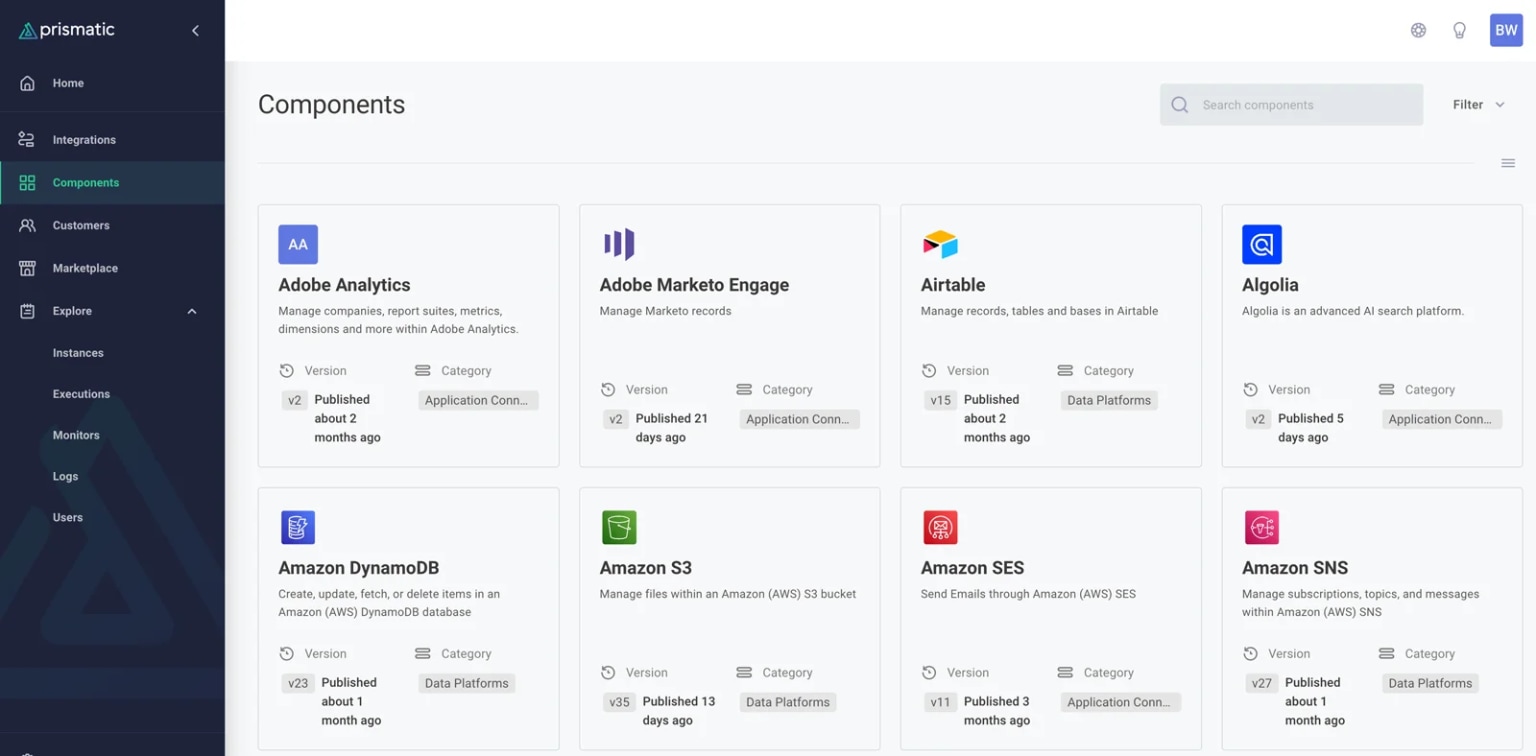
An embedded integration platform gives you the tools to solve your SaaS product's integration needs. It does this by enabling you to:
- Build and maintain integrations easily
- Deploy them to many customers with different configurations
- Provide a best-in-class marketplace UX to your customers
- Enable agentic workflows for AI-powered products
Build and maintain integrations easily
An embedded integration platform starts with two complementary build paths: a code-native development experience for engineers who prefer working in TypeScript in their own IDEs with full version control and CI/CD support, and a low-code integration designer for non-devs and business teams. The best platforms offer both as a unified experience, not as separate products bolted together.
Your devs focus on product-specific business logic rather than rebuilding integration infrastructure from scratch. Integration development fits into existing dev workflows: the platform provides an SDK, API, and CLI, supports TypeScript, and integrates with standard version control and CI/CD processes.
AI coding assistants are also part of the picture: the Prism MCP dev server connects tools like Claude Code and Cursor directly to your Prismatic environment, enabling developers to scaffold integrations, generate custom connectors, and deploy to production without leaving their IDEs. Prismatic Skills for Claude Code goes further, giving Claude Code specialized knowledge of Prismatic’s component library and patterns, enabling it to build, test, and deploy a complete integration from a single prompt.
Deploy them to many customers with different configurations
An embedded integration platform allows you to build an integration once and productize it for deployment to many customers, each with a unique configuration. Unlike enterprise integration platforms, embedded integration platforms are purpose-built on the multi-tenancy model.
Provide a best-in-class marketplace UX to your customers
An embedded integration platform includes a white-labeled embedded marketplace that allows your customers to discover, configure, and enable available integrations without assistance from your team.
Flexible configuration wizards guide them through the steps for each integration, providing specific instructions along the way. Once the integrations are up and running, customers can use the monitoring and alerting tools to do first-level troubleshooting of integration issues. And with AI Copilot for the embedded workflow builder, customers who want to go further can describe a custom workflow in plain language and have AI Copilot build it in real time.
Enable agentic workflows for AI-powered products
As B2B SaaS products add AI features, those features increasingly need to act within connected apps. Beyond reading data, they need to create records, trigger workflows, and update systems on behalf of users. An embedded iPaaS that supports agentic workflows gives you the infrastructure to make this work reliably.
Prismatic’s MCP flow server exposes your existing integration flows as MCP tools that AI agents can invoke. Instead of the agent making raw API calls (with all the hallucination and error risk that entails), it calls a pre-built, pre-tested Prismatic flow that handles authentication, data transformation, error handling, retry logic, and audit logging automatically.
This is a deterministic integration architecture: your engineers define exactly what should happen in a flow, and the agent triggers it as a unit rather than a sequence of guessed API calls. The agent gets the outcome, and your customers get reliability.
What specific benefits does an embedded integration platform provide?
We've discussed embedded integrations, their importance, and how challenging it can be to do them well. We've also introduced the embedded integration platform as a set of tools and processes that can be a game-changer for building, deploying, and supporting native integrations for your customers. Next, let's take an in-depth look at the benefits.
Embedded integration platforms enable you to:
- Save engineering time
- Increase win rate and sales velocity
- Provide a great UX for integrations
- Improve your customer service
- Reduce customer churn
Save engineering time
Speed and innovation are critical for SaaS – not only for going to market with an original app but also for building new features and closing functional gaps with competitors (two things embedded integrations can help you do). But the most significant negative of building integrations from scratch is the sheer amount of engineering time.
Let's look at how an embedded integration platform can benefit your company and your customers – freeing up your devs for work that enhances your core value proposition. With an embedded integration platform, you can:
- Develop integrations with fewer engineering resources
- Shift integration onboarding and support to non-engineers
- Leverage ready-made infrastructure for integrations
- Accelerate development further with AI tooling
Develop integrations with fewer engineering resources
Building embedded integrations via the traditional process requires much engineering time and effort. That work is costly and slows down core product development that engineering could do instead.
An embedded integration platform lets your non-engineering teams handle much of the integration workload. Non-devs can build integrations using the low-code capabilities of an embedded integration platform's low-code integration designer and API connectors.
Devs can empower integration creators by writing reusable custom connectors that handle industry-specific logic or niche apps. Non-devs then drop these custom connectors into integrations to build what your customers need.
Or, devs can use a code-native integration building experience to write entire integrations with their favorite IDEs.
Shift integration onboarding and support to non-engineers
Native integrations built using an embedded integration platform are reusable and configurable. A simple deployment environment makes it easy for your onboarding team to configure and deploy embedded integrations for individual customers without involving engineering. Or you could put the power of onboarding into your customers' hands by letting them self-activate integrations in an embedded integration marketplace.
Similarly, engineers can be far less involved when there's an integration question or issue in production. Support teams can proactively address and troubleshoot issues with the embedded integration platform's built-in logging and alerting tools. The embedded integration marketplace takes this a step further. It ensures that each of your customers can troubleshoot their own integrations.
Leverage ready-made infrastructure for integrations
Writing the code for integrations is the first of many steps to running them in a production environment. And, if you are taking a traditional approach to building integrations, you'll need to stand up additional infrastructure (with all that it entails) to make them work.
An embedded integration platform has the necessary infrastructure to run integrations, the integration marketplace to expose them to customers, and all the required tooling to deploy and support those embedded integrations.
You won't need to add infrastructure or engineers to set it up and maintain it. Instead, you can use those resources to support and enhance your core product.
We can focus on what our integration solves for our customers instead of our own infrastructure.
Accelerate development further with AI tooling
AI coding assistants have changed how fast engineers can build software. Embedded iPaaS platforms that embrace AI tooling build on this advantage. When your AI assistant has deep knowledge of the integration platform it's building on, the development experience is night-and-day better than a coding assistant guessing at API patterns.
Prismatic Skills gives Claude Code specialized knowledge of the Prismatic platform. As a result, it understands the component library, best practices, and deployment workflow. Devs can scaffold a complete integration from a prompt, and the tool will generate TypeScript code, compile and deploy to the Prismatic environment, run tests, and iterate on failures. What previously required days of setup can happen in hours. And the output isn't rough AI-generated code that needs significant cleanup. Instead, the code follows the same patterns Prismatic's own team uses internally.
The Prism MCP dev server connects AI coding assistants directly to your Prismatic environment. Devs can query execution logs, trigger deployments, and manage their Prismatic environment from their IDE, without using the platform's UI.
With Prismatic's Claude Skills, our developers describe what they need and get production-ready integrations in days instead of weeks. It's completely changed how our team thinks about integration development.
Increase win rate and sales velocity
Unlike a traditional approach to building integrations, an embedded integration platform lets you create reusable, configurable integrations in days or weeks rather than months. And with AI-assisted development tooling, many integrations can be deployed and tested in hours. This shifts your sales response from "We'll have to plan that for some time next year," to "We can have that ready in a week or two."
Let's look at how an embedded integration platform can benefit your sales cycle – giving you tools to close more deals and do it faster. With an embedded integration platform, you can:
- Meet many integration requirements upfront
- Define high-level requirements to set the integration scope
- Include new integrations in the initial onboarding process
- Use integrations to offset functional gaps in your product
Meet many integration requirements upfront
With an embedded integration platform, you'll quickly be able to close the gap between the integrations you have and the integrations your customers need you to have. From that point, when dealing with prospects, you'll often be able to say, "We have that," when discussing specific embedded integrations.
If you don't have it, you'll be able to build it quickly or give a relatively short timeline for its development. That flexibility on your part, coupled with a robust embedded integration marketplace, assures prospects and customers alike that you are invested in native integrations for your app and understand their importance. Customers can also use the embedded workflow builder to create workflows between your product and other apps they use.
Define high-level requirements to set the integration scope
When you use an embedded integration platform to build your integrations, a meaningful portion of that integration is ready before you write a single line of code. Depending on the integration, this could represent 30%, 50%, or even 90% of the final work, given Prismatic’s 190+ pre-built connectors, code-native SDK, and managed infrastructure. AI-assisted development further compresses the remaining work.
Once you've built a handful of embedded integrations, you know what building an integration with the embedded integration platform requires.
By talking through the desired integration with your prospect, you should be able to help the prospect define the requirements for a new integration in sufficient detail to lay it out for the contract, thereby keeping the sale moving along and ensuring a win.
Include new integrations in the initial onboarding process
It's common to agree to build new integrations to close deals. Unsurprisingly, customers want to start using them right away.
You may already have a list of embedded integrations from which your prospect can pick. But what if the integration the prospect wants isn't on the list? With an embedded integration platform, you can quickly build a prototype of the integration as part of the sales process.
With AI-assisted development, that prototype can often be production-ready and not just functional. A dev can describe the integration to Prismatic Skills for Claude Code and have a deployable, tested integration in the time it previously took to read the API docs. When the prospect says yes, you can quickly make needed adjustments and deploy the integration.
Use integrations to offset functional gaps in your product
Customers and prospects almost always want your app to do more – even if that additional functionality doesn't align with your app's purpose.
Of course, defining your roadmap is not the customer's job. That's the purview of the product team. However, if there's functionality that a prospect needs, and you know it's not something you want to build, you can often move the deal back into the win column by integrating with another app that does what they need.
Provide a great UX for integrations
Good UX is essential for SaaS apps, and that need extends to every part of your product, including your embedded integrations. You probably spent considerable time and money getting the UX right for your product.
Let's look at how an embedded integration platform can help you extend that UX from your core product into every integration your customers have with your product. With an embedded integration platform, you can:
- Make integrations a first-class part of your product
- Let customers enable, configure, and support their integrations
- Build integrations to be flexible
Make integrations a first-class part of your product
Integrations often suffer because they are relegated to the "when we get around to it" development queue. An embedded integration platform can significantly speed up your integration development, reducing the average development time from months to weeks (or even days).
Embedded integration platforms include a low-code integration designer (and a long list of API connectors and other components) that make it faster to build reusable, productized integrations for your app. They also include an embedded integration marketplace that displays your integration offerings to your users. You can choose which integrations to display, group them into categories, and specify icons, descriptions, and more.
In short, you can showcase your embedded integrations as essential product functionality rather than separate add-ons.
Let customers enable, configure, and support their integrations
As part of the embedded marketplace experience, let customers browse the marketplace and then choose and self-activate integrations – without requiring handholding from your engineering, onboarding, or support teams.
Then let your customers configure the integrations and set up credentials, webhooks, and data mappings – whatever options should be defined uniquely for each customer. By putting this power in their hands, you can ensure that integrations perfectly fit your customers' needs.
Self-serve support tools such as logging, monitoring, and alerting put users in the driver's seat instead of making them depend on support whenever an integration has a hiccup. AI Copilot for the embedded workflow builder takes self-service a step further: customers who want to build custom workflows can describe what they need in plain language, and AI Copilot builds it for them on the canvas in real time. Users can review the workflow as it’s built, approve a plan before execution, or iterate step by step.
Our customers now have an integration marketplace where they can connect and configure their integrations themselves which has reduced time and mistakes for our internal support teams.
Build integrations to be flexible
Change is constant. Today's SaaS apps must be flexible, and nowhere is that truer than with integrations. Integrations, by definition, tie two or more apps or systems together for data exchange. A vendor could change an API anytime, a new law could require additional fields on specific record types, and customers' appetites for more data are never satisfied.
An embedded integration platform, with its integration designer, API connectors, code components, and ability to dovetail neatly into your dev environment, encourages best practices for building adaptable embedded integrations.
The embedded integration platform also provides versioning for the integrations. In addition, each API connector or component is individually versioned because customers may be stuck on different app versions and need connectors to match.
Improve your customer service
Customer service for SaaS integrations can be all over the place, depending on how you built them, which people in your organization are well-versed in them, and what kind of tools you have available.
An embedded integration platform, however, has several features that can lead directly to a consistent customer experience for embedded integrations.
Let's look at an embedded integration platform and see how it can immediately improve customer service. With an embedded integration platform, you can:
- Leverage an infrastructure designed for integrations
- Solve integration issues faster by empowering non-devs
- Allow customers to self-service their integrations
Leverage an infrastructure designed for integrations
Integrations present significant infrastructure challenges. You may have the available capacity with your current production environment, but SaaS integrations have redundancy, security, and scalability needs that your environment may not support.
The foundation of an embedded integration platform is an infrastructure designed for running integrations. Your customer service benefits in two ways from leveraging that infrastructure for native integrations:
- First, you don't have your engineers and support personnel spending time on integration infrastructure (handling all the upgrades, security patches, and backups).
- Second, using the infrastructure provided by the embedded integration platform (with resources to manage a nearly unlimited number of embedded integrations) substantially reduces integration problems in production and associated customer service requests, compared to deploying integrations on infrastructure built in-house.
Solve integration issues faster by empowering non-devs
In a typical customer service environment, first-level support takes the calls/emails/chats. Then they refer more complex matters to the next level (either more technical non-devs or developers themselves).
An embedded integration platform shifts much of the day-to-day integration onboarding and support functions to non-engineers. The platform is an accessible, centralized repository for integration info so that customer-facing teams can answer customer questions without consulting devs. You can also upload documents like design specifications, troubleshooting steps – whatever your teams need. They can easily see which customers have which integrations enabled, their configurations, when they last ran, if any errors have occurred, and so on.
Configurable monitoring alerts the appropriate teams when an integration encounters an error or doesn't run when expected. Built-in logging makes it easy to dig in and troubleshoot. Customer-facing teams can easily handle everyday needs like updating outdated credentials, tweaking a configuration, or upgrading to a newer version of an integration.
By empowering your non-engineers, you significantly increase the odds that customers with integration issues can resolve them via one or two interactions with your customer-facing teams and not end up in a backlog with engineering.
Allow customers to self-service their integrations
Traditional integration development often leaves your customers with little to no insight into the integrations: which ones are available, how they work, how they're configured, how to determine if the integration is working correctly, and what (if anything) a customer can do if there are issues. As a result, your customers depend entirely on your onboarding and support teams for integration setup, maintenance, and support.
An embedded integration platform eases the load on your teams by enabling customers to perform many tasks traditionally handled by support. Customers can search and view available integrations using an in-app integration marketplace and then self-activate them. They can also enter and update their credentials and other config options. And finally, customers can set up monitoring to receive alerts on integration state and actions and view logs to perform initial troubleshooting.
This access to critical data translates into far fewer issues for customer support and faster solutions for your customers.
Reduce customer churn
An embedded integration platform can help reduce customer churn by making your product essential to your customers because it's connected to their other critical apps. The platform can also elevate embedded integrations in visibility and value, establishing them as key product differentiators.
Customer retention and annual revenue per user or subscription, both of those have significantly changed since we've got the Prismatic embeddable solution baked into our product. Our churn month over month has gone down, I'd say, almost 3%

Let's examine the following customer retention benefits:
- Make your product central to customer productivity
- Provide an end-to-end integration experience
- Draw attention to the value of integrations
- Increase the cost of switching
Make your product central to customer productivity
If your customers rely on your product to orchestrate their daily processes, that's the very definition of stickiness. A product with multiple integrations to your customers' other apps, enabled by an embedded integration platform, becomes deeply ingrained in their day-to-day operations. Your product has become essential: eliminating redundant data entry, automating tasks in other systems, providing access to data from other sources, and making it easier to share information.
Provide an end-to-end integration experience
Integrations can often feel like afterthoughts bolted onto your product. And they are often provided as services rather than features of your product. But it doesn't have to be this way.
An embedded integration platform includes all the tools you need to provide customers with an end-to-end integration experience that moves those integrations from afterthoughts to essential product functionality. The platform includes development, testing, configuration, deployment, monitoring, and support functionality. And at every step of the process, you can involve your customers, making them partners in the integration process.
Draw attention to the value of integrations
Another way to increase stickiness is to help customers notice and appreciate the value they receive from your product, making it easier to justify the cost. You can provide significant additional value to your customers with native integrations, and an in-app integration marketplace helps to highlight that value. This integration marketplace, typically white-labeled and embedded into the product, features lists of available integrations and access to self-service integration tools for enabling, monitoring, and troubleshooting integrations.
Increase the cost of switching
Stickiness increases further when customers recognize that switching to a different product would be difficult while retaining all the benefits they currently rely on. For your customer, leaving a product with multiple integrations means removing not just that app but also a hub of their technology ecosystem and all the connected workflows it powers.
Finding another vendor with a product comparable to yours, plus the ability to provide all those integrations, and then working with the vendor to recreate all the integrations and related workflows, represents a high switching cost involving considerable effort and disruption. When customers’ AI agents also rely on your integration flows as MCP tools, the switching cost increases since rebuilding those agentic workflows (with a new vendor and platform) is a significant undertaking..
How to pick the best embedded integration platform
The embedded integration platform market has matured significantly. When Prismatic launched in 2019, you could count the vendors on one hand. Today, there are 30 to 40 vendors, and the usual categories (embedded iPaaS, enterprise iPaaS, and unified API) are blurring as more vendors rush to add AI branding to existing products. Choosing the right platform matters more than ever: the wrong choice means continuing to struggle with integrations, while the right choice provides you with a welcome competitive advantage.
Check out the embedded iPaaS category at G2.
When picking the best embedded integration platform for your situation, you can consider numerous factors (many of which are covered in the linked list). However, we have found the following to be the key selection criteria:
- Is the platform built for your use case?
- Can the platform handle the complexity typical of your integrations?
- Is the platform dev-friendly?
- Does the platform have AI and agentic capabilities?
Is the platform built for your use case?
Many embedded integration platforms, such as those from Tray.ai and Workato, started as enterprise integration platforms (for companies' internal integrations and workflows). These vendors later pivoted their products to address the embedded integration platform market. While they are great for general automation, they're less well-suited for building embedded integrations for B2B SaaS apps. And tools such as Zapier confuse your relationship with your customers by constantly reminding them they are Zapier customers.
Prismatic, on the other hand, is built from the ground up for B2B software companies. As a result, it was specifically designed to add productized native integrations to your SaaS. It includes everything you need to build integrations fast, embed a self-serve integration marketplace in your product, and manage integrations at scale.
The integrations we build with Prismatic mean customers can now get these third-party apps up and running in seconds with a few configuration steps. It's a game changer in the market.
Can the platform handle real-world complexity?
There are straightforward SaaS integrations where we connect A to B and transfer X. But, many integrations B2B software teams need to build are messy in one regard or another: imperfect (or non-existent) APIs, non-standard auth, customer-specific data mapping, branching logic with multiple flows, automatic retry needs – the list goes on.
Some embedded integration platforms are optimized for simple data transfers between common SaaS apps like Salesforce and Slack but fall short when things get complicated. Meanwhile, Prismatic provides the flexibility to ensure you can handle even the most complex embedded integration scenarios.
Is the platform dev-friendly?
Low-code tools for integrations are fantastic. They can let non-devs build, deploy, and support your integrations. But low-code tools have limitations and can leave you stuck. When that happens, does the embedded integration platform for you devs to write code for integrations?
Prismatic makes that straightforward, whether your devs need to build a bit of custom code, custom connectors, or entire integrations. Your devs can store integration code in your standard repository and manage it via existing CI/CD processes.
Prismatic provides an API for devs and a CLI for those who live in the command line. Devs can use their favorite IDEs and the code-native integrations SDK to build entire integrations in TypeScript. The Prism MCP dev server connects AI coding assistants directly to your Prismatic environment, and Prismatic Skills for Claude Code gives Claude Code specialized knowledge of the platform. Other embedded integration platforms don’t provide the functionality that allows developers to extend the platform in this manner, let alone the AI tooling to accelerate it.
When you need something more customized [than built-in components], you can write code directly in the browser or develop custom components in your favorite IDE."
Does the platform have AI and agentic capabilities?
Not all AI claims in the integration platform space are equal. Many vendors label existing features as "AI-driven" without making any meaningful change to the product. When evaluating platforms, ask specifically about:
- AI-assisted development – Does the platform provide tooling that gives AI coding assistants context about the platform itself, or just general-purpose code generation? Can a dev invoke the AI functionality from their IDE?
- Agentic workflow infrastructure – Does the platform expose integration flows as MCP tools? Or does it require agents to call raw API endpoints, leaving error handling and auth management to the LLM?
- Deterministic execution – When an AI agent calls a flow, does the platform enforce strict input validation, handle retries and error handling, and provide full audit logs?
- Customer-facing AI features – Does the embedded workflow builder let customers build workflows in plain language?
Prismatic's answer to each of these questions is yes.
The Prism MCP dev server and Prismatic Skills for Claude Code address AI-assisted development. The MCP flow server provides agentic infrastructure. Execution is deterministic by design. And the AI Copilot for the embedded workflow builder helps your customers create their own unique workflows.
When evaluating systems, ask for a demo of the specific AI functionality you need to see.
How do I know if an embedded integration platform suits my needs?
There is no substitute for a product demo, followed by a proof of concept (POC), to get a good handle on the capabilities of an embedded integration platform.
Your selection process should include the product leader responsible for your integration strategy, your integration team leader, and dev team members who've built prior integrations.
During the product demo, ask questions to ensure the platform handles the types of integrations you need to build. Remember that a demo showing straightforward automation between two common SaaS apps does not necessarily mean a solution can support a complex integration between your product and a niche third-party app with no API. If you have specific use cases on your roadmap, bring them up.
Then, do a POC to confirm that the solution you're considering can support your types of integrations. Build a typical integration, maybe even the next integration in your backlog. Use the POC to ensure that the solution you're considering handles the hard parts of integrations that you tend to encounter.
An embedded integration platform helps everyone
The benefits of using an embedded integration platform for native integrations are clear. From sales to customer support, an embedded integration platform can help you increase efficiencies, empower users, and increase customer happiness.
While several embedded integration platforms are available on the market, we invite you to start your search with Prismatic. SaaS companies across many industries and ranging from startups to Fortune 500 have chosen Prismatic because of our:
- Singular focus on integrations for B2B SaaS companies
- Accessible tools that empower non-devs to build, deploy, and support integrations
- Extensible and dev-friendly platform that handles real-world integration complexity
- White-labeled customer-facing UX that allows customers to build, configure, and self-activate their integrations
- Stable, secure, and scalable infrastructure
In addition, we bring a dedication to improving our embedded integration platform as new needs and technologies arise.
Schedule a demo to see our embedded integration platform in action and learn how it can benefit your SaaS.