
Launch an Integration Marketplace

Integrations customers turn on themselves
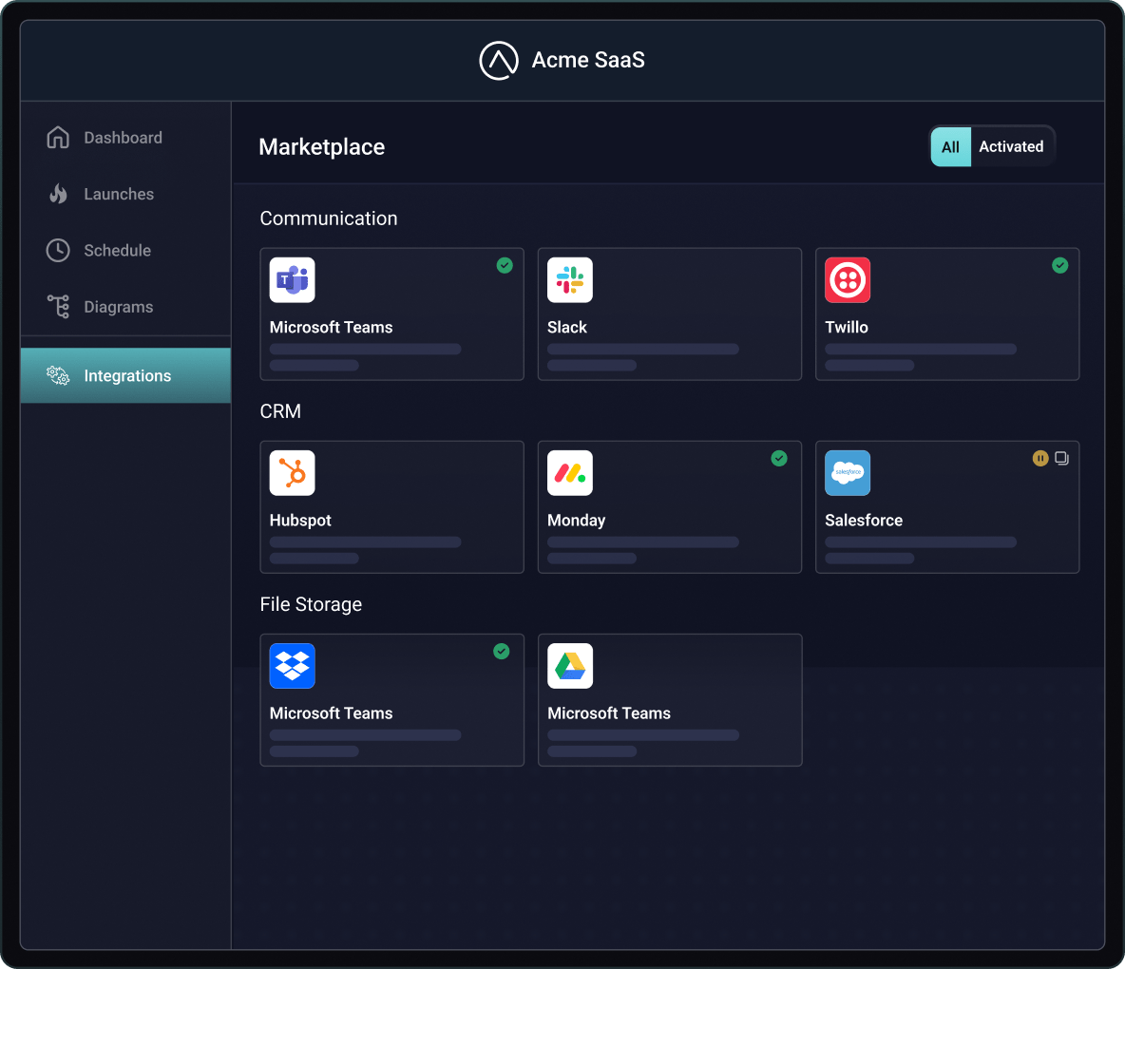
Prospects ask what you integrate with before they buy, and customers open tickets to turn on those integrations. A branded marketplace answers both: every integration you ship appears in your product, and customers activate them without waiting on your team.

Customers pick an integration, connect the third-party app, and follow a config wizard your team designed: connections, field mappings, schedules, and per-user settings you allow. Your team controls the logic. Prismatic provides the authentication infrastructure for every connection.

Embed the marketplace with the SDK as an iframe or popover, themed and translated to match your product. Or build your own UI on Prismatic's API. Filter which integrations each customer sees, and offer customer-specific integrations for individual accounts.

Customers can check instance status, update credentials, pause, or disconnect on their own, and see execution logs where you enable them. Your team monitors deployments from Prismatic: automatic retries for transient issues, logging and alerting, and replay of failed executions after you ship a fix.
Everything your customers do without a ticket

Connect third-party apps
Customers authenticate with Salesforce, HubSpot, Slack, or any connector in your catalog. Prismatic provides the OAuth and credential infrastructure for each connection.

Run more than one instance
Allow multiple instances of an integration, so a customer with three Shopify stores or two QuickBooks companies connects each one from the same listing.
Embed an iframe or roll your own
Embed the iframe
Prismatic's marketplace, added to your product as an iframe or popover. Themed to your brand and translated for your customers.
WHY
Building marketplace pages yourself is front-end work your customers can't use until it ships. Using the iframe puts a self-serve catalog in your product fast.
HOW
Install the Embedded SDK, authenticate customers with a token from your existing auth system, and render the marketplace in an integrations page or popover.
Roll your own
A fully custom marketplace user experience built for your integrations with your code using Prismatic's API and embedded SDK.
WHY
Some SaaS products need the marketplace to blend in more closely with the rest of the app or fit a design system that the iframe isn't capable of supporting.
HOW
Query available integrations and deployment status, display it all in your UI, and call Prismatic's configuration wizard when a customer activates an integration.
Don't take our word for it







Common questions
Yes. Embed Prismatic's marketplace with the embedded SDK and theme it to match your product, or build your own UI on Prismatic's API and open the config wizard when a customer activates an integration. Either way, Prismatic deploys, runs, and monitors every instance.
There are two layers. Your customers sign in through your product; the embedded SDK authenticates them to Prismatic behind the scenes, so there's no separate Prismatic login. When a customer connects a third-party app, Prismatic provides the authentication infrastructure, including OAuth flows and credential storage, scoped to that customer.
Yes. Each customer gets a separate instance of the integration, configured through the wizard your team designed. One customer maps different fields or filters different records than another, and where you enable user-level configuration, individuals on the same team set their own preferences.
Your team updates the integration once and publishes a new version. You choose which version the marketplace offers and update deployed instances from Prismatic; each customer's configuration carries over, and customers fill in only new settings, if any.
Not for day-to-day use. Customers activate, reconfigure, pause, reconnect, and remove their own instances from the marketplace, and can view execution logs where you enable them. Your team steps in for the exceptions, with full monitoring in Prismatic.
Yes. Filter the marketplace by category or label for each customer, hide tabs and controls with screen configuration, and offer a customer-specific integration by deploying it to that one customer only. A strategic account can see an integration nobody else does.
Yes. The embedded workflow builder sits alongside the marketplace, so customers who need something your catalog doesn't cover can build it inside your product, on the same connectors and platform. See Enable Customers to Build Workflows for the details.