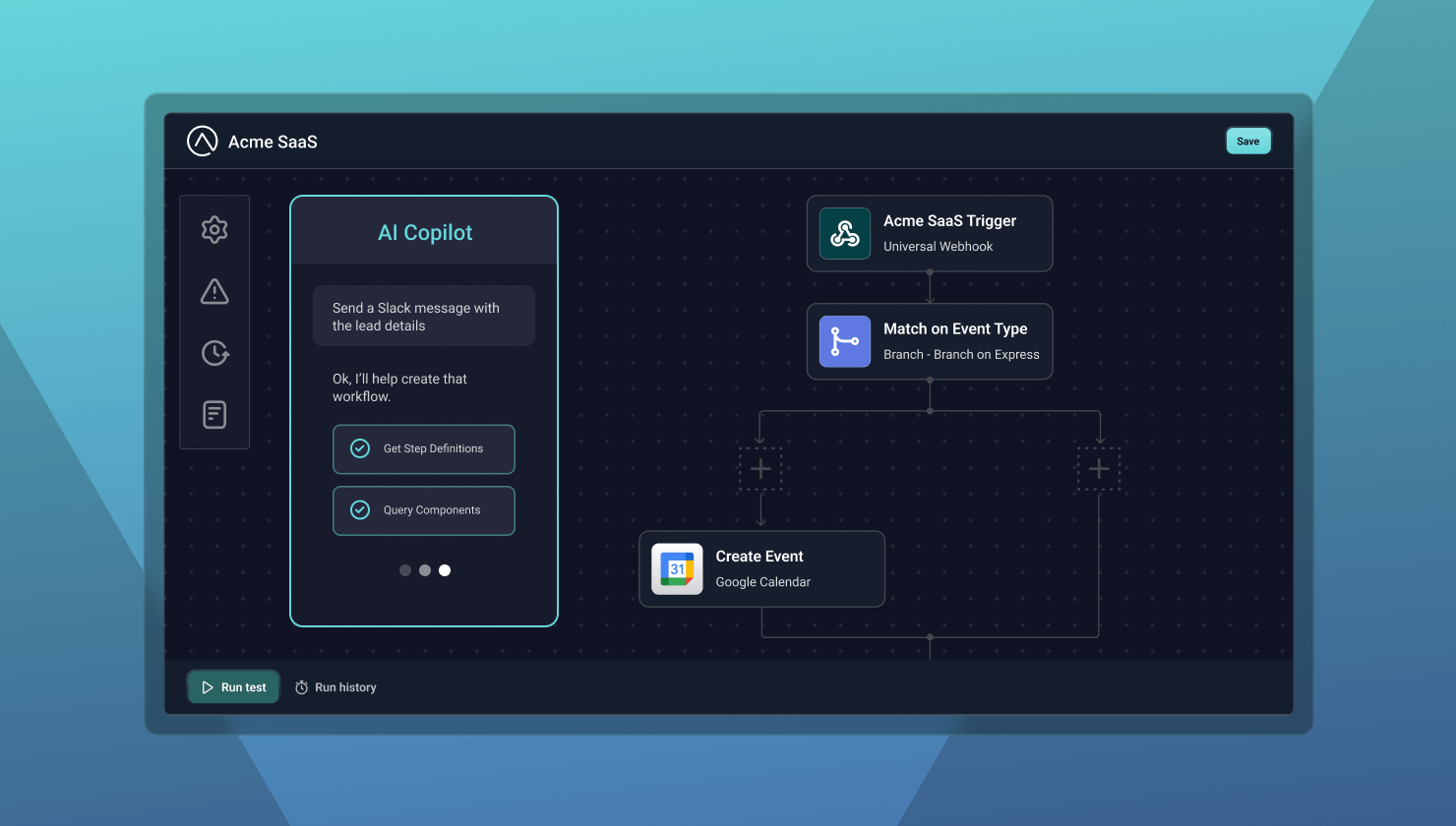
- Customers assemble workflows from provided templates and components. A white-labeled canvas inside your product lets customers build, test, and manage workflows while you control the connectors, actions, templates, and components for each customer.
- Long-tail integration requests stop tying up your engineering team. Most B2B SaaS companies have a few must-have integrations and a tail that only one or two customers need, yet that tail can still decide a sale or a go-live. Customers build those workflows themselves.
- Enterprise prospects get a self-service path. Requirements like a proprietary webhook, a homegrown system, or a complex data transformation no longer stall a deal while product scopes the work.
- Onboarding doesn't wait on engineering for small automations. New customers often need a routing, notification, or task automation before they consider themselves live. They configure it during onboarding using the provided templates and guardrails.
- Custom components cover niche and vertical-specific tools. Your engineers build them once with Prismatic's custom component SDK and expose them in the builder. Customers get a governed way to connect regional, proprietary, or industry-specific systems.
Your customers will always ask for one more integration, automation, or "small" customization.
Each request may be reasonable on its own. Together, they create a backlog your engineering team must build, deploy, monitor, update, and support – often without advancing your core product.
Saying no can delay onboarding or create friction in an enterprise sale. Saying yes to everything can bury your team in one-off work.
An embedded iPaaS workflow builder gives you another option: a white-labeled, visual workflow canvas inside your product. You provide the approved building blocks; customers assemble, test, and manage workflows for their own businesses.
How an embedded workflow builder works
An embedded builder changes who handles integration work and how much of it reaches your engineering team.
Customers can connect services and configure workflows without leaving your product or submitting a support ticket for every change. Because the person configuring the workflow usually understands the business process best, fewer requirements need to pass through support, services, or engineering.
Triggers, actions, connectors, and more let customers build workflows without requiring a new custom implementation for every combination. Your engineers create reusable capabilities once and you customers assemble and configure them.
Connections can be scoped to a customer and reused across workflows. A customer can authenticate to an application once, then use that connection in multiple permitted workflows.
In addition, an AI Copilot can help customers get started by turning a plain-language goal into a starting workflow. For example:
When a new deal closes in Salesforce, create a project in Asana and alert our team in Slack.
Customers can review, refine, and test the result before enabling it. This lowers the learning curve for customer users who understand the business process but do not know which components to choose.
Self-service does not have to mean unlimited access. You can control which connectors, actions, templates, and custom components are available for each customer or use case. Workflow contexts can further guide the starting experience and limit the components and actions available for a particular workflow.
The platform also provides execution and operational infrastructure, including execution logs, monitoring, alerting, retries, replay, and deployment.
1. Clear the long tail of one-off integration requests
Most B2B SaaS companies have a handful of must-have integrations, a larger group that customers request regularly, and a long tail of workflows that only one or two customers need.
The long tail can still affect revenue, retention, and onboarding. A custom request may determine whether a prospect signs, whether an implementation goes live, or whether an existing customer can support a critical process.
An embedded builder gives those requests somewhere to go. Customers can use the components you expose to create workflows for their specific requirements instead of waiting for you to productize every variation.
You can still build strategic integrations and bespoke work when necessary. But you no longer have to choose only between "we'll build it" and "we can't support it."
2. Close enterprise deals without promising everything
Enterprise prospects often bring integration requirements such as a proprietary webhook, a homegrown system, or a highly complex data transformation. If the requested integration becomes a condition of the sale, the deal will often stall while product and engineering scope the work.
An embedded builder changes that conversation. Instead of promising that every requirement will eventually make the roadmap, you can show prospects how they can create and maintain proprietary workflows directly inside your product.
That does not mean promising to support every possible system. But, it does mean giving enterprise customers a native, self-service path for addressing more of their integration needs.
3. Offload customer-specific requirements
Many integration requirements are small. But, no matter the size or complexity, each of them still requires scoping, building, testing, deployment, and support.
An embedded builder lets customers or customer-facing teams handle many of these changes with defined components and templates. AI assistance can help customers choose and configure the right steps even when they are not workflow experts.
Enabling an embedded workflow builder allows you to keep your engineers focused on reusable code and core product work instead of owning every customer-specific requirement forever.
4. Speed onboarding and time to value
New customers often need a specific automation before they consider themselves live. It might route records to another system, send a notification, create a task, or support a process unique to their operating model. Regardless of the specific functionality, it's critical to that customer.
If every request waits for engineering, time to value depends on your team's availability. An embedded builder lets customers avoid that bottleneck and configure the workflow during onboarding while your team provides templates, guidance, and guardrails.
The result can be a shorter path from implementation to a working process – and fewer onboarding projects blocked by a small integration requirement.
5. Extend your ecosystem to niche and vertical-specific tools
You can build native integrations for the applications most of your customers use. You cannot realistically maintain connectors for every regional, proprietary, niche, or industry-specific system they run.
An embedded builder expands your ecosystem without requiring your team to write every workflow. Custom connectors and API-capable components can give customers a governed way to connect systems you may never have capacity to support directly.
Your team can build custom components with Prismatic's custom component SDK, then expose those components through the customer-facing workflow experience. This is a developer task, but the resulting building blocks can make customer configuration much more flexible.
This model is especially useful for vertical SaaS companies. Customers may depend on specialized tools that are central to their business but relevant to only a small segment of your market. Your product team can keep investing in strategic integrations while customers handle more of the long tail.
How to choose the right workflow builder
Start with one question: who will use it?
For an embedded workflow builder, the answer is your customers and the internal teams who support them – not just your integration developers. Evaluate the experience accordingly.
Does it feel native to your product?
Look for white-labeling and theming controls for branding, authentication, navigation, permissions, and customer context. A portal that looks bolted on is not the same as a native product feature.
Can you govern what customers build?
You should be able to control which connectors, actions, templates, and custom components are exposed to each customer. Preconfigured experiences can give your customers a useful starting point instead of dropping everyone onto a blank canvas.
Does it support custom components?
The workflow builder should expose your APIs and domain-specific capabilities through reusable components. Evaluate how engineers create, test, and manage those components. A straightforward SDK and standard developer process matter. There is no point in replacing one maintenance burden with another.
Can non-technical users work independently?
Test the experience with operations managers, administrators, and implementation specialists – not just developers. Can users understand the available components, configure a workflow, and troubleshoot a failed step without extensive training?
AI can help, but don't stop at whether the platform has an AI feature. Look for an experience that helps your customers create, understand, modify, and troubleshoot workflows while keeping them in control.
Is the production infrastructure strong enough?
The canvas is important, but there should be much more:
- Multi-tenant isolation
- Secure credential handling and encryption
- Execution logs, monitoring, and alerting
- Retry and replay functionality
- Environment and deployment controls
- Versioning and audit history
- Security and compliance capabilities
A workflow builder that is only a UI layer can re-introduce the maintenance burden you are trying to avoid. Make sure the platform can execute and manage workflows at the scale you need.
How much effort does embedding require?
Build a proof of concept. Test authentication, theming, customer provisioning, permissions, environments, and the context that passes from your product into the builder.
Also ask for evidence from companies with similar customer volumes. A platform that works for ten customers may not operate the same way at a thousand. Test a realistic workflow with all the pieces (authentication, data mapping, conditional logic, an error path, and the embedded customer experience).
You do not have to build every workflow
Customers will keep finding integration use cases you didn't anticipate. That is a sign they are discovering new ways to use your product – not a reason for your engineering team to implement every idea.
An embedded iPaaS workflow builder lets you provide reusable components and guardrails while customers create workflows that fit their needs.
With Prismatic's embedded workflow builder, you can provide a white-labeled workflow-building experience directly in your product, give customers access to the connectors and actions you choose, expose your own product through custom components, and use AI Copilot to make workflow creation more accessible.
Productize what is common. Build what is strategic. Let your customers handle the long-tail pieces that make sense for them.
They'll thank you for it.