Code Component Data Sources
You can use the code component within your config wizard in order to fetch data from a third-party API and present it to your customers as they configure their instance.
In the video above, we create a couple of datasources that fetch data from third-party apps and present them as dropdown options in the config wizard. The code for both data sources is below.
When should I use a code component data source?
You'll want to use a code component data source if:
- Your data source is a one-off, unique to your integration
- Your data source is simple and wouldn't benefit from unit testing
- You want to fetch data from a third-party API that doesn't have a built-in component or the component doesn't have a relevant data source already built out
You should build a data source into a component if:
- Your data source is reusable across multiple integrations
- Your data source is complex and would benefit from unit testing
- You use the embedded workflow builder and want to use the data source to feed dynamic action inputs
Simple picklist code datasource
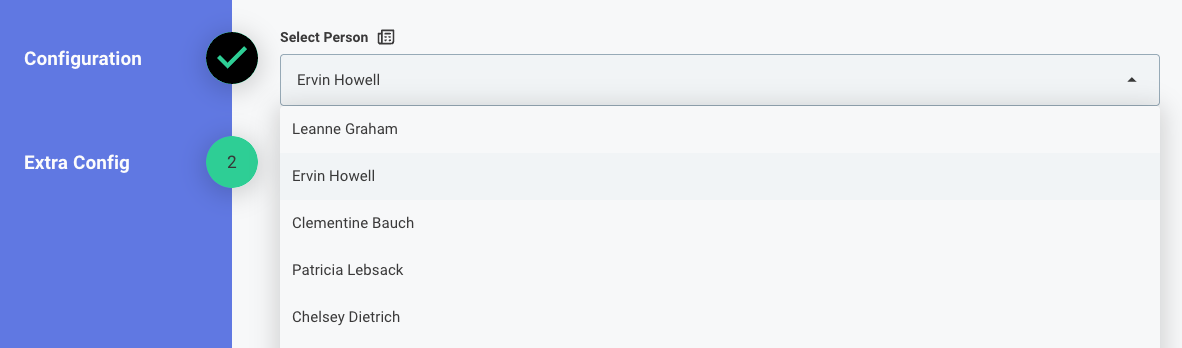
This example picklist code data source fetches a list of users from a public API and maps their names to the label and their emails to the key so that a customer can select a user from a dropdown.
module.exports = async (context, { connection, contextValue }) => {
  const response = await fetch("https://jsonplaceholder.typicode.com/users");
  const users = await response.json();
  const options = users.map((user) => {
    return {
      label: user.name,
      key: user.email,
    };
  });
  return {
    result: options,
  };
};
Slack channel picklist as code datasource
This example code datasource fetches a list of channels from Slack and maps the channel name to the label and the channel ID to the key so that a customer can select a channel from a dropdown when configuring their instance.
module.exports = async (context, { connection, contextValue }) => {
  const accessToken = connection.token.access_token;
  const response = await fetch("https://slack.com/api/conversations.list", {
    headers: {
      Authorization: `Bearer ${accessToken}`,
    },
  });
  const data = await response.json();
  const options = data.channels.map((channel) => ({
    label: channel.name,
    key: channel.id,
  }));
  return {
    result: options,
  };
};