Organization (Customer) Connections
An Organization (Customer) Connection is used when your customers have unique credentials to your app (or another third-party app), but you (the organization) will be the one to enter those credentials on their behalf.
For example, suppose you are Acme SaaS. Several of your integrations interact with your API, and each of your customers have their own Acme SaaS API key. You know their Acme SaaS API keys. It would feel strange for a customer user who is logged in to your Acme SaaS web app to enter their own Acme SaaS API key into an embedded config wizard. So, you can set each of your customers' Acme SaaS API keys on their behalf once, and the instances that your customer deploys that rely on that key will reference the customer-specific connection.
Creating a new organization (customer) connection
To create a new organization (customer) connection, see Managing Connections. When prompted to select the connection type, select Customer-Specific Credentials and then I will authenticate on my customer's behalf.
Configuring a customer's connection
Once an organization (customer) connection is created, you can assign connection values for each of your customers. You can do this through the UI or programmatically.
Through the UI, open Customers and select a customer. Under the customer's Connections tab, select + Add connection and then select the organization (customer) connection you just created.
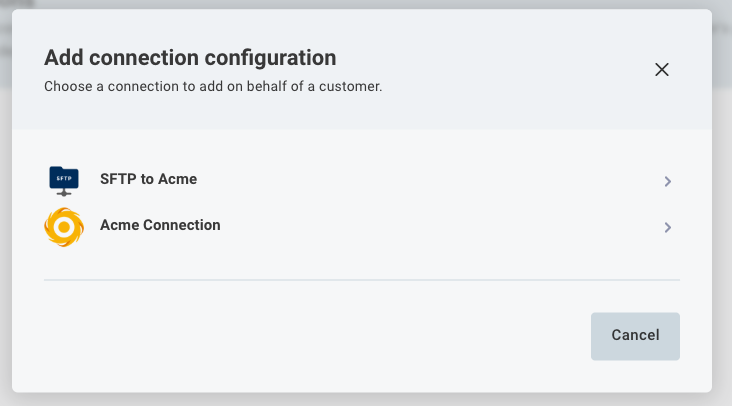
Fill in the fields that your connection requires (API key, username, password, endpoint URL, etc.) with customer-specific values.
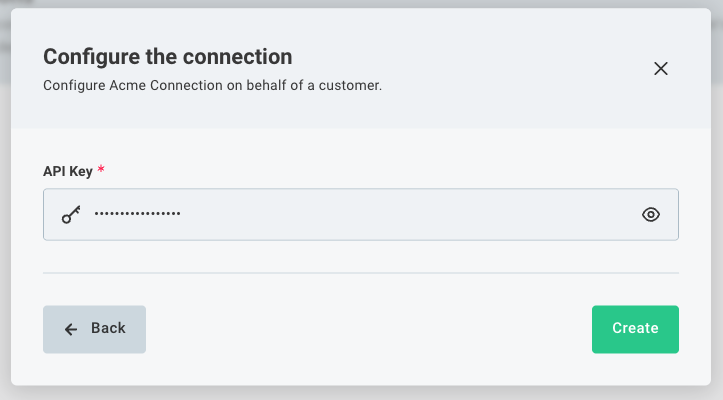
The values you fill in here will be used whenever this customer deploys an instance of an integration that relies on your connection.
Programmatically creating a customer's connection
Programmatically setting a customer's connection values is a three-query process using the Prismatic GraphQL API:
-
Fetch the organization (customer) connection's ID You can do this by running a
scopedConfigVariablesquery:query {scopedConfigVariables(stableKey: "acme-api-key") {nodes {idkeystableKeyconnection {inputs {nodes {idkey}}}}}}This will yield your organization (customer) connection's ID along with its inputs and their keys. Take note of the ID you get back - it should start with
U2Nvc.... -
Fetch your customer's ID. You can do that through a
customersquery.query {customers(externalId: "my-external-id") {nodes {idname}}}Take note of your customer's ID (note: not their external ID) - it should start with
Q3Vzd.... -
Create a connection for your customer with some values you know. You can do that with a
createCustomerConfigVariablemutation using the connection and customer ID you noted, along with an array ofinputs. Inputs should have the shape{ value: string, name: string, type: "value" }Each input's
nameis the key of the connection input (e.g. "username", "apiKey", "host", etc.).valueis the customer's value for that input.mutation {createCustomerConfigVariable(input: {scopedConfigVariable: "U2NvcGVkQ29uZmlnVmFyaWFibGU6NjIzZjM2NWItMzc3Ny00MWRkLWEyODAtNTBjNjliMjQyMGQ4"customer: "Q3VzdG9tZXI6NzFlY2NiYzQtYjc5OC00YzQzLWIzZDAtZjdmYzE5OTEyYzlj"inputs: [{ value: "Testing", name: "apiKey", type: "value" }]}) {customerConfigVariable {id}errors {fieldmessages}}}
FAQ
What will customer users see?
Nothing. You as an organization will create the connection for your customer. When a customer configures an instance that relies on that connection, no UI elements will appear in their config wizard.
Can organization (customer) connections be used if I have multiple tenants?
Yes. If your organization has multiple tenants (for example, a US and EU tenant, or a dev and prod tenant), be sure to assign your organization (customer) connections the same Stable Key in each tenant. Then, when you sync integrations between tenants, your integrations will automatically use the correct organization (customer) connection in the new tenant.