Large Data Sync
Many integrations need to do an initial bulk import of data when first deployed, and then keep data up to date by processing incoming webhooks in real time. Or, they need to periodically re-sync data from a source system on a schedule.
The code-native batchFlowTrigger pattern handles both cases through a single, unified execution path.
This page covers the code-native pattern. For the equivalent in the low-code designer and embedded workflow builder, add batching to a custom connector's trigger. See large data syncs in custom triggers, which walks through the same "Import Posts" example used below, written as a custom trigger.
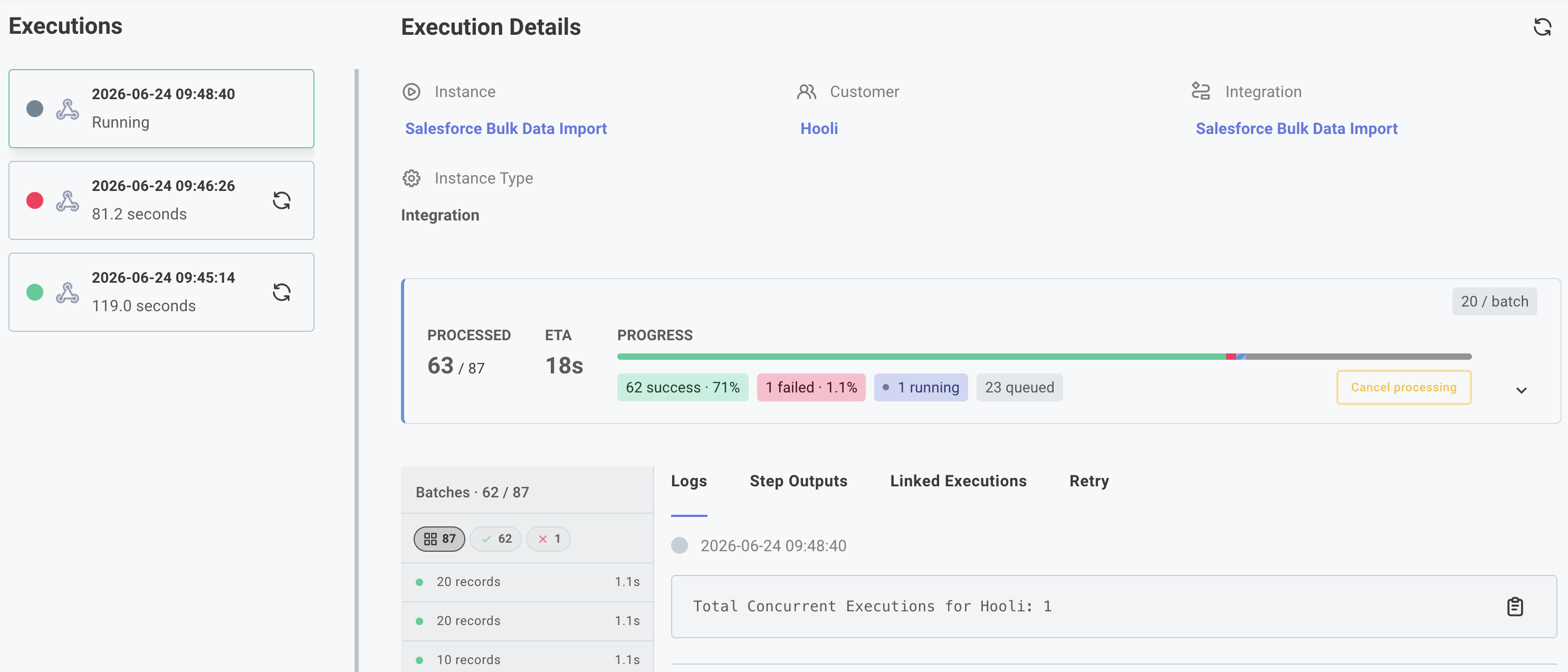
How it works
If you'd like a video walkthrough of this pattern, click here.
A flow using batchFlowTrigger defines two trigger functions:
onDeploy- runs when the instance is deployed. Fetches one page of records and returns them, along with apaginationStatecursor so the next page can pick up where this one left off. Prismatic callsonDeployrepeatedly until you returnnullforpaginationState, signaling that the initial sync is complete.onTrigger- runs each time the flow's webhook fires. LikeonDeploy, it can returnitemsand apaginationStateto page through data - useful when a single webhook event should trigger a batched re-sync. For simple real-time events, it typically returns just the incoming records with no pagination state.
Both functions produce items - an array of records - that Prismatic hands to onExecution in chunks. Your onExecution function processes records the same way regardless of which function produced them.
Basic structure
import { batchFlowTrigger, flow } from "@prismatic-io/spectral";

// The shape of a single record
type Post = { id: number; title: string };

// The cursor carried between backfill pages to remember where we left off
type PostCursor = { startId: number };

export const importPosts = flow({
  name: "Import Posts",
  stableKey: "import-posts",

  // How many records onExecution receives at once, and how many
  // batches can run concurrently. Note - `onDeploy` can return
  // any number of records, and they'll be split into batches of
  // this size for `onExecution`.
  batchConfig: { batchSize: 5, concurrentBatchLimit: 3 },

  trigger: batchFlowTrigger<Post, PostCursor>({
    onDeploy: async (context, payload) => {
      // Get previous pagination state, or start at 0 if this is the first page
      const startId = payload.paginationState?.startId ?? 0;

      // Assume `fetchPage` returns `{ data: Post[] }` for the next page of posts
      const response = await fetchPage(startId, 20);

      return {
        items: response.data,
        // Return null when the page is empty - signals the sync is done
        paginationState:
          response.data.length > 0
            ? { startId: startId + response.data.length } // Increment the cursor for the next page
            : null,
      };
    },

    // Receive incoming webhook events and return them as a `Post[]` array to be processed by onExecution.
    onTrigger: async (context, payload) => {
      const post = payload.body.data as Post;
      return {
        items: [post],
        response: { statusCode: 200, contentType: "text/plain", body: "ok" },
      };
    },
  }),

  onExecution: async (context, params) => {
    // Both onDeploy and onTrigger deliver records here
    const posts = params.onTrigger.results.body.data as Post[];
    for (const post of posts) {
      context.logger.info(`Processing post ${post.id}: ${post.title}`);
    }
    return { data: null };
  },
});
Key concepts
items and paginationState
onDeploy returns an object with two fields:
items- the records fetched from this page. These are whatonExecutionwill receive when the set of records is split into batches.paginationState- any serializable value that represents your position in the dataset. Prismatic passes this back toonDeployon the next call aspayload.paginationState. Returnnull(orundefined) when there are no more pages.
You choose the shape of paginationState. A simple page offset, a last-seen ID, or an API-provided cursor token all work well.
onDeploy runs repeatedly until pagination ends
Prismatic calls onDeploy in a loop:
- First call:
payload.paginationStateisundefined. Fetch page 1 and returnpaginationStatepointing to page 2. - Second call:
payload.paginationStateis whatever you returned previously. Fetch page 2, returnpaginationStatepointing to page 3. - Continue until a page returns no data - return
paginationState: nullto stop.
Each call to onDeploy produces a set of items that are immediately dispatched to onExecution, so processing starts while the next page is still being fetched.
batchConfig controls throughput
batchConfig: { batchSize: 5, concurrentBatchLimit: 3 }
batchSize-onExecutionis called once for everybatchSizerecords. IfonDeployfetches 20 records withbatchSize: 5,onExecutionis invoked four times.concurrentBatchLimit- the number ofonExecutioncalls that can run in parallel. Tune this against your downstream system's rate limits.
onTrigger and onDeploy both feed onExecution
onTrigger runs whenever the flow's webhook fires, and it supports the same return shape as onDeploy: items, an optional paginationState, and an optional HTTP response. This means onTrigger can also page through data in batches - for example, if a webhook event signals that a new batch of records is available, onTrigger can fetch and page through them the same way onDeploy does.
For simple real-time events (a single record arrives in the webhook body), onTrigger typically returns just that record with no pagination state. Either way, the items flow into the same onExecution path.
Inside onExecution, records are always available at:
params.onTrigger.results.body.data;
This is an array regardless of whether they came from onDeploy or onTrigger.
Regular data syncs
The onDeploy example above shows how to backfill a large dataset when the integration is first deployed.
If you want to run the data sync on a regular schedule instead of just on deploy, you can omit onDeploy and instead use the same items / paginationState pattern in onTrigger.
For example, a scheduled flow could run every hour and page through a source API to fetch new records, returning them to onExecution in batches.
FAQ
Is there a limit to the number of records I can backfill?
To prevent runaway infinite loops, an onDeploy or onTrigger will loop a maximum of 1000 times.
If you need to fetch more than 1000 pages of records, consider fetching multiple pages at once and returning them in a single items array.
I only see a few batches when testing - why?
It's easy to accidentally create an infinite loop in an onDeploy or onTrigger function if you handle pagination incorrectly.
The test runner will stop after 2 iterations to give you an opportunity to see sample results of your batch processing, but will not execute a full backfill. If you want to test a full backfill, deploy the integration and watch the instance execution in real time.
Example integrations
Three reference integrations show this pattern end to end:
- Simple initial data sync - pages through a public JSON API using a numeric offset cursor and processes records through a unified
onExecution. A good starting point. - Salesforce initial data sync - uses a last-seen ID cursor to page through Salesforce leads via SOQL, and also sets up a Salesforce Outbound Message to receive new leads in real time.
- Migrate Salesforce Recursive Flow to Batch Polling Trigger - a low-code integration that demonstrates how to migrate a recursive flow to a batch polling trigger. If you've already leveraged a recursive strategy to backfill data, this example shows how to migrate to a batch polling trigger approach.
Additional resources
- Large data syncs in custom triggers - this same example, written as a custom connector trigger for the low-code designer and embedded workflow builder
- Get Started with Large Data Syncs - a video walkthrough of this pattern
- Handling Large Data Sets - webinar discussing large data syncs