Step Outputs
Actions and Triggers can return a variety of data types. To return a simple string, number, boolean, array, or object your return block can read:
// return a string:
return {
  data: "some string",
};
// return a number:
return {
  data: 123.45,
};
// return a boolean:
return {
  data: true,
};
// return an array:
return {
  data: [1, 2, 3, 4, "a", "b"],
};
// return an object:
return {
  data: {
    key1: "value1",
    key2: ["value2", 123],
  },
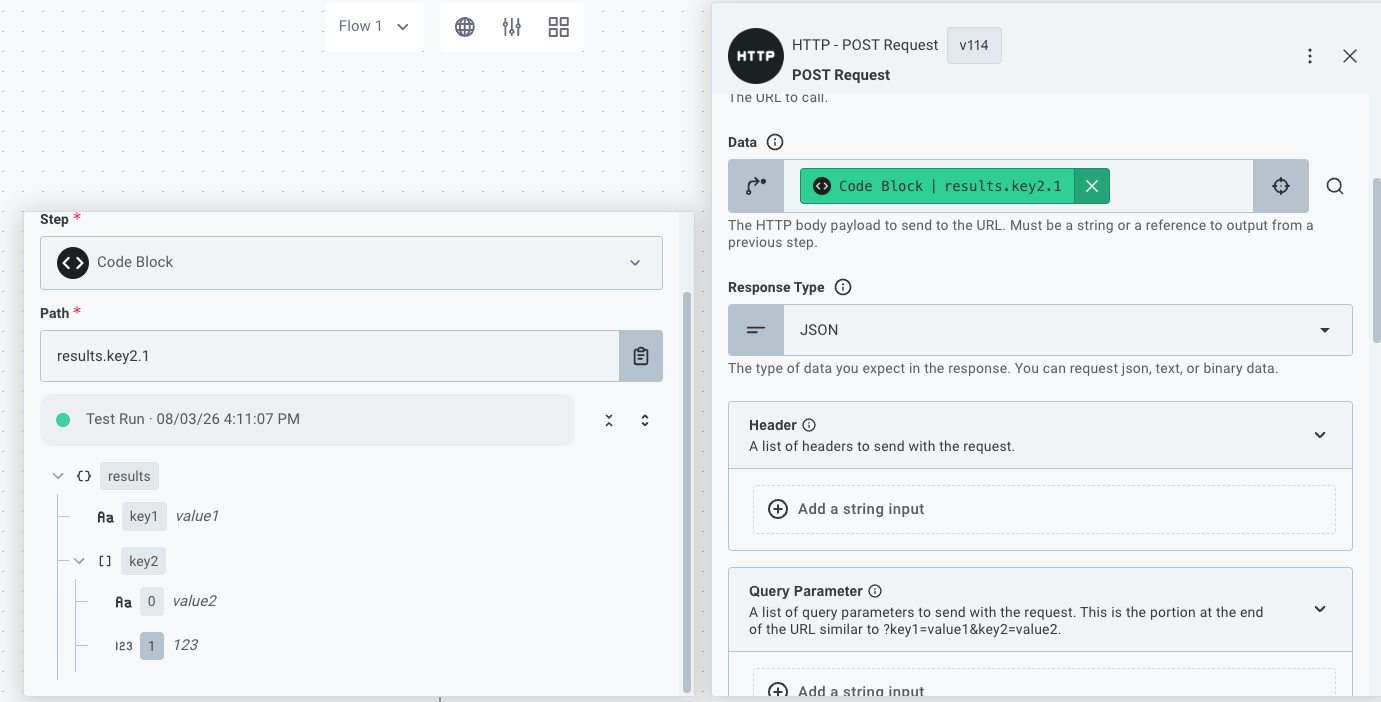
};
Those values can be used as inputs in subsequent steps by referencing this step's results:
If you'd like to return binary data (for example, a PDF file), see Returning binary data from an action.
Example payloads
Your custom trigger or action's results can be used as inputs for subsequent steps. But, until the action is executed, the actual results are not available. As an integration builder or as one of your customers' embedded workflow builder users, you may want to add several steps to your workflow without having to run your entire workflow after adding each step.
Follow the component authoring guidelines to declare known output shapes and choose how your action supplies reference data. The options below work together: static schemas describe outputs before configuration, and inline calls can provide real data once the step is configured.
Selecting an example payload in the integration designer
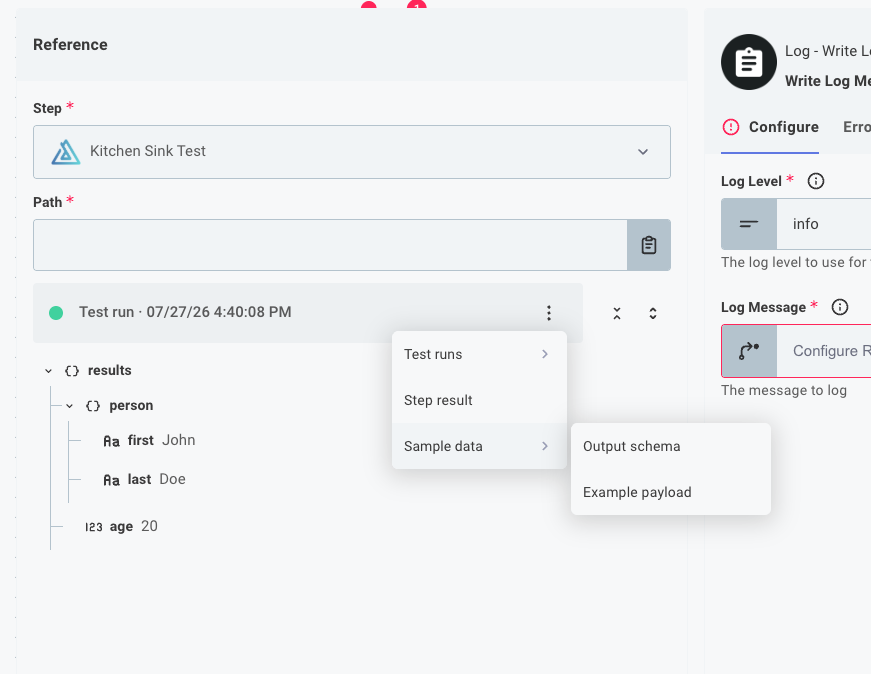
As an organization user in the integration designer, you can select which step result type you'd like to reference as you map step results to inputs. Depending on what are defined for the action, you can select from:
- A recent test run
- A stand-alone step result from an out-of-band
performorexamplePerforminvocation - Sample data from output schema or example payload
Example payloads in the embedded workflow builder
Your customers using the embedded workflow builder will be presented the best example possible based on recent executions and what example data is available. The embedded workflow builder will present a step result based on this logic:
Safely running the perform function
When to use: If your action does not modify data (is non-destructive), and you set performSafety to 'safe', the integration designer and embedded workflow builder can run your perform function on its own to provide example data.
Real data can include account-specific fields, such as custom fields on a CRM record. A single record may omit optional fields, so keep a schema for the output shape you know. Your function must work with the supplied inputs, without relying on state stored during a workflow run.
Note: your reference step must be fully configured with a valid connection.
action({
  display: {
    label: "Fetch a Record",
    description: "Fetch a record from Acme",
  },
  inputs: {
    connection: input({
      label: "Connection",
      type: "connection",
      required: true,
    }),
    recordId: input({
      label: "Record ID",
      type: "string",
      required: true,
    }),
  },
  perform: async (context, inputs) => {
    const record = await fetchRecord({
      recordId: inputs.recordId,
      apiKey: inputs.connection.fields.apiKey,
    });
    return { data: record };
  },
  performSafety: "safe",
});
examplePerform
When to use: If your action creates, updates, or deletes data, but you still want to provide real example data, define an examplePerform function that fetches data without changing it.
Similar to a perform function, the examplePerform function is defined on the action and is invoked outside of execution when the step is referenced if it is defined, the step is fully configured (including any connections).
action({
  display: {
    label: "Update a Record",
    description: "Update a record in Acme",
  },
  inputs: {
    connection: input({
      label: "Connection",
      type: "connection",
      required: true,
    }),
    recordId: input({
      label: "Record ID",
      type: "string",
      required: true,
    }),
    name: input({ label: "Name", type: "string" }),
    email: input({ label: "Email", type: "string" }),
    companyId: input({ label: "Company ID", type: "string" }),
  },
  perform: async (context, inputs) => {
    const record = await updateRecord({
      recordId: inputs.recordId,
      apiKey: inputs.connection.fields.apiKey,
      newData: {
        name: inputs.name,
        email: inputs.email,
        companyId: inputs.companyId,
      },
    });
    return { data: record };
  },
  examplePerform: async (context, inputs) => {
    const record = await fetchRecord({
      recordId: inputs.recordId,
      apiKey: inputs.connection.fields.apiKey,
    });
    // Return the record, simulating an update to fields that changed
    return {
      data: {
        ...record,
        ...(inputs.name ? { name: inputs.name } : {}),
        ...(inputs.email ? { email: inputs.email } : {}),
        ...(inputs.companyId ? { companyId: inputs.companyId } : {}),
      },
    };
  },
});
Static output schema
When to use: Declare an outputSchema when you know the shape of the data your action returns.
Describe the value inside data, not the surrounding return object.
Prismatic uses the schema to generate sample data; it does not check whether results from running the action match the schema.
Output schema is particularly useful when consumed by the embedded workflow builder AI Copilot since it provides clear guidance on the structure of the data that will flow through the workflow, including which return fields to expect all the time and which return fields are optional.
The step does not need to be fully configured to yield an example based on output schema.
action({
  display: {
    label: "Fetch a Record",
    description: "Fetch a record from Acme",
  },
  inputs: {
    connection: input({
      label: "Connection",
      type: "connection",
      required: true,
    }),
    recordId: input({
      label: "Record ID",
      type: "string",
      required: true,
    }),
  },
  perform: async (context, inputs) => {
    const record = await fetchRecord({
      recordId: inputs.recordId,
      apiKey: inputs.connection.fields.apiKey,
    });
    return { data: record };
  },
  outputSchema: {
    type: "actionOutput",
    schema: {
      type: "object",
      properties: {
        person: {
          type: "object",
          properties: {
            first: { type: "string" },
            last: { type: "string" },
          },
          required: ["last"], // Only last name is guaranteed
        },
        age: { type: "number", minimum: 0, maximum: 123 },
      },
      required: ["person", "age"],
    },
  },
});
Static example payload
When to use: you know the shape of the result of your action and would like to provide your own example data.
An output schema or static example payload gives the reference picker data when the step isn't fully configured and can't run inline.
Use examplePayload when you want to supply specific example values.
The embedded workflow builder prefers schema-generated data when both are available.
action({
  display: {
    label: "Fetch a Record",
    description: "Fetch a record from Acme",
  },
  inputs: {
    connection: input({
      label: "Connection",
      type: "connection",
      required: true,
    }),
    recordId: input({
      label: "Record ID",
      type: "string",
      required: true,
    }),
  },
  perform: async (context, inputs) => {
    const record = await fetchRecord({
      recordId: inputs.recordId,
      apiKey: inputs.connection.fields.apiKey,
    });
    return { data: record };
  },
  examplePayload: {
    data: {
      person: {
        first: "John",
        last: "Doe",
      },
      age: 20,
    },
  },
});
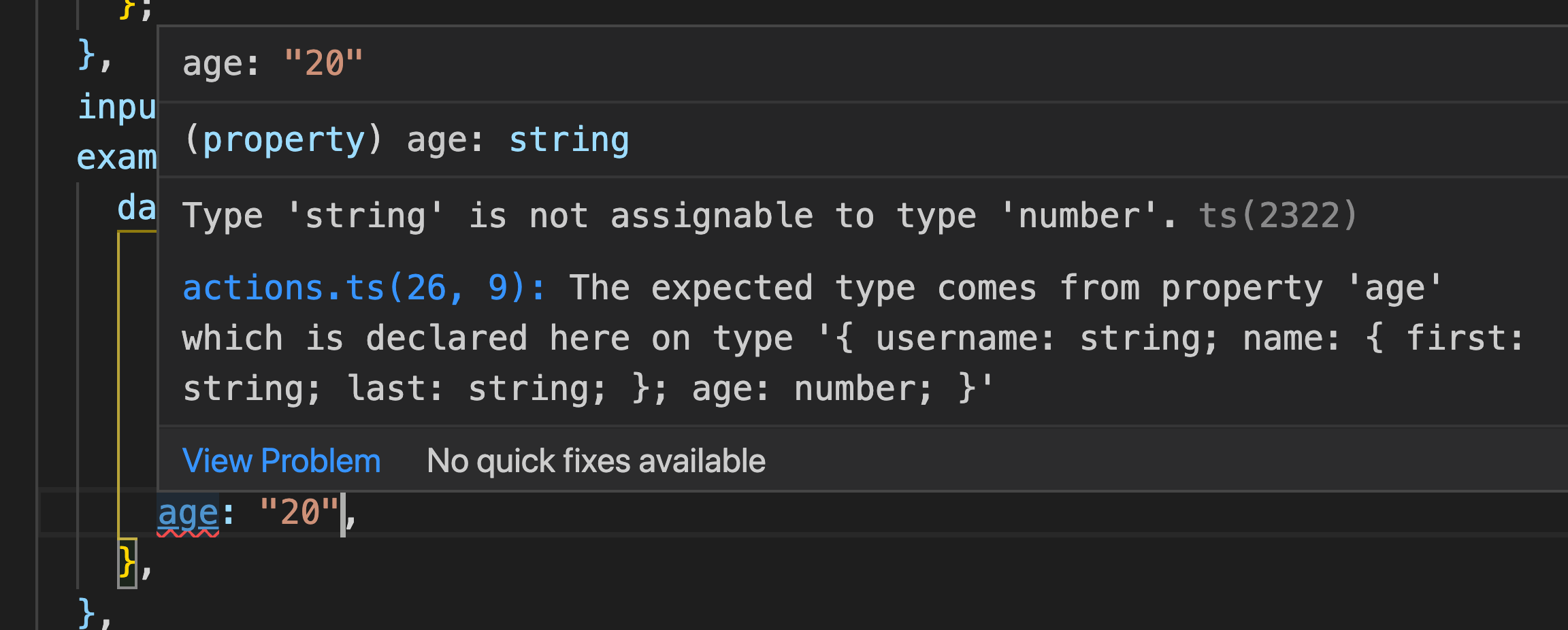
Note: your examplePayload must match the exact TypeScript type of the return value of your perform function.
If your perform function's return value does not match the type of the example payload, TypeScript will generate a helpful error message: