Salesforce Component

Query, create, update, or delete Salesforce records.
Component key: salesforce · Changelog ↓Description
Salesforce is a customer relationship management (CRM) platform. This component provides the ability to manage sales leads and records within the Salesforce platform.
API Documentation
This component was built using the following API References currently utilizing v63.0 by default.
This component includes CRUD (create, read, update, delete) actions for records and a create action for leads. For more complex queries, the Salesforce Object Query Language and the query action of this component are available.
Listening for events in Salesforce
Salesforce can send notifications when a record is created, updated, deleted, or undeleted. To listen for these events, use the Outbound Messaging feature of Salesforce.
When a Salesforce Flow is created, the conditions that cause the rule to run are specified. When those conditions are met, Salesforce sends an outbound message to the URL specified in the outbound message.
The Flow Outbound Message Webhook trigger can be used to run on instance deploy and will configure the necessary Flows and outbound messages automatically.
Example integration
An example integration is available in the GitHub examples repo and can be imported and tested.
The integration has three flows:
- Initial Account Import runs when an instance is first deployed. It uses SOQL to query pages of Account records, and for each page it loops over results and posts those results to "Acme". Account records are translated using the field mapping values the customer selected with a code step.
- Process Salesforce Outbound Messages receives notifications when an Account is changed. It fetches the modified account, maps data from SFDC to a format that "Acme Corp" understands, and sends the request to Acme. The subscription to a Salesforce Outbound Message and Workflow Rule are performed on instance deploy automatically. Those resource are deleted on instance removal.
- Create Account from Acme provides bi-directional data flow from SFDC and Acme.
A webhook request can be sent to this flow via its webhook URL, and a corresponding Account will be created in SFDC. A payload should look like this:
{
"acct_name": "My New Account",
"revenue": 12345
}
The integration also has a custom field mapper, which fetches fields on the Account object and allows the user to map them to fields on the Acme object. The field mapper in the example integration is built using the Code component, but it is recommended to build a custom field mapper in a custom component so it can be tested locally and dynamically pull data from the app, as well.
Connections
Basic Authentication
key: basicPrerequisites
- A Salesforce account with API access enabled
- The account's security token (if security tokens are enabled)
Setup Steps
When using Basic Auth, supply a Salesforce username and password. Depending on the Salesforce setup, the password may have a security token attached to it. If security tokens in the Salesforce account are disabled, the password to supply is simply the Salesforce password. If security tokens are enabled in the Salesforce account, then the password to enter is the concatenation of the password and the security token.
For example, if the Salesforce password is p@$sw0rD and the security token that Salesforce provides is ExAmPlE0000000000ExAmPlE, then enter p@$sw0rDExAmPlE0000000000ExAmPlE as the password.
Manage security tokens by clicking the profile picture on the top-right of Salesforce, selecting My Settings, and then opening Personal -> Reset My Security Token.
Configure the Connection
Create a connection of type Basic Authentication and enter:
- Username: Enter the Salesforce account username
- Password: Enter the Salesforce password, or the password concatenated with the security token if security tokens are enabled
- Login URL: Enter the Salesforce My Domain URL (e.g.,
https://my-company.my.salesforce.com/)
| Input | Notes | Example |
|---|---|---|
| Login URL | The Salesforce Login URL for Basic Authentication (e.g., https://login.salesforce.com or a custom My Domain URL). | https://my-company.my.salesforce.com/ |
| Password | The password of the Salesforce account | |
| Username | The username of the Salesforce account | myUser |
OAuth 2.0
key: oauth2OAuth 2.0 provides a simple way for users to authorize applications. To use OAuth 2.0, create and configure a Connected App within Salesforce.
Prerequisites
- A Salesforce account with Administrator access
- Permission to create Connected Apps in the Salesforce org
Setup Steps
- Log in to the Salesforce account
- Navigate to Setup by clicking the gear icon in the upper right corner
- Open Apps > External Client Apps > Settings
- Enable Allow creation of connected apps if it is not already enabled
- Select New Connected App
- When creating the "Connected App" be sure to check Enable OAuth Settings, and enter the OAuth callback URL
https://oauth2.prismatic.io/callbackas a Callback URL. - Consult Salesforce to determine the proper OAuth Scopes to assign. To grant integrations the same permissions that the user authenticating through OAuth has, select Full access (full). Also select Perform requests at any time (refresh_token, offline_access). Select Require Secret for Web Server Flow and Require Secret for Refresh Token Flow:
- When creating the "Connected App" be sure to check Enable OAuth Settings, and enter the OAuth callback URL
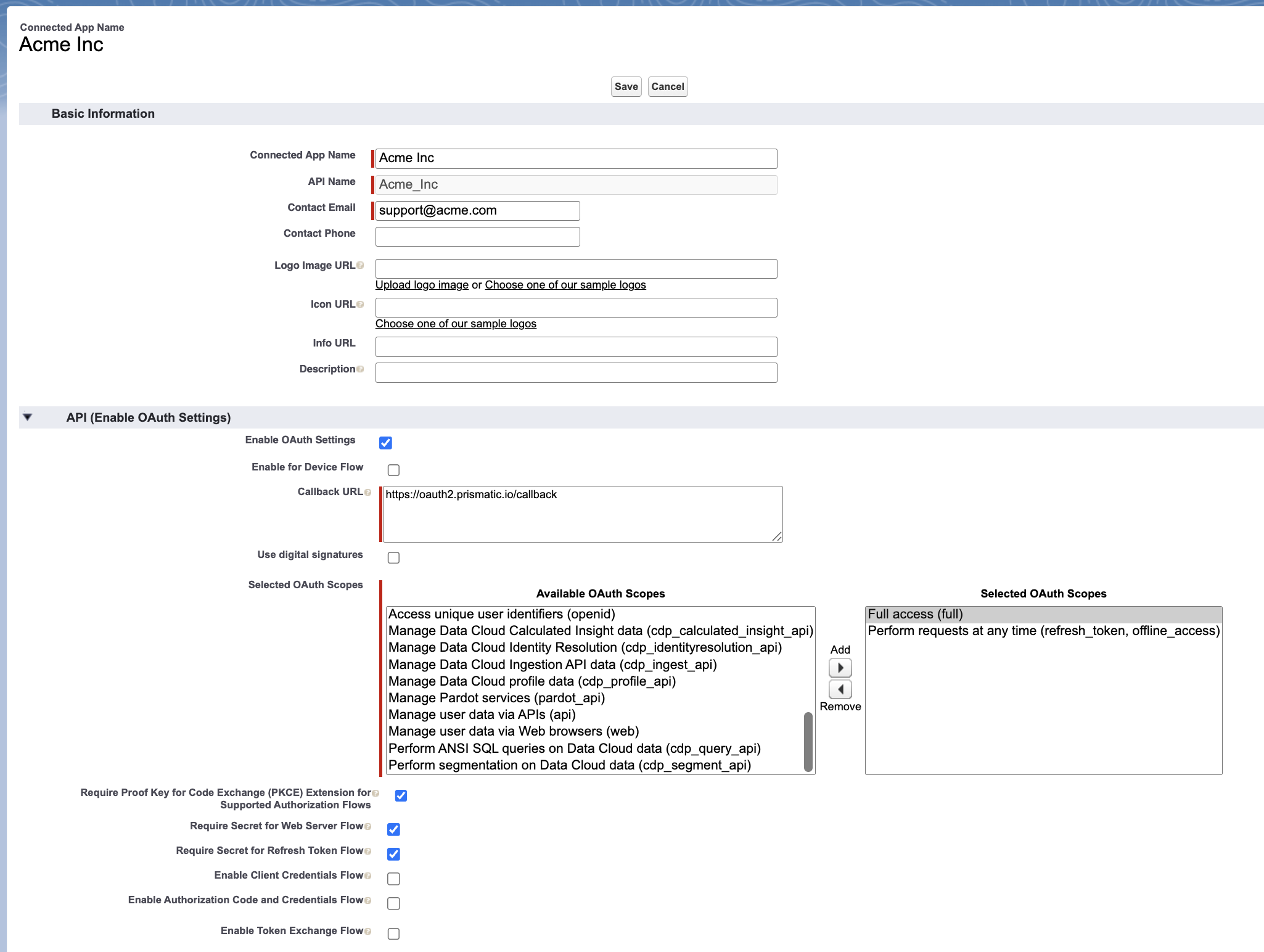
Next select Save and Continue. Then, get the app's Consumer Key and Consumer Secret by selecting Manage Consumer Details. Take note of these keys:
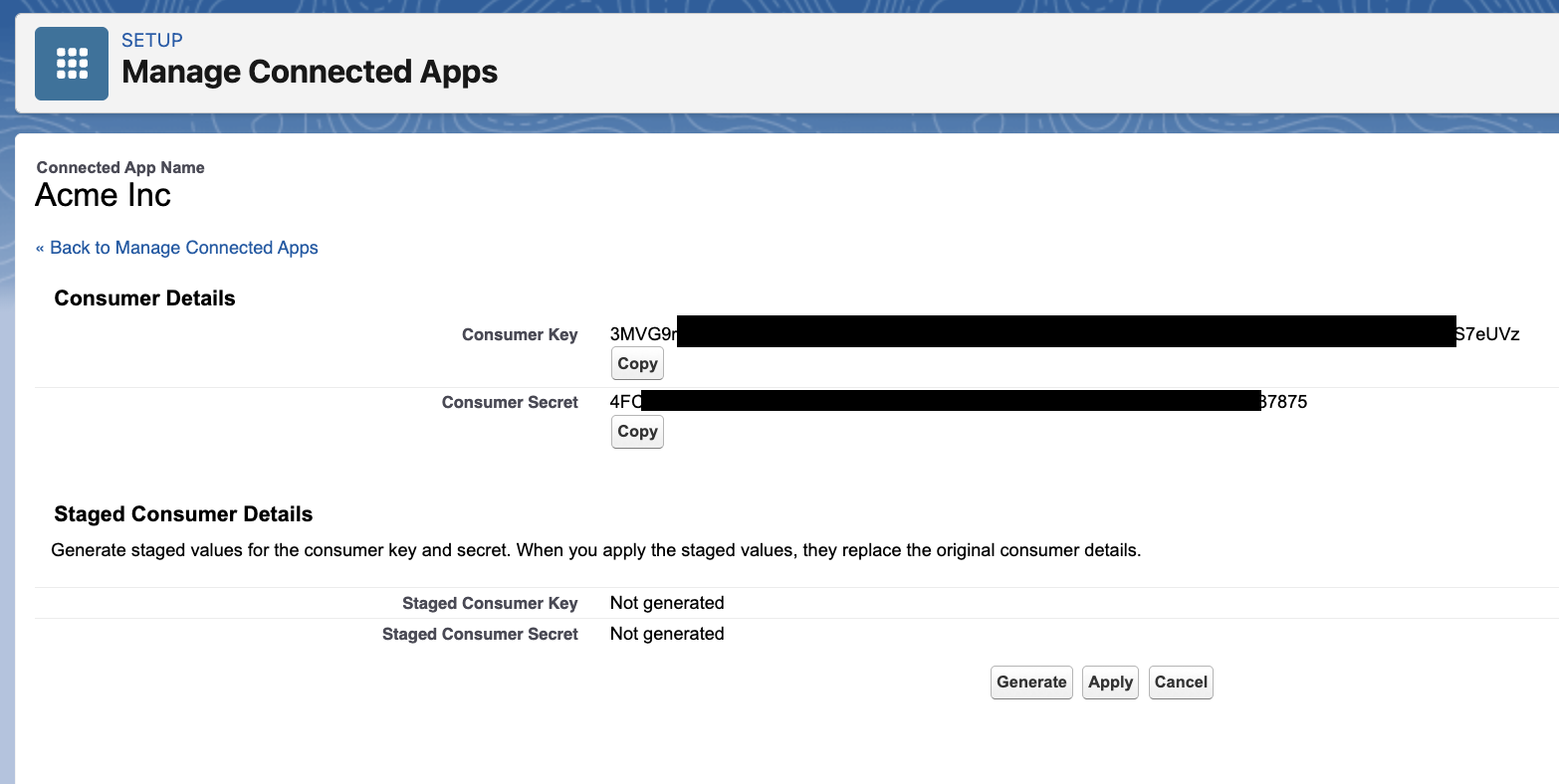
To return to this screen, select Apps > App Manager, click the dropdown menu to the right of the app and select Edit. From there, manage callback URLs.
Configure the Connection
Create a connection of type OAuth 2.0 and enter:
- Consumer Key: Enter the Consumer Key from the Connected App
- Consumer Secret: Enter the Consumer Secret from the Connected App
- Authorize URL: Defaults to
https://login.salesforce.com/services/oauth2/authorize - Token URL: Defaults to
https://login.salesforce.com/services/oauth2/token - Revoke URL: Defaults to
https://login.salesforce.com/services/oauth2/revoke
To connect to a Salesforce sandbox organization for testing purposes, edit the connection's Authorize URL, Token URL and Revoke URL to read test.salesforce.com instead of login.salesforce.com.
Be sure to change these values back when testing is done.
| Input | Notes | Example |
|---|---|---|
| Authorize URL | The OAuth 2.0 Authorization URL for Salesforce | https://login.salesforce.com/services/oauth2/authorize |
| Consumer Key | The Consumer Key from the Salesforce Connected App. | 3MVG9ZL1aBcDeFGHjklMNOpQRsTUVwXyZ1234567890abcdefg |
| Consumer Secret | The Consumer Secret from the Salesforce Connected App. | |
| Revoke URL | The OAuth 2.0 Revocation URL for Salesforce | https://login.salesforce.com/services/oauth2/revoke |
| Scopes | A space-delimited set of one or more OAuth scopes to request access to. | |
| Token URL | The OAuth 2.0 Token URL for Salesforce | https://login.salesforce.com/services/oauth2/token |
OAuth 2.0 Client Credentials
key: salesforceClientCredentialsOAuth 2.0 Client Credentials provides server-to-server authentication without user interaction. Use this connection type for integrations that run in the background without a user context.
Prerequisites
- A Salesforce account with Administrator access
- A Connected App configured for OAuth 2.0 (see OAuth 2.0 connection documentation), or permission to create a new one
Setup Steps
This connection requires a Connected App configured for Client Credentials. If a Connected App already exists for OAuth 2.0, enable Client Credentials on that app. Otherwise, create a new Connected App following the OAuth 2.0 setup steps first.
-
Enable Client Credentials Flow:
- Navigate to Setup > Apps > App Manager
- Find the Connected App and select Edit from the dropdown menu
- Under API (Enable OAuth Settings), check Enable Client Credentials Flow
- Click Save
-
Configure Run As User — the Client Credentials flow requires specifying which user the integration will authenticate as:
- From the Connected App, select Manage from the dropdown menu
- Click Edit Policies
- Under Client Credentials Flow, select a user from the Run As dropdown
- Click Save
The selected user's permissions determine what the integration can access.
Configure the Connection
- Instance URL: Enter the Salesforce My Domain URL (e.g.,
https://acme-corp.my.salesforce.com) - Consumer Key: Enter the Consumer Key from the Connected App
- Consumer Secret: Enter the Consumer Secret from the Connected App
- Scopes: Scopes are configured in the Salesforce Connected App settings
For sandbox environments, use the sandbox My Domain URL format: https://your-company--sandbox.sandbox.my.salesforce.com
| Input | Notes | Example |
|---|---|---|
| Consumer Key | The Consumer Key from the Salesforce Connected App. | 3MVG9ZL1aBcDeFGHjklMNOpQRsTUVwXyZ1234567890abcdefg |
| Consumer Secret | The Consumer Secret from the Salesforce Connected App. | |
| Instance URL | The Salesforce My Domain URL (e.g., https://your-company.my.salesforce.com). For sandbox, use https://your-company--sandbox.sandbox.my.salesforce.com. | https://acme-corp.my.salesforce.com |
| Scopes | Scopes are configured in the Salesforce Connected App settings. | |
| Token URL | {{#instanceUrl}}/services/oauth2/token |
Triggers
Flow Outbound Message Webhook
Receive Flow-based outbound messages from Salesforce. | key: flowOutboundMessageTrigger
| Input | Notes | Example |
|---|---|---|
| Connection | The Salesforce connection to use. | |
| Fields | Fields to include in the Outbound Message. | Name, Phone, Email, etc. |
| Filter Formula | Optional formula to filter which records trigger the flow. | ISCHANGED(Email) && NOT(ISBLANK(Email)) |
| Flow Metadata | Additional Flow metadata in JSON format. This will be merged with other inputs. | |
| Prefix | Sets a prefix to the Flow Name and Outbound Messages created. Must start with a letter, can contain letters, numbers, underscores, and be at most 15 characters. | Acme_Services |
| Trigger Record Type | The Salesforce object API name (e.g., Account, Contact) whose record changes will trigger this flow. | |
| Trigger On | When to trigger the flow (record creation, update, or both). | CreateAndUpdate |
| Version | The Salesforce API version number to use for requests. | 63.0 |
The Flow Outbound Message trigger can manage Salesforce Flow based webhook integrations for the instance. Unlike traditional webhook setups that require manual configuration in Salesforce Setup, this trigger handles the entire Flow lifecycle automatically.
How It Works
- On Instance Deploy: The trigger automatically creates a record-triggered Flow in the Salesforce org with an outbound message action pointing to the instance's unique webhook URL. If a previous Flow and Outbound Message exist for this instance, they are deleted and recreated.
- On Instance Deletion: The trigger automatically removes the Salesforce Flow and Outbound Message that were created on deploy, cleaning up all resources in the Salesforce org.
Configuration
- Prefix: A prefix applied to the Flow Name and Outbound Messages created. Must start with a letter, can contain letters, numbers, and underscores, and be at most 15 characters.
- Trigger Record Type: The Salesforce object API name (e.g., Account, Contact) whose record changes will trigger this flow.
- Trigger On: When to trigger the flow — on record creation, update, or both.
- Fields: Fields to include in the Outbound Message payload.
- Filter Formula: An optional formula to filter which records trigger the flow.
- Flow Metadata: Additional Flow metadata in JSON format, merged with other inputs.
- Version: The Salesforce API version to use.
The trigger supports different Flow trigger conditions:
- Create: Triggers when new records are created
- Update: Triggers when existing records are updated
- Create or Update: Triggers on both record creation and updates
Returned Data
The trigger receives deserialized XML payloads from Salesforce outbound messages, automatically converted to JSON. The structure includes the Salesforce object fields configured in the outbound message.
Example Payload
{
  "soapenv:Envelope": {
    "soapenv:Body": {
      "notifications": {
        "OrganizationId": { "_text": "00D7F000004xkKaUAI" },
        "ActionId": { "_text": "04k7F0000008OKaQAM" },
        "Notification": {
          "Id": { "_text": "04l7F0000008OKQQA2" },
          "sObject": {
            "sf:Id": { "_text": "0017000000hOMChAAO" },
            "sf:Name": { "_text": "Acme Corp" },
            "sf:Email": { "_text": "contact@acme.com" }
          }
        }
      }
    }
  }
}
New and Updated Records
Checks for new and updated records in Salesforce on a recurring schedule. | key: pollChangesTrigger
| Input | Notes | Example |
|---|---|---|
| Connection | The Salesforce connection to use. | |
| Dynamic Fields | A field for dynamic inputs that can be configured at deploy time with the use of a key value config variable. | |
| Field Values | Key-value pairs mapping Salesforce field API names to the values to set on the record. | |
| Field Value Types | For each item, provide the key and the type corresponding to the field value entered above. Valid types are Boolean, Number, or String. | Name:string,Phone:string |
| Max Records To Fetch | The maximum number of records the trigger will fetch. Defaults to 20,000 records. | 20000 |
| Record Type | The Salesforce object API name to act on (e.g., Account, Contact, Opportunity). | Account |
| Show New Records | When true, newly created records are included in the polling results. | true |
| Show Updated Records | When true, recently modified records are included in the polling results. | true |
| Version | The Salesforce API version number to use for requests. | 63.0 |
The New and Updated Records trigger checks for new and updated records in Salesforce on a recurring schedule. It uses the configured record type and field values to query for records, then compares timestamps against the last polling time to identify changes.
How It Works
On each polling interval, the trigger queries Salesforce for records of the specified type. It compares each record's CreatedDate and LastModifiedDate against the last poll timestamp to determine which records are new or updated. Only changed records are included in the trigger payload.
The trigger maintains polling state internally, storing the timestamp of each execution to use as the comparison point for the next poll.
Configuration
- Record Type: The Salesforce object API name to poll for changes (e.g., Account, Contact, Opportunity)
- Show New Records: When enabled, newly created records are included in the results
- Show Updated Records: When enabled, recently modified records are included in the results
- Field Values: Key-value pairs to filter which records are returned
- Field Value Types: The data types for the field values (Boolean, Number, or String)
- Dynamic Fields: Additional fields that can be configured at deploy time
- Max Records To Fetch: The maximum number of records per poll. Defaults to 20,000 records
- Version: The Salesforce API version to use
Returned Data
The trigger returns an object containing arrays of new and updated records based on the configuration.
Example Payload
{
  "newRecords": [
    {
      "Id": "0017000000hOMChAAO",
      "Name": "New Account",
      "CreatedDate": "2025-01-15T10:30:00.000+0000",
      "LastModifiedDate": "2025-01-15T10:30:00.000+0000"
    }
  ],
  "updatedRecords": [
    {
      "Id": "0017000000hOMCiAAO",
      "Name": "Updated Account",
      "CreatedDate": "2024-06-01T08:00:00.000+0000",
      "LastModifiedDate": "2025-01-15T10:45:00.000+0000"
    }
  ]
}
Webhook
Receive and validate webhook requests from Salesforce for manually configured webhook subscriptions. | key: webhook
A Salesforce outbound message can be configured to send information to a flow's webhook URL under certain conditions (an "Account" is created, an "Opportunity" is updated, etc.).
This trigger responds to a Salesforce outbound message request with the acknowledgement (ack) response that Salesforce expects.
Since Salesforce always sends XML payloads, the XML is deserialized automatically as part of the trigger, so no additional XML deserialization step is required.
Returned Data
The trigger automatically deserializes the XML payload from Salesforce into a JSON object. The structure depends on which Salesforce object and fields are configured in the outbound message.
Example Payload
{
  "soapenv:Envelope": {
    "soapenv:Body": {
      "notifications": {
        "OrganizationId": { "_text": "00D7F000004xkKaUAI" },
        "ActionId": { "_text": "04k7F0000008OKaQAM" },
        "Notification": {
          "Id": { "_text": "04l7F0000008OKQQA2" },
          "sObject": {
            "sf:Id": { "_text": "0017000000hOMChAAO" },
            "sf:Name": { "_text": "Acme Corp" }
          }
        }
      }
    }
  }
}
Workflow Outbound Message Webhook (Deprecated)
Receive workflow rule outbound messages from Salesforce. | key: workflowTrigger
| Input | Notes | Example |
|---|---|---|
| Connection | The Salesforce connection to use. | |
| Description | A text description of the object. | This is a description of the object |
| Fields | Fields to include in the Outbound Message. | Name, Phone, Email, etc. |
| Outbound Message Name | The name of the outbound message to be used. | MyOutboundMessage |
| Record Type | The Salesforce object API name to act on (e.g., Account, Contact, Opportunity). | Account |
| Trigger Type | Conditions in which the trigger fires. On All Changes: The workflow rule is considered on all changes. On Create Only: Considered on creation. On Create or Meets Rule Criteria: Considered on create and when it is updated to meet any Rule Criteria configured to the workflow rule. | onAllChanges |
| Version | The Salesforce API version number to use for requests. | 63.0 |
| Workflow Rule Name | The name of the workflow rule to be used. | MyWorkflowRule |
Salesforce is ending support for Workflow Rules and Process Builder on December 31, 2025 and will no longer provide customer support or bug fixes for Workflow Rules and Process Builder. While existing webhook subscriptions may continue to function, they will become unsupported after the deadline. It is recommended to migrate webhook subscriptions to the Flow Builder by that time.
As a solution, the Salesforce component now offers Flow based features to replace the workflow rule functionality. Outbound Message functionality will remain unaffected and Flows are compatible with Outbound Messages. For an overview of the new Flow trigger functionality please reference the following Flow Outbound Message Webhook demonstration.
Migrating Workflow Rules to Flows: It is recommended to migrate current integrations to Flows before the end of the year.
To migrate, update and configure existing integrations to the new Flow Outbound Message Webhook trigger. On deploy, the trigger will automatically create a brand new active Flow and Outbound Message. The original Outbound Message will be removed to disable the Workflow Rule automation.
- The migration only removes the prior Outbound Message. The Workflow Rule will remain intact but is no longer active.
- The payload returned by the new trigger will be different and may break integration references. Please review and update any input steps that reference the trigger payload.
Data Sources
Map Record Type Fields
A map of a list of fields to Salesforce Record Type fields. | key: mapRecordTypeFields | type: objectFieldMap
| Input | Notes | Example |
|---|---|---|
| Connection | The Salesforce connection to use. | |
| Include Supplemental Metadata | When true, will store all data retrieved from the Salesforce Metadata API for each mapped Record Type. | false |
| Mapping Fields | Provide an ObjectFieldMap that contains the list of fields to map and optional default mappings to object fields. | { "fields": [ { "field": { "key": "name", "label": "Name" }, "defaultObject": { "key": "account", "label": "Account" }, "defaultField": { "key": "contactName", "label": "Contact Name" } }, { "field": { "key": "address", "label": "Address" }, "defaultObject": { "key": "account", "label": "Account" }, "defaultField": { "key": "contactAddress", "label": "Contact Address" } } ] } |
| Selected Record Types | The selected Record Types to use as choices for performing field mapping. | |
| Version | The Salesforce API version number to use for requests. | 63.0 |
Preview Record Type Field Values
A list of values of the specified Record Type field for use as a preview during configuration. | key: previewRecordTypeFieldValues | type: picklist
| Input | Notes | Example |
|---|---|---|
| Connection | The Salesforce connection to use. | |
| Field Name | The name of field on the Record Type for which to fetch values. | Account Name |
| Record Type | The Salesforce object API name to act on (e.g., Account, Contact, Opportunity). | Account |
| Value Count | The maximum number of values to fetch. Must be less than or equal to 20. | 5 |
| Version | The Salesforce API version number to use for requests. | 63.0 |
Preview Record Type Fields
A list of fields of the specified Record Type for use as a preview during configuration. | key: previewRecordTypeFields | type: picklist
| Input | Notes | Example |
|---|---|---|
| Connection | The Salesforce connection to use. | |
| Record Type | The Salesforce object API name to act on (e.g., Account, Contact, Opportunity). | Account |
| Version | The Salesforce API version number to use for requests. | 63.0 |
Select Bulk Job
A picklist of bulk ingest jobs in the Salesforce org. | key: selectBulkJob | type: picklist
| Input | Notes | Example |
|---|---|---|
| Connection | The Salesforce connection to use. | |
| Filter Query | Filter results by matching this text. | Some text to filter by |
| Version | The Salesforce API version number to use for requests. | 63.0 |
Select Contact
A picklist of contacts in the Salesforce org. | key: selectContact | type: picklist
| Input | Notes | Example |
|---|---|---|
| Connection | The Salesforce connection to use. | |
| Filter Query | Filter results by matching this text. | Some text to filter by |
| Version | The Salesforce API version number to use for requests. | 63.0 |
Select Customer
A picklist of customers in the Salesforce org. | key: selectCustomer | type: picklist
| Input | Notes | Example |
|---|---|---|
| Connection | The Salesforce connection to use. | |
| Filter Query | Filter results by matching this text. | Some text to filter by |
| Version | The Salesforce API version number to use for requests. | 63.0 |
Select Flow
A picklist of available Flows in the Salesforce org. | key: selectFlow | type: picklist
| Input | Notes | Example |
|---|---|---|
| Connection | The Salesforce connection to use. | |
| Filter Query | Filter results by matching this text. | Some text to filter by |
| Version | The Salesforce API version number to use for requests. | 63.0 |
Select Lead
A picklist of leads in the Salesforce org. | key: selectLead | type: picklist
| Input | Notes | Example |
|---|---|---|
| Connection | The Salesforce connection to use. | |
| Filter Query | Filter results by matching this text. | Some text to filter by |
| Version | The Salesforce API version number to use for requests. | 63.0 |
Select Opportunity
A picklist of opportunities in the Salesforce org. | key: selectOpportunity | type: picklist
| Input | Notes | Example |
|---|---|---|
| Connection | The Salesforce connection to use. | |
| Filter Query | Filter results by matching this text. | Some text to filter by |
| Version | The Salesforce API version number to use for requests. | 63.0 |
Select Outbound Message
A picklist of available Outbound Messages in the Salesforce org. | key: selectOutboundMessage | type: picklist
| Input | Notes | Example |
|---|---|---|
| Connection | The Salesforce connection to use. | |
| Filter Query | Filter results by matching this text. | Some text to filter by |
| Version | The Salesforce API version number to use for requests. | 63.0 |
Select Profile
A picklist of profiles in the Salesforce org. | key: selectProfile | type: picklist
| Input | Notes | Example |
|---|---|---|
| Connection | The Salesforce connection to use. | |
| Filter Query | Filter results by matching this text. | Some text to filter by |
| Version | The Salesforce API version number to use for requests. | 63.0 |
Select Record Type
A picklist of record types in the Salesforce org. | key: selectRecordType | type: picklist
| Input | Notes | Example |
|---|---|---|
| Connection | The Salesforce connection to use. | |
| Filter Query | Filter results by matching this text. | Some text to filter by |
| Version | The Salesforce API version number to use for requests. | 63.0 |
Select Record Type
A picklist of available Salesforce Record Types. | key: selectRecordTypes | type: objectSelection
| Input | Notes | Example |
|---|---|---|
| Connection | The Salesforce connection to use. | |
| Default Selected Record Types | The names of the Record Types to default in a selected state. | |
| Include All Custom Record Types | When true, will include all Custom Record Types, even those not included in Record Type Name Filter. | true |
| Include Only Top Level Record Types | When true, will include only Record Types that are top-level, meaning not subtypes of other Types, regardless of other filters. | false |
| Record Type Filter | The names or labels of the Record Types to include; if blank then all types are included. Uses case-insensitive matching. | |
| Show Triggerable Only | When true, only triggerable objects are returned. When false, all objects are returned. | false |
| Version | The Salesforce API version number to use for requests. | 63.0 |
Select Record Type With Fields
A picklist of available Salesforce Record Types with their associated fields. | key: selectRecordTypesWithFields | type: objectSelection
| Input | Notes | Example |
|---|---|---|
| Connection | The Salesforce connection to use. | |
| Default Selected Record Types | The names of the Record Types to default in a selected state. | |
| Include All Custom Record Types | When true, will include all Custom Record Types, even those not included in Record Type Name Filter. | true |
| Include Only Top Level Record Types | When true, will include only Record Types that are top-level, meaning not subtypes of other Types | false |
| Record Type Filter | The names or labels of the Record Types to include; if left blank no record types are returned. Uses case-insensitive matching. | |
| Show Triggerable Only | When true, only triggerable objects are returned. When false, all objects are returned. | false |
| Version | The Salesforce API version number to use for requests. | 63.0 |
Select User
A picklist of users in the Salesforce org. | key: selectUser | type: picklist
| Input | Notes | Example |
|---|---|---|
| Connection | The Salesforce connection to use. | |
| Filter Query | Filter results by matching this text. | Some text to filter by |
| Version | The Salesforce API version number to use for requests. | 63.0 |
Actions
Abort Bulk Job
Abort a bulk ingest job. | key: abortBulkJob
| Input | Notes | Example |
|---|---|---|
| Bulk Job ID | The unique identifier of the bulk job returned from the Create Bulk Job action. | 750R0000000zlh9IAA |
| Connection | The Salesforce connection to use. | |
| Version | The Salesforce API version number to use for requests. | 63.0 |
{
  "data": {
    "id": "7506g00000DhRA2AAN",
    "operation": "insert",
    "object": "Account",
    "createdById": "0056g000005HQPyAAO",
    "createdDate": "2018-12-18T22:51:36.000+0000",
    "systemModstamp": "2018-12-18T22:51:58.000+0000",
    "state": "Open",
    "concurrencyMode": "Parallel",
    "contentType": "CSV",
    "apiVersion": 60,
    "jobType": "V2Ingest",
    "contentUrl": "services/data/v60.0/jobs/ingest/7506g00000DhRA2AAN/batches",
    "lineEnding": "LF",
    "columnDelimiter": "COMMA",
    "retries": 0,
    "totalProcessingTime": 0,
    "apiActiveProcessingTime": 0,
    "apexProcessingTime": 0
  }
}
Abort Bulk Query Job
Abort a bulk query job. | key: abortBulkQueryJob
| Input | Notes | Example |
|---|---|---|
| Connection | The Salesforce connection to use. | |
| Query Job ID | The ID of the query job to abort | 750R0000000zlh9IAA |
| Version | The Salesforce API version number to use for requests. | 63.0 |
{
  "data": {
    "id": "750R000000146UvIAI",
    "operation": "query",
    "object": "Account",
    "createdById": "005R0000000GiwjIAC",
    "createdDate": "2018-12-18T16:15:31.000+0000",
    "systemModstamp": "2018-12-18T16:15:32.000+0000",
    "state": "Aborted",
    "concurrencyMode": "Parallel",
    "contentType": "CSV",
    "apiVersion": 46
  }
}
Activate Flow
Activate a Flow in Salesforce by name. | key: activateFlow
| Input | Notes | Example |
|---|---|---|
| Connection | The Salesforce connection to use. | |
| Flow Name | The name for the Flow. Accepts both display names and API names. Display names are automatically converted to API format, while API names are used as is. | |
| Version | The Salesforce API version number to use for requests. | 63.0 |
{
  "data": {
    "fullName": "My_Flow",
    "success": true,
    "errors": []
  }
}
Add Attachment
Attach a file to a parent record object (Account, Opportunity, etc.). | key: addAttachment
| Input | Notes | Example |
|---|---|---|
| Connection | The Salesforce connection to use. | |
| File Contents | Reference a file from a previous step, or enter plain text here. | Hello World |
| File Name | The name of the file to upload, including the file extension. | file.pdf |
| Record ID | The unique identifier for a Salesforce record. | 0017000000hOMChAAO |
| Version | The Salesforce API version number to use for requests. | 63.0 |
{
  "data": {
    "id": "015D0000000N3ZZIA0",
    "errors": [],
    "success": true
  }
}
Add User Permission Set
Add a permission set to the specified user. | key: addUserPermissionSet
| Input | Notes | Example |
|---|---|---|
| Connection | The Salesforce connection to use. | |
| Permission Set | The name of the Salesforce Permission Set to assign to or remove from the user. | Standard User |
| User Name | The username of the Salesforce user to reference. | JohnDoe |
| Version | The Salesforce API version number to use for requests. | 63.0 |
{
  "data": {
    "id": "06Q606ExampleId",
    "success": true,
    "errors": []
  }
}
Bulk Insert Records
Create new Salesforce records in bulk. | key: bulkInsertRecords
| Input | Notes | Example |
|---|---|---|
| Connection | The Salesforce connection to use. | |
| External ID Field Name | The name of the column that refers to the External ID Field | ExtId__c |
| File | The binary file data to upload as a Salesforce Content Version. | |
| Record Type | The Salesforce object API name to act on (e.g., Account, Contact, Opportunity). | Account |
| Version | The Salesforce API version number to use for requests. | 63.0 |
{
  "data": [
    {
      "id": "015D0000000N3ZZIA0",
      "errors": [],
      "success": true
    }
  ]
}
Bulk Upsert Records
Update Salesforce records if they exist, otherwise create new Salesforce records. | key: bulkUpsertRecords
| Input | Notes | Example |
|---|---|---|
| Connection | The Salesforce connection to use. | |
| External ID Field Name | The name of the column that refers to the External ID Field | ExtId__c |
| File | The binary file data to upload as a Salesforce Content Version. | |
| Record Type | The Salesforce object API name to act on (e.g., Account, Contact, Opportunity). | Account |
| Version | The Salesforce API version number to use for requests. | 63.0 |
{
  "data": [
    {
      "id": "015D0000000N3ZZIA0",
      "errors": [],
      "success": true
    }
  ]
}
Complete Upload Bulk Job
Notify Salesforce that the upload of job data is complete and ready for processing. No additional job data can be added after this call. | key: completeUploadBulkJob
| Input | Notes | Example |
|---|---|---|
| Bulk Job ID | The unique identifier of the bulk job returned from the Create Bulk Job action. | 750R0000000zlh9IAA |
| Connection | The Salesforce connection to use. | |
| Version | The Salesforce API version number to use for requests. | 63.0 |
{
  "data": {
    "id": "7506g00000DhRA2AAN",
    "operation": "insert",
    "object": "Account",
    "createdById": "0056g000005HQPyAAO",
    "createdDate": "2018-12-18T22:51:36.000+0000",
    "systemModstamp": "2018-12-18T22:51:58.000+0000",
    "state": "Open",
    "concurrencyMode": "Parallel",
    "contentType": "CSV",
    "apiVersion": 60,
    "jobType": "V2Ingest",
    "contentUrl": "services/data/v60.0/jobs/ingest/7506g00000DhRA2AAN/batches",
    "lineEnding": "LF",
    "columnDelimiter": "COMMA",
    "retries": 0,
    "totalProcessingTime": 0,
    "apiActiveProcessingTime": 0,
    "apexProcessingTime": 0
  }
}
Create Account
Create a Salesforce account record. | key: createAccount
| Input | Notes | Example |
|---|---|---|
| Billing City | The city of the object's billing address. | Cupertino |
| Billing Country | The country of the object's billing address. | CA |
| Billing Postal Code | The zip code of the object's billing address. | 94024 |
| Billing State | The state of the object's billing address. | CA |
| Billing Street Address | The street address of the billing object. | 4 Privet Drive |
| City | The city of the object's address. | Cupertino |
| Connection | The Salesforce connection to use. | |
| Country | The country of the object's address. | United States |
| Description | A text description of the object. | This is a description of the object |
| Dynamic Fields | A field for dynamic inputs that can be configured at deploy time with the use of a key value config variable. | |
| Number of Employees | The number of employees associated with the object. | 30 |
| Field Values | Key-value pairs mapping Salesforce field API names to the values to set on the record. | |
| Industry | The industry of the account record. | |
| Name | The name assigned to the Salesforce record. | myExampleObject |
| Phone | The primary phone number for the object. | 18005555555 |
| Postal Code | The zip code of the object's address. | 94024 |
| Annual Revenue | The estimated annual revenue of the account, in the organization's default currency. | 38000 |
| State | The state of the object's address. | CA |
| Street Address | The street address of the object. | 4 Privet Drive |
| Account Type | The type of account record. | |
| Version | The Salesforce API version number to use for requests. | 63.0 |
| Website | The website URL associated with the record. | website-example.com |
{
  "data": {
    "id": "06Q606ExampleId",
    "success": true,
    "errors": []
  }
}
Create Bulk Job
Create a bulk ingest job representing an operation and its associated data for asynchronous processing in Salesforce. | key: createBulkJob
| Input | Notes | Example |
|---|---|---|
| Assignment Rule ID | The ID of an assignment rule to run for a Case or a Lead. The assignment rule can be active or inactive. | 01Q7F0000004g8eUAA |
| Column Delimiter | The character delimiter used to separate column values in the bulk query results file. | COMMA |
| Connection | The Salesforce connection to use. | |
| External ID Field Name | The external ID field in the object being updated. Only needed for upsert operations. Field values must also exist in CSV job data. | ExtId__c |
| Line Ending | The line ending character sequence used in the bulk query results file. | LF |
| Object | The object type for the data being processed. Use only a single object type per job. | Account |
| Operation | The data manipulation operation for the bulk job (e.g., insert, update, upsert, delete, or hardDelete). | insert |
| Version | The Salesforce API version number to use for requests. | 63.0 |
{
  "data": {
    "id": "750R0000000zlh9IAA",
    "operation": "query",
    "object": "Account",
    "createdById": "005R0000000GiwjIAC",
    "createdDate": "2018-12-10T17:50:19.000+0000",
    "systemModstamp": "2018-12-10T17:51:27.000+0000",
    "state": "JobComplete",
    "concurrencyMode": "Parallel",
    "contentType": "CSV",
    "apiVersion": 46,
    "jobType": "V2Query",
    "lineEnding": "LF",
    "columnDelimiter": "COMMA",
    "numberRecordsProcessed": 500,
    "retries": 0,
    "totalProcessingTime": 334,
    "isPkChunkingSupported": true
  }
}
Create Bulk Query Job
Create a bulk query job. | key: createBulkQueryJob
| Input | Notes | Example |
|---|---|---|
| Column Delimiter | The character delimiter used to separate column values in the bulk query results file. | COMMA |
| Connection | The Salesforce connection to use. | |
| Line Ending | The line ending character sequence used in the bulk query results file. | LF |
| Operation | The Salesforce Bulk API operation type. Use 'query' for standard queries and 'queryAll' to include deleted or archived records. | query |
| Query | The SOQL query to execute against the Salesforce Bulk API. | SELECT Id FROM Account |
| Version | The Salesforce API version number to use for requests. | 63.0 |
{
  "data": {
    "id": "750R0000000zlh9IAA",
    "operation": "query",
    "object": "Account",
    "createdById": "005R0000000GiwjIAC",
    "createdDate": "2018-12-10T17:50:19.000+0000",
    "systemModstamp": "2018-12-10T17:50:19.000+0000",
    "state": "UploadComplete",
    "concurrencyMode": "Parallel",
    "contentType": "CSV",
    "apiVersion": 46,
    "lineEnding": "LF",
    "columnDelimiter": "COMMA"
  }
}
Create Contact
Create a Salesforce contact. | key: createContact
| Input | Notes | Example |
|---|---|---|
| Assistant | The name of the contact's assistant. | Jane Doe |
| Assistant's Phone | The phone number of the contact's assistant. | 18005555555 |
| Billing City | The city of the object's billing address. | Cupertino |
| Billing Country | The country of the object's billing address. | CA |
| Billing Postal Code | The zip code of the object's billing address. | 94024 |
| Billing State | The state of the object's billing address. | CA |
| Billing Street Address | The street address of the billing object. | 4 Privet Drive |
| Birthdate | The birthdate of the contact. Format: YYYY-MM-DD. | 1985-06-15 |
| City | The city of the object's address. | Cupertino |
| Connection | The Salesforce connection to use. | |
| Country | The country of the object's address. | United States |
| Department | The department name associated with the contact. | Sales |
| Description | A text description of the object. | This is a description of the object |
| Dynamic Fields | A field for dynamic inputs that can be configured at deploy time with the use of a key value config variable. | |
| Email Address | The email address for the object. | someone@example.com |
| Fax | The fax number associated with the record. | 18008999372 |
| Field Values | Key-value pairs mapping Salesforce field API names to the values to set on the record. | |
| First Name | The first name of the contact at the company | John |
| Last Name | The last name of the contact at the company | Smith |
| Mobile Phone | The mobile phone number for the object. | 18005555555 |
| Phone | The primary phone number for the object. | 18005555555 |
| Postal Code | The zip code of the object's address. | 94024 |
| State | The state of the object's address. | CA |
| Street Address | The street address of the object. | 4 Privet Drive |
| Title | The job title or professional title associated with the contact or lead. | Example Title |
| Version | The Salesforce API version number to use for requests. | 63.0 |
{
  "data": {
    "id": "06Q606ExampleId",
    "success": true,
    "errors": []
  }
}
Create Customer
Create a Salesforce customer. | key: createCustomer
| Input | Notes | Example |
|---|---|---|
| Connection | The Salesforce connection to use. | |
| Customer Status Type | The status of the customer account. | Active |
| Last Reference Date | The timestamp for when the current user last viewed a record related to this record. | 2021-09-01T00:00:00.000Z |
| Last Viewed Date | The timestamp for when the current user last viewed this record. If this value is null, it's possible that this record was referenced (LastReferencedDate) and not viewed. | 2021-09-01T00:00:00.000Z |
| Name | Name of this customer. | myExampleObject |
| Owner ID | The ID of the user who owns the record. | 00570000001a2fF |
| Party ID | The unique identifier of the individual object related to this customer record. | 0697000000K2g5AAAR |
| Total Lifetime Value | The total revenue amount gained from this customer. | 1000 |
| Version | The Salesforce API version number to use for requests. | 63.0 |
{
  "data": {
    "id": "06Q606ExampleId",
    "success": true,
    "errors": []
  }
}
Create Flow
Create a draft Flow in Salesforce. | key: createFlow
| Input | Notes | Example |
|---|---|---|
| Connection | The Salesforce connection to use. | |
| Description | A text description of the object. | This is a description of the object |
| Flow Metadata | Additional Flow metadata in JSON format. This will be merged with other inputs. | |
| Flow Name | The name for the Flow. Accepts both display names and API names. Display names are automatically converted to API format, while API names are used as is. | |
| Run In Mode | The context user mode the Flow runs as. DefaultMode respects user permissions and sharing rules. SystemModeWithoutSharing grants broad data access but may lead to security warnings. | DefaultMode |
| Version | The Salesforce API version number to use for requests. | 63.0 |
{
  "data": {
    "fullName": "My_Flow",
    "success": true,
    "errors": []
  }
}
Create Lead
Create a Salesforce lead record. | key: createLead
| Input | Notes | Example |
|---|---|---|
| City | The city of the object's address. | Cupertino |
| Company | The name of the company associated with the record. | Widgets Inc. |
| Connection | The Salesforce connection to use. | |
| Description | A text description of the object. | This is a description of the object |
| Dynamic Fields | A field for dynamic inputs that can be configured at deploy time with the use of a key value config variable. | |
| Email Address | The email address for the object. | someone@example.com |
| Number of Employees | The number of employees associated with the object. | 30 |
| Field Values | Key-value pairs mapping Salesforce field API names to the values to set on the record. | |
| First Name | The first name of the contact at the company | John |
| Last Name | The last name of the contact at the company | Smith |
| Lead Source | The origin or channel from which the lead was generated (e.g., Web, Phone, Email). | Web |
| Lead Status | The status of the lead. Examples of valid values include: Open, Working, Closed - Converted, Closed - Not Converted. | Converted |
| Phone | The primary phone number for the object. | 18005555555 |
| Postal Code | The zip code of the object's address. | 94024 |
| Rating | The rating for the lead. | |
| Annual Revenue | The estimated annual revenue of the account, in the organization's default currency. | 38000 |
| State | The state of the object's address. | CA |
| Street Address | The street address of the object. | 4 Privet Drive |
| Title | The job title or professional title associated with the contact or lead. | Example Title |
| Version | The Salesforce API version number to use for requests. | 63.0 |
| Website | The website URL associated with the record. | website-example.com |
{
  "data": {
    "id": "06Q606ExampleId",
    "success": true,
    "errors": []
  }
}
Create Metadata
Create new metadata components. | key: createObjectsFromMetadata
| Input | Notes | Example |
|---|---|---|
| Connection | The Salesforce connection to use. | |
| Metadata | See JSforce Metadata API documentation for related documentation. | |
| Metadata Type | The type of metadata to act upon. | CustomObject |
| Version | The Salesforce API version number to use for requests. | 63.0 |
{
  "data": {
    "success": true,
    "fullName": "TestObject1__c"
  }
}
Create Metadata Fields
Create custom fields from metadata. | key: createFieldsFromMetadata
| Input | Notes | Example |
|---|---|---|
| Connection | The Salesforce connection to use. | |
| Metadata | See JSforce Metadata API documentation for related documentation. | |
| Metadata Type | The type of metadata to act upon. | CustomObject |
| Version | The Salesforce API version number to use for requests. | 63.0 |
{
  "data": {
    "success": true,
    "fullName": "TestObject1__c"
  }
}
Create Opportunity
Create a Salesforce opportunity record representing a sale or pending deal. | key: createOpportunity
| Input | Notes | Example |
|---|---|---|
| Account ID | The ID of the account to reference. | 0017000000hOMChAAO |
| Amount | The monetary amount associated with the opportunity. | 38000 |
| Close Date | The date the sale is expected to close. Format: YYYY-MM-DD. | 2025-12-31 |
| Connection | The Salesforce connection to use. | |
| Description | A text description of the object. | This is a description of the object |
| Dynamic Fields | A field for dynamic inputs that can be configured at deploy time with the use of a key value config variable. | |
| Field Values | Key-value pairs mapping Salesforce field API names to the values to set on the record. | |
| Lead Source | The origin or channel from which the lead was generated (e.g., Web, Phone, Email). | Web |
| Name | The name assigned to the Salesforce record. | myExampleObject |
| Next Step | A description of the next action or milestone for the opportunity. | Follow up with the client |
| Opportunity Type | The category of the opportunity, indicating whether it is for a new or existing customer. | |
| Probability | The probability of the success of the sale. | 50 |
| Stage | The stage the sale is currently in. | Prospecting |
| Version | The Salesforce API version number to use for requests. | 63.0 |
{
  "data": {
    "id": "06Q606ExampleId",
    "success": true,
    "errors": []
  }
}
Create Outbound Message
Create an Outbound Message in Salesforce. | key: createWorkflowOutboundMessage
| Input | Notes | Example |
|---|---|---|
| Connection | The Salesforce connection to use. | |
| Description | A text description of the object. | This is a description of the object |
| Dynamic Fields | Dynamic Fields, provided by value collection config variable, to include in the Outbound Message | |
| Endpoint URL | The endpoint URL to send the outbound message / webhook to | https://example.com/webhook |
| Fields | Fields to include in the Outbound Message. | Name, Phone, Email, etc. |
| Integration User Email | The email of the user under which the payload is sent. If not provided, the current user will be used | john@doe.com |
| Outbound Message Name | The name of the Salesforce Outbound Message to create or reference. | MyOutboundMessage |
| Record Type | The Salesforce object API name to act on (e.g., Account, Contact, Opportunity). | Account |
| Version | The Salesforce API version number to use for requests. | 63.0 |
{
  "data": {
    "success": true,
    "fullName": "TestObject1__c"
  }
}
Create Profile
Create a Salesforce profile. | key: createProfile
| Input | Notes | Example |
|---|---|---|
| Connection | The Salesforce connection to use. | |
| Description | Description of the profile. | |
| Name | The name of the profile. | |
| Permissions | Key/value object with permission name keys and boolean value indicating if a permission is granted or not. Use 'Describe Permissions' to retrieve the permissions of a Record Type. | |
| User License | Identifier for associated UserLicense. | |
| Version | The Salesforce API version number to use for requests. | 63.0 |
{
  "data": {
    "id": "06Q606ExampleId",
    "success": true,
    "errors": []
  }
}
Create Record
Create a Salesforce record. | key: createRecord
| Input | Notes | Example |
|---|---|---|
| Connection | The Salesforce connection to use. | |
| Dynamic Fields | A field for dynamic inputs that can be configured at deploy time with the use of a key value config variable. | |
| Field Values | Key-value pairs mapping Salesforce field API names to the values to set on the record. | |
| Record Type | The Salesforce object API name to act on (e.g., Account, Contact, Opportunity). | Account |
| Version | The Salesforce API version number to use for requests. | 63.0 |
{
  "data": {
    "id": "06Q606ExampleId",
    "success": true,
    "errors": []
  }
}
Create User
Create a Salesforce user. | key: createUser
| Input | Notes | Example |
|---|---|---|
| Alias | A short identifier for the Salesforce user, typically used in reports and list views. | JD |
| Connection | The Salesforce connection to use. | |
| Dynamic Fields | A field for dynamic inputs that can be configured at deploy time with the use of a key value config variable. | |
| Email Address | The email address for the object. | someone@example.com |
| Field Values | Key-value pairs mapping Salesforce field API names to the values to set on the record. | |
| First Name | The first name of the contact at the company | John |
| Last Name | The last name of the contact at the company | Smith |
| Profile | The name of the Salesforce User Profile that defines the user's permissions and settings. | Standard User |
| Time Zone | The time zone for the user. Uses IANA format (e.g., America/New_York). | |
| User Name | The username of the Salesforce user to reference. | JohnDoe |
| Version | The Salesforce API version number to use for requests. | 63.0 |
{
  "data": {
    "id": "06Q606ExampleId",
    "success": true,
    "errors": []
  }
}
Create Workflow Rule
Create a Workflow Rule. Workflow Rules are deprecated by Salesforce; migrate to Flow-based actions. | key: createWorkflowRule
| Input | Notes | Example |
|---|---|---|
| Active | When true, the workflow rule is active and will fire when its criteria are met. | true |
| Connection | The Salesforce connection to use. | |
| Description | A text description of the object. | This is a description of the object |
| Rule Criteria Filter | Filter criteria data structure to use with the rule, use this or Formula. See Salesforce Metadata API - FilterItem for the expected structure. | |
| Formula | Formula to evaluate. Use this input or Filter Criteria | OwnerId <> LastModifiedById |
| Outbound Message Actions | Full Names of the Outbound Message Actions for this Rule to fire. | |
| Record Type | The Salesforce object API name to act on (e.g., Account, Contact, Opportunity). | Account |
| Rule Name | The name of the Salesforce Workflow Rule to create or reference. | |
| Trigger Type | Conditions in which the trigger fires. On All Changes: The workflow rule is considered on all changes. On Create Only: Considered on creation. On Create or Meets Rule Criteria: Considered on create and when it is updated to meet any Rule Criteria configured to the workflow rule. | onAllChanges |
| Version | The Salesforce API version number to use for requests. | 63.0 |
{
  "data": {
    "success": true,
    "fullName": "TestObject1__c"
  }
}
Deactivate Flow
Deactivate a Flow in Salesforce by name. | key: deactivateFlow
| Input | Notes | Example |
|---|---|---|
| Connection | The Salesforce connection to use. | |
| Flow Name | The name for the Flow. Accepts both display names and API names. Display names are automatically converted to API format, while API names are used as is. | |
| Version | The Salesforce API version number to use for requests. | 63.0 |
{
  "data": {
    "fullName": "My_Flow",
    "success": true,
    "errors": []
  }
}
Delete Account
Delete an existing account record. | key: deleteAccount
| Input | Notes | Example |
|---|---|---|
| Connection | The Salesforce connection to use. | |
| Field Values | Key-value pairs mapping Salesforce field API names to the values to set on the record. | |
| Record ID | The unique identifier for a Salesforce record. | 0017000000hOMChAAO |
| Version | The Salesforce API version number to use for requests. | 63.0 |
Delete Bulk Job
Delete a bulk ingest job. | key: deleteBulkJob
| Input | Notes | Example |
|---|---|---|
| Bulk Job ID | The unique identifier of the bulk job returned from the Create Bulk Job action. | 750R0000000zlh9IAA |
| Connection | The Salesforce connection to use. | |
| Version | The Salesforce API version number to use for requests. | 63.0 |
{
  "data": {}
}
Delete Bulk Query Job
Delete a bulk query job. | key: deleteBulkQueryJob
| Input | Notes | Example |
|---|---|---|
| Connection | The Salesforce connection to use. | |
| Query Job ID | The ID of the query job to delete | 750R0000000zlh9IAA |
| Version | The Salesforce API version number to use for requests. | 63.0 |
{
  "data": {}
}
Delete Contact
Delete an existing contact record. | key: deleteContact
| Input | Notes | Example |
|---|---|---|
| Connection | The Salesforce connection to use. | |
| Record ID | The unique identifier for a Salesforce record. | 0017000000hOMChAAO |
| Version | The Salesforce API version number to use for requests. | 63.0 |
{
  "data": {
    "id": "06Q606ExampleId",
    "success": true,
    "errors": []
  }
}
Delete Customer
Delete an existing customer record. | key: deleteCustomer
| Input | Notes | Example |
|---|---|---|
| Connection | The Salesforce connection to use. | |
| Record ID | The unique identifier for a Salesforce record. | 0017000000hOMChAAO |
| Version | The Salesforce API version number to use for requests. | 63.0 |
{
  "data": {
    "success": true,
    "fullName": "TestObject1__c"
  }
}
Delete Flow
Delete a Flow from Salesforce by name. | key: deleteFlow
| Input | Notes | Example |
|---|---|---|
| Connection | The Salesforce connection to use. | |
| Flow Name | The name for the Flow. Accepts both display names and API names. Display names are automatically converted to API format, while API names are used as is. | |
| Version | The Salesforce API version number to use for requests. | 63.0 |
{
  "data": {
    "fullName": "My_Flow",
    "success": true,
    "errors": []
  }
}
Delete Instanced Flows and Outbound Messages
Delete all instanced flows and outbound messages for a given endpoint URL. | key: deleteInstancedFlowsAndOutboundMessages
| Input | Notes | Example |
|---|---|---|
| Connection | The Salesforce connection to use. | |
| Endpoint URL | The endpoint URL to delete the instanced flows and outbound messages for. | https://example.com/webhook |
| Version | The Salesforce API version number to use for requests. | 63.0 |
{
  "data": {
    "deletedFlows": [
      "My_Flow"
    ],
    "deletedOutboundMessages": [
      "My_Outbound_Message"
    ]
  }
}
Delete Lead
Delete a Salesforce lead record. | key: deleteLead
| Input | Notes | Example |
|---|---|---|
| Connection | The Salesforce connection to use. | |
| Record ID | The unique identifier for a Salesforce record. | 0017000000hOMChAAO |
| Version | The Salesforce API version number to use for requests. | 63.0 |
{
  "data": {
    "id": "06Q606ExampleId",
    "success": true,
    "errors": []
  }
}
Delete Metadata
Delete one or more metadata components. | key: deleteMetadata
| Input | Notes | Example |
|---|---|---|
| Connection | The Salesforce connection to use. | |
| Object Full Names | The full API names of the Salesforce metadata objects to act on (e.g., TestObject1__c). | |
| Metadata Type | The type of metadata to act upon. | CustomObject |
| Version | The Salesforce API version number to use for requests. | 63.0 |
{
  "data": null
}
Delete Opportunity
Delete an existing opportunity record. | key: deleteOpportunity
| Input | Notes | Example |
|---|---|---|
| Connection | The Salesforce connection to use. | |
| Record ID | The unique identifier for a Salesforce record. | 0017000000hOMChAAO |
| Version | The Salesforce API version number to use for requests. | 63.0 |
{
  "data": {
    "id": "06Q606ExampleId",
    "success": true,
    "errors": []
  }
}
Delete Profile
Delete a Salesforce profile. | key: deleteProfile
| Input | Notes | Example |
|---|---|---|
| Connection | The Salesforce connection to use. | |
| Record ID | The unique identifier for a Salesforce record. | 0017000000hOMChAAO |
| Version | The Salesforce API version number to use for requests. | 63.0 |
{
  "data": {
    "id": "06Q606ExampleId",
    "success": true,
    "errors": []
  }
}
Delete Record
Delete an existing Salesforce record. | key: deleteRecord
| Input | Notes | Example |
|---|---|---|
| Connection | The Salesforce connection to use. | |
| Record ID | The unique identifier for a Salesforce record. | 0017000000hOMChAAO |
| Record Type | The Salesforce object API name to act on (e.g., Account, Contact, Opportunity). | Account |
| Version | The Salesforce API version number to use for requests. | 63.0 |
{
  "data": {
    "id": "06Q606ExampleId",
    "success": true,
    "errors": []
  }
}
Delete Workflow Outbound Message
Delete a Workflow Outbound Message. | key: deleteWorkflowOutboundMessage
| Input | Notes | Example |
|---|---|---|
| Connection | The Salesforce connection to use. | |
| Full Name Identifier | The unique full name identifier for Salesforce Metadata objects (e.g., CustomObject API name). | |
| Version | The Salesforce API version number to use for requests. | 63.0 |
{
  "data": {
    "success": true,
    "fullName": "TestObject1__c"
  }
}
Delete Workflow Rule
Delete a Workflow Rule. Workflow Rules are deprecated by Salesforce; migrate to Flow-based actions. | key: deleteWorkflowRule
| Input | Notes | Example |
|---|---|---|
| Connection | The Salesforce connection to use. | |
| Full Name Identifier | The unique full name identifier for Salesforce Metadata objects (e.g., CustomObject API name). | |
| Version | The Salesforce API version number to use for requests. | 63.0 |
{
  "data": {
    "success": true,
    "fullName": "TestObject1__c"
  }
}
Describe Customer SObject
Describe metadata attributes of a Salesforce Customer object. | key: describeCustomerSObject
| Input | Notes | Example |
|---|---|---|
| Connection | The Salesforce connection to use. | |
| Version | The Salesforce API version number to use for requests. | 63.0 |
{
  "data": {
    "actionOverrides": [],
    "activateable": false,
    "associateEntityType": null,
    "associateParentEntity": null,
    "childRelationships": [
      {
        "cascadeDelete": true,
        "childSObject": "AIInsightValue",
        "deprecatedAndHidden": false,
        "field": "SobjectLookupValueId",
        "junctionIdListNames": [],
        "junctionReferenceTo": [],
        "relationshipName": null,
        "restrictedDelete": false
      },
      {
        "cascadeDelete": true,
        "childSObject": "AIRecordInsight",
        "deprecatedAndHidden": false,
        "field": "TargetId",
        "junctionIdListNames": [],
        "junctionReferenceTo": [],
        "relationshipName": null,
        "restrictedDelete": false
      },
      {
        "cascadeDelete": false,
        "childSObject": "CommSubscriptionConsent",
        "deprecatedAndHidden": false,
        "field": "PartyRoleId",
        "junctionIdListNames": [],
        "junctionReferenceTo": [],
        "relationshipName": "CommSubsConsents",
        "restrictedDelete": true
      },
      {
        "cascadeDelete": false,
        "childSObject": "CommSubscriptionConsentChangeEvent",
        "deprecatedAndHidden": false,
        "field": "PartyRoleId",
        "junctionIdListNames": [],
        "junctionReferenceTo": [],
        "relationshipName": null,
        "restrictedDelete": false
      },
      {
        "cascadeDelete": false,
        "childSObject": "ContactPointConsent",
        "deprecatedAndHidden": false,
        "field": "PartyRoleId",
        "junctionIdListNames": [],
        "junctionReferenceTo": [],
        "relationshipName": "ContactPointConsents",
        "restrictedDelete": true
      },
      {
        "cascadeDelete": false,
        "childSObject": "ContactPointConsentChangeEvent",
        "deprecatedAndHidden": false,
        "field": "PartyRoleId",
        "junctionIdListNames": [],
        "junctionReferenceTo": [],
        "relationshipName": null,
        "restrictedDelete": false
      },
      {
        "cascadeDelete": false,
        "childSObject": "ContactPointTypeConsent",
        "deprecatedAndHidden": false,
        "field": "PartyRoleId",
        "junctionIdListNames": [],
        "junctionReferenceTo": [],
        "relationshipName": "ContactPointTypeConsents",
        "restrictedDelete": true
      },
      {
        "cascadeDelete": false,
        "childSObject": "ContactPointTypeConsentChangeEvent",
        "deprecatedAndHidden": false,
        "field": "PartyRoleId",
        "junctionIdListNames": [],
        "junctionReferenceTo": [],
        "relationshipName": null,
        "restrictedDelete": false
      },
      {
        "cascadeDelete": true,
        "childSObject": "CustomerShare",
        "deprecatedAndHidden": false,
        "field": "ParentId",
        "junctionIdListNames": [],
        "junctionReferenceTo": [],
        "relationshipName": "Shares",
        "restrictedDelete": false
      },
      {
        "cascadeDelete": false,
        "childSObject": "FlowExecutionErrorEvent",
        "deprecatedAndHidden": false,
        "field": "ContextRecordId",
        "junctionIdListNames": [],
        "junctionReferenceTo": [],
        "relationshipName": null,
        "restrictedDelete": false
      },
      {
        "cascadeDelete": false,
        "childSObject": "FlowRecordRelation",
        "deprecatedAndHidden": false,
        "field": "RelatedRecordId",
        "junctionIdListNames": [],
        "junctionReferenceTo": [],
        "relationshipName": null,
        "restrictedDelete": false
      },
      {
        "cascadeDelete": false,
        "childSObject": "PartyConsent",
        "deprecatedAndHidden": false,
        "field": "PartyRoleId",
        "junctionIdListNames": [],
        "junctionReferenceTo": [],
        "relationshipName": "PartyConsents",
        "restrictedDelete": true
      },
      {
        "cascadeDelete": false,
        "childSObject": "PartyConsentChangeEvent",
        "deprecatedAndHidden": false,
        "field": "PartyRoleId",
        "junctionIdListNames": [],
        "junctionReferenceTo": [],
        "relationshipName": null,
        "restrictedDelete": false
      },
      {
        "cascadeDelete": true,
        "childSObject": "PendingServiceRoutingInteractionInfo",
        "deprecatedAndHidden": false,
        "field": "TargetObjectId",
        "junctionIdListNames": [],
        "junctionReferenceTo": [],
        "relationshipName": null,
        "restrictedDelete": false
      },
      {
        "cascadeDelete": true,
        "childSObject": "ProcessInstance",
        "deprecatedAndHidden": false,
        "field": "TargetObjectId",
        "junctionIdListNames": [],
        "junctionReferenceTo": [],
        "relationshipName": "ProcessInstances",
        "restrictedDelete": false
      },
      {
        "cascadeDelete": false,
        "childSObject": "ProcessInstanceHistory",
        "deprecatedAndHidden": false,
        "field": "TargetObjectId",
        "junctionIdListNames": [],
        "junctionReferenceTo": [],
        "relationshipName": "ProcessSteps",
        "restrictedDelete": false
      }
    ],
    "compactLayoutable": true,
    "createable": true,
    "custom": false,
    "customSetting": false,
    "deepCloneable": false,
    "defaultImplementation": null,
    "deletable": true,
    "deprecatedAndHidden": false,
    "extendedBy": null,
    "extendsInterfaces": null,
    "feedEnabled": false,
    "fields": [],
    "hasSubtypes": false,
    "implementedBy": null,
    "implementsInterfaces": null,
    "isInterface": false,
    "isSubtype": false,
    "keyPrefix": "0o6",
    "label": "Customer",
    "labelPlural": "Customers",
    "layoutable": true,
    "listviewable": null,
    "lookupLayoutable": null,
    "mergeable": false,
    "mruEnabled": true,
    "name": "Customer",
    "namedLayoutInfos": [],
    "networkScopeFieldName": null,
    "queryable": true,
    "recordTypeInfos": [
      {
        "active": true,
        "available": true,
        "defaultRecordTypeMapping": true,
        "developerName": "Master",
        "master": true,
        "name": "Master",
        "recordTypeId": "012964000000000AAA",
        "urls": {
          "layout": "/services/data/v53.0/sobjects/Customer/describe/layouts/012964000000000AAA"
        }
      }
    ],
    "replicateable": true,
    "retrieveable": true,
    "searchLayoutable": true,
    "searchable": true,
    "sobjectDescribeOption": "FULL",
    "supportedScopes": [],
    "triggerable": true,
    "undeletable": true,
    "updateable": true,
    "urls": {
      "compactLayouts": "/services/data/v53.0/sobjects/Customer/describe/compactLayouts",
      "rowTemplate": "/services/data/v53.0/sobjects/Customer/{ID}",
      "approvalLayouts": "/services/data/v53.0/sobjects/Customer/describe/approvalLayouts",
      "uiDetailTemplate": "https://dummy-uri.my.salesforce.com/{ID}",
      "uiEditTemplate": "https://dummy-uri.my.salesforce.com/{ID}/e",
      "describe": "/services/data/v53.0/sobjects/Customer/describe",
      "uiNewRecord": "https://dummy-uri.my.salesforce.com/0o6/e",
      "layouts": "/services/data/v53.0/sobjects/Customer/describe/layouts",
      "sobject": "/services/data/v53.0/sobjects/Customer"
    }
  }
}
Describe Object
Describe attributes of a Salesforce record type. | key: describeObject
| Input | Notes | Example |
|---|---|---|
| Connection | The Salesforce connection to use. | |
| Record Type | The Salesforce object API name to act on (e.g., Account, Contact, Opportunity). | Account |
| Version | The Salesforce API version number to use for requests. | 63.0 |
Describe Permissions
Describe permissions of a Salesforce record type. | key: describePermissions
| Input | Notes | Example |
|---|---|---|
| Connection | The Salesforce connection to use. | |
| Record Type | The Salesforce object API name to act on (e.g., Account, Contact, Opportunity). | Account |
| Version | The Salesforce API version number to use for requests. | 63.0 |
Find Record
Find a single Salesforce record. | key: findRecord
| Input | Notes | Example |
|---|---|---|
| Connection | The Salesforce connection to use. | |
| Dynamic Fields | A field for dynamic inputs that can be configured at deploy time with the use of a key value config variable. | |
| Field Values | Key-value pairs mapping Salesforce field API names to the values to set on the record. | |
| Field Value Types | For each item, provide the key and the type corresponding to the field value entered above. Valid types are Boolean, Number, or String. | Name:string,Phone:string |
| Record Type | The Salesforce object API name to act on (e.g., Account, Contact, Opportunity). | Account |
| Version | The Salesforce API version number to use for requests. | 63.0 |
{
  "data": {
    "Id": "003RM000006pL5gQAE",
    "Name": "Acme",
    "Phone": "123-456-7890",
    "BillingCity": "San Francisco",
    "BillingState": "CA"
  }
}
Find Records
Find and fetch Salesforce records. | key: findRecords
| Input | Notes | Example |
|---|---|---|
| Connection | The Salesforce connection to use. | |
| Dynamic Fields | A field for dynamic inputs that can be configured at deploy time with the use of a key value config variable. | |
| Fetch All | When true, automatically fetches all pages of results instead of a single page. | false |
| Field Values | Key-value pairs mapping Salesforce field API names to the values to set on the record. | |
| Field Value Types | For each item, provide the key and the type corresponding to the field value entered above. Valid types are Boolean, Number, or String. | Name:string,Phone:string |
| Max Records To Fetch | The maximum number of records to fetch when Fetch All is enabled. Defaults to 20,000 records. | 20000 |
| Page Number | The page number to retrieve when paginating results. Uses 1-based indexing. | 3 |
| Page Size | The maximum number of results to return per page when paginating results. | 20 |
| Record Type | The Salesforce object API name to act on (e.g., Account, Contact, Opportunity). | Account |
| Sort Criteria | The criteria by which to sort the records. Use a string to specify the field and order. Prefix with '-' for descending order. For example, '-CreatedDate Name' will sort by 'CreatedDate' in descending order and by 'Name' in ascending order. | -CreatedDate Name |
| Version | The Salesforce API version number to use for requests. | 63.0 |
{
  "data": [
    {
      "Id": "003RM000006pL5gQAE",
      "Name": "Acme",
      "Phone": "123-456-7890",
      "BillingCity": "San Francisco",
      "BillingState": "CA"
    }
  ]
}
Get Attachment
Get a file attachment from an account, opportunity, or contact. | key: getAttachment
| Input | Notes | Example |
|---|---|---|
| Connection | The Salesforce connection to use. | |
| File ID | The unique identifier of the file to retrieve. | 0697000000K2g5AAAR |
| Version | The Salesforce API version number to use for requests. | 63.0 |
{
  "data": {
    "type": "Buffer",
    "data": [
      83,
      71,
      86,
      115,
      98,
      71,
      56,
      103,
      86,
      50,
      57,
      121,
      98,
      71,
      81,
      61
    ]
  },
  "contentType": "image/png"
}
Get Bulk Job Failed Record Results
Retrieve a list of failed records for a completed insert, delete, update, or upsert bulk job. | key: getJobFailedRecordResults
| Input | Notes | Example |
|---|---|---|
| Bulk Job ID | The unique identifier of the bulk job returned from the Create Bulk Job action. | 750R0000000zlh9IAA |
| Connection | The Salesforce connection to use. | |
| Version | The Salesforce API version number to use for requests. | 63.0 |
Get Bulk Job Information
Retrieve information about a bulk ingest job. | key: getBulkJob
| Input | Notes | Example |
|---|---|---|
| Bulk Job ID | The unique identifier of the bulk job returned from the Create Bulk Job action. | 750R0000000zlh9IAA |
| Connection | The Salesforce connection to use. | |
| Version | The Salesforce API version number to use for requests. | 63.0 |
{
  "data": {
    "id": "7506g00000DhRA2AAN",
    "operation": "insert",
    "object": "Account",
    "createdById": "0056g000005HQPyAAO",
    "createdDate": "2018-12-18T22:51:36.000+0000",
    "systemModstamp": "2018-12-18T22:51:58.000+0000",
    "state": "Open",
    "concurrencyMode": "Parallel",
    "contentType": "CSV",
    "apiVersion": 60,
    "jobType": "V2Ingest",
    "contentUrl": "services/data/v60.0/jobs/ingest/7506g00000DhRA2AAN/batches",
    "lineEnding": "LF",
    "columnDelimiter": "COMMA",
    "retries": 0,
    "totalProcessingTime": 0,
    "apiActiveProcessingTime": 0,
    "apexProcessingTime": 0
  }
}
Get Bulk Job Successful Record Results
Retrieve the successful record results for a bulk ingest job. | key: getJobSuccessfulRecordResults
| Input | Notes | Example |
|---|---|---|
| Bulk Job ID | The unique identifier of the bulk job returned from the Create Bulk Job action. | 750R0000000zlh9IAA |
| Connection | The Salesforce connection to use. | |
| Version | The Salesforce API version number to use for requests. | 63.0 |
Get Bulk Query Job Information
Get information about a single bulk query job. | key: getQueryJobInformation
| Input | Notes | Example |
|---|---|---|
| Connection | The Salesforce connection to use. | |
| Query Job ID | The unique identifier of the bulk query job returned from the Create Bulk Query Job action. | 750R0000000zlh9IAA |
| Version | The Salesforce API version number to use for requests. | 63.0 |
{
  "data": {
    "id": "750R0000000zlh9IAA",
    "operation": "query",
    "object": "Account",
    "createdById": "005R0000000GiwjIAC",
    "createdDate": "2018-12-10T17:50:19.000+0000",
    "systemModstamp": "2018-12-10T17:51:27.000+0000",
    "state": "JobComplete",
    "concurrencyMode": "Parallel",
    "contentType": "CSV",
    "apiVersion": 46,
    "jobType": "V2Query",
    "lineEnding": "LF",
    "columnDelimiter": "COMMA",
    "numberRecordsProcessed": 500,
    "retries": 0,
    "totalProcessingTime": 334,
    "isPkChunkingSupported": true
  }
}
Get Bulk Query Job Results
Retrieve the results for a completed bulk query job. | key: getQueryJobResults
| Input | Notes | Example |
|---|---|---|
| Connection | The Salesforce connection to use. | |
| Locator | A string that identifies a specific set of query results. Providing a value for this parameter returns only that set of results. | MTAwMDA |
| Max Records | The maximum number of records to retrieve per set of results for the query. The request is still subject to the size limits. | 100 |
| Query Job ID | The unique identifier of the bulk query job returned from the Create Bulk Query Job action. | 750R0000000zlh9IAA |
| Version | The Salesforce API version number to use for requests. | 63.0 |
{
  "data": "\n  \"Id\",\"Name\"\n\"005R0000000UyrWIAS\",\"Jane Dunn\"\n\"005R0000000GiwjIAC\",\"George Wright\"\n\"005R0000000GiwoIAC\",\"Pat Wilson\"\n"
}
Get Current User
Retrieve information about the currently authenticated user. | key: getCurrentUser
| Input | Notes | Example |
|---|---|---|
| Connection | The Salesforce connection to use. | |
| Version | The Salesforce API version number to use for requests. | 63.0 |
{
  "data": {
    "id": "https://login.salesforce.com/id/00Z8d000694w9weEAQ/0064c00859AJGN6KPA",
    "asserted_user": true,
    "user_id": "0064c00859AJGN6KPA",
    "organization_id": "00Z8d000694w9weEAQ",
    "username": "jhon@doe.com",
    "nick_name": "dev",
    "display_name": "Dev Env",
    "email": "jhon@doe.com",
    "email_verified": true,
    "first_name": "Dev",
    "last_name": "Dev",
    "timezone": "America/Los_Angeles",
    "photos": {
      "picture": "https://dummy-uri.file.force.com/profilephoto/005/F",
      "thumbnail": "https://dummy-uri.file.force.com/profilephoto/005/T"
    },
    "addr_street": null,
    "addr_city": null,
    "addr_state": null,
    "addr_country": "US",
    "addr_zip": null,
    "mobile_phone": null,
    "mobile_phone_verified": false,
    "is_lightning_login_user": false,
    "status": {
      "created_date": null,
      "body": null
    },
    "urls": {
      "enterprise": "https://dummy-uri.my.salesforce.com/services/Soap/c/{version}/00Z8d000694w9we",
      "metadata": "https://dummy-uri.my.salesforce.com/services/Soap/m/{version}/00Z8d000694w9we",
      "partner": "https://dummy-uri.my.salesforce.com/services/Soap/u/{version}/00Z8d000694w9we",
      "rest": "https://dummy-uri.my.salesforce.com/services/data/v{version}/",
      "sobjects": "https://dummy-uri.my.salesforce.com/services/data/v{version}/sobjects/",
      "search": "https://dummy-uri.my.salesforce.com/services/data/v{version}/search/",
      "query": "https://dummy-uri.my.salesforce.com/services/data/v{version}/query/",
      "recent": "https://dummy-uri.my.salesforce.com/services/data/v{version}/recent/",
      "tooling_soap": "https://dummy-uri.my.salesforce.com/services/Soap/T/{version}/00Z8d000694w9we",
      "tooling_rest": "https://dummy-uri.my.salesforce.com/services/data/v{version}/tooling/",
      "profile": "https://dummy-uri.my.salesforce.com/0064c00859AJGN6KPA",
      "feeds": "https://dummy-uri.my.salesforce.com/services/data/v{version}/chatter/feeds",
      "groups": "https://dummy-uri.my.salesforce.com/services/data/v{version}/chatter/groups",
      "users": "https://dummy-uri.my.salesforce.com/services/data/v{version}/chatter/users",
      "feed_items": "https://dummy-uri.my.salesforce.com/services/data/v{version}/chatter/feed-items",
      "feed_elements": "https://dummy-uri.my.salesforce.com/services/data/v{version}/chatter/feed-elements",
      "custom_domain": "https://dummy-uri.my.salesforce.com"
    },
    "active": true,
    "user_type": "STANDARD",
    "language": "en_US",
    "locale": "en_US",
    "utcOffset": -28800000,
    "last_modified_date": "2023-10-06T18:48:33Z",
    "is_app_installed": true
  }
}
Get Customer
Retrieve a customer record by ID. | key: getCustomer
| Input | Notes | Example |
|---|---|---|
| Connection | The Salesforce connection to use. | |
| Record ID | The unique identifier for a Salesforce record. | 0017000000hOMChAAO |
| Version | The Salesforce API version number to use for requests. | 63.0 |
{
  "data": {
    "attributes": {
      "type": "Customer",
      "url": "/services/data/v53.0/sobjects/Customer/0o68c000000wk3lAAA"
    },
    "Id": "0o68c000000wk3lAAA",
    "OwnerId": "0064c00859AJGN6KPA",
    "IsDeleted": false,
    "Name": "Customer Name",
    "CreatedDate": "2023-12-14T20:54:21.000+0000",
    "CreatedById": "0064c00859AJGN6KPA",
    "LastModifiedDate": "2023-12-14T20:54:21.000+0000",
    "LastModifiedById": "0064c00859AJGN6KPA",
    "SystemModstamp": "2023-12-14T20:54:21.000+0000",
    "LastViewedDate": "2023-12-21T22:23:30.000+0000",
    "LastReferencedDate": "2023-12-21T22:23:30.000+0000",
    "PartyId": "0PK8c000963oLkUGAU",
    "TotalLifeTimeValue": null,
    "CustomerStatusType": "Active"
  }
}
Get File
Retrieve a file from Salesforce ContentVersion. | key: getFile
| Input | Notes | Example |
|---|---|---|
| Connection | The Salesforce connection to use. | |
| Content Version ID | The unique identifier of the ContentVersion record for the file to retrieve. | 0697000000K2g5AAAR |
| Version | The Salesforce API version number to use for requests. | 63.0 |
{
  "data": {
    "type": "Buffer",
    "data": [
      83,
      71,
      86,
      115,
      98,
      71,
      56,
      103,
      86,
      50,
      57,
      121,
      98,
      71,
      81,
      61
    ]
  },
  "contentType": "image/png"
}
Get Flow
Get details of a specific Flow by name. | key: getFlow
| Input | Notes | Example |
|---|---|---|
| Connection | The Salesforce connection to use. | |
| Flow Name | The name for the Flow. Accepts both display names and API names. Display names are automatically converted to API format, while API names are used as is. | |
| Version | The Salesforce API version number to use for requests. | 63.0 |
{
  "data": {
    "fullName": "Example_Flow_01",
    "actionCalls": [
      {
        "name": "Send_Example_Action",
        "label": "Send Example Action",
        "locationX": 176,
        "locationY": 158,
        "actionName": "Account.Example_Action",
        "actionType": "outboundMessage",
        "flowTransactionModel": "CurrentTransaction",
        "nameSegment": "Account.Example_Action",
        "processMetadataValues": [],
        "inputParameters": [],
        "outputParameters": []
      }
    ],
    "apiVersion": "49.0",
    "areMetricsLoggedToDataCloud": "false",
    "description": "Example description",
    "environments": "Default",
    "formulas": [
      {
        "name": "TriggerCondition",
        "dataType": "Boolean",
        "expression": "true",
        "processMetadataValues": []
      }
    ],
    "label": "Example Label",
    "processType": "AutoLaunchedFlow",
    "runInMode": "DefaultMode",
    "start": {
      "locationX": 50,
      "locationY": 0,
      "connector": {
        "targetReference": "Send_Example_Action",
        "processMetadataValues": []
      },
      "object": "Account",
      "recordTriggerType": "CreateAndUpdate",
      "triggerType": "RecordAfterSave",
      "processMetadataValues": [],
      "filters": []
    },
    "status": "Draft",
    "variables": [
      {
        "name": "TriggeringRecord",
        "dataType": "SObject",
        "isCollection": false,
        "isInput": true,
        "isOutput": false,
        "objectType": "Account",
        "processMetadataValues": []
      }
    ],
    "apexPluginCalls": [],
    "assignments": [],
    "choices": [],
    "constants": [],
    "decisions": [],
    "dynamicChoiceSets": [],
    "loops": [],
    "processMetadataValues": [],
    "recordCreates": [],
    "recordDeletes": [],
    "recordLookups": [],
    "recordUpdates": [],
    "screens": [],
    "stages": [],
    "steps": [],
    "subflows": [],
    "textTemplates": [],
    "waits": []
  }
}
Get Object Metadata
Get the metadata of an object by full name. | key: getObjectMetadataByName
| Input | Notes | Example |
|---|---|---|
| Connection | The Salesforce connection to use. | |
| Object Full Name | The full API name of the Salesforce custom object (e.g., Widget__c). | Widget__c |
| Metadata Type | The type of metadata to act upon. | CustomObject |
| Version | The Salesforce API version number to use for requests. | 63.0 |
{
  "data": {
    "createdById": "0064c00859AJGN6KPA",
    "createdByName": "Dev Env",
    "createdDate": "1970-01-01T00:00:00.000Z",
    "fileName": "objects/Campaign.object",
    "fullName": "Campaign",
    "id": "",
    "lastModifiedById": "0064c00859AJGN6KPA",
    "lastModifiedByName": "Dev Env",
    "lastModifiedDate": "1970-01-01T00:00:00.000Z",
    "namespacePrefix": "",
    "type": "CustomObject"
  }
}
Get Record
Get a single Salesforce record by ID. | key: getRecord
| Input | Notes | Example |
|---|---|---|
| Connection | The Salesforce connection to use. | |
| Record ID | The unique identifier for a Salesforce record. | 0017000000hOMChAAO |
| Record Type | The Salesforce object API name to act on (e.g., Account, Contact, Opportunity). | Account |
| Version | The Salesforce API version number to use for requests. | 63.0 |
{
  "data": {
    "Id": "003RM000006pL5gQAE",
    "Name": "Acme",
    "Phone": "123-456-7890",
    "BillingCity": "San Francisco",
    "BillingState": "CA"
  }
}
List All Bulk Query Job Information
Retrieve information about all bulk query jobs in the org. | key: getAllQueryJobInformation
| Input | Notes | Example |
|---|---|---|
| Concurrency Mode | For future use. Gets information only about jobs matching the specified concurrency mode. | parallel |
| Connection | The Salesforce connection to use. | |
| Is PK Chunking Enabled | When true, the request only returns information about jobs where PK Chunking is enabled. This only applies to Bulk API (not Bulk API 2.0) jobs. | false |
| Job Type | Gets information only about jobs matching the specified job type. | |
| Query Locator | A string that identifies a specific set of query results. Providing a value for this parameter returns only that set of results. | MTAwMDA |
| Version | The Salesforce API version number to use for requests. | 63.0 |
{
  "data": {
    "done": false,
    "records": [
      {
        "id": "750R0000000zhfdIAA",
        "operation": "query",
        "object": "Account",
        "createdById": "005R0000000GiwjIAC",
        "createdDate": "2018-12-07T19:58:09.000+0000",
        "systemModstamp": "2018-12-07T19:59:14.000+0000",
        "state": "JobComplete",
        "concurrencyMode": "Parallel",
        "contentType": "CSV",
        "apiVersion": 60,
        "jobType": "V2Query",
        "lineEnding": "LF",
        "columnDelimiter": "COMMA"
      },
      {
        "id": "750R0000000zhjzIAA",
        "operation": "query",
        "object": "Account",
        "createdById": "005R0000000GiwjIAC",
        "createdDate": "2018-12-07T20:52:28.000+0000",
        "systemModstamp": "2018-12-07T20:53:15.000+0000",
        "state": "JobComplete",
        "concurrencyMode": "Parallel",
        "contentType": "CSV",
        "apiVersion": 60,
        "jobType": "V2Query",
        "lineEnding": "LF",
        "columnDelimiter": "COMMA"
      }
    ],
    "nextRecordsUrl": "/services/data/v60.0/jobs/ingest?queryLocator=01gR0000000opRTIAY-2000"
  }
}
List Bulk Jobs
List all bulk ingest jobs in the org. | key: listBulkJobs
| Input | Notes | Example |
|---|---|---|
| Connection | The Salesforce connection to use. | |
| Is PK Chunking Enabled | When true, the request only returns information about jobs where PK Chunking is enabled. This only applies to Bulk API (not Bulk API 2.0) jobs. | false |
| Job Type | Gets information only about jobs matching the specified job type. | |
| Locator | A string that identifies a specific set of query results. Providing a value for this parameter returns only that set of results. | MTAwMDA |
| Version | The Salesforce API version number to use for requests. | 63.0 |
{
  "data": {
    "done": true,
    "nextRecordsUrl": "/services/data/v60.0/jobs/ingest?queryLocator=01gR0000000opRTIAY-2000",
    "records": [
      {
        "id": "7506g00000DhRA2AAN",
        "operation": "insert",
        "object": "Account",
        "createdById": "0056g000005HQPyAAO",
        "createdDate": "2018-12-18T22:51:36.000+0000",
        "systemModstamp": "2018-12-18T22:51:58.000+0000",
        "state": "Open",
        "concurrencyMode": "Parallel",
        "contentType": "CSV",
        "apiVersion": 60,
        "jobType": "V2Ingest",
        "contentUrl": "services/data/v60.0/jobs/ingest/7506g00000DhRA2AAN/batches",
        "lineEnding": "LF",
        "columnDelimiter": "COMMA",
        "retries": 0,
        "totalProcessingTime": 0,
        "apiActiveProcessingTime": 0,
        "apexProcessingTime": 0
      },
      {
        "id": "7506g00000DhRA2AAN",
        "operation": "insert",
        "object": "Account",
        "createdById": "0056g000005HQPyAAO",
        "createdDate": "2018-12-18T22:51:36.000+0000",
        "systemModstamp": "2018-12-18T22:51:58.000+0000",
        "state": "Open",
        "concurrencyMode": "Parallel",
        "contentType": "CSV",
        "apiVersion": 60,
        "jobType": "V2Ingest",
        "contentUrl": "services/data/v60.0/jobs/ingest/7506g00000DhRA2AAN/batches",
        "lineEnding": "LF",
        "columnDelimiter": "COMMA",
        "retries": 0,
        "totalProcessingTime": 0,
        "apiActiveProcessingTime": 0,
        "apexProcessingTime": 0
      }
    ]
  }
}
List Composite Resources
Retrieve a list of URIs for available composite resources. | key: listCompositeResources
| Input | Notes | Example |
|---|---|---|
| Connection | The Salesforce connection to use. | |
| Version | The Salesforce API version number to use for requests. | 63.0 |
{
  "data": {
    "hasErrors": false,
    "results": [
      {
        "tree": "/services/data/v54.0/composite/tree",
        "batch": "/services/data/v54.0/composite/batch",
        "sobjects": "/services/data/v54.0/composite/sobjects",
        "graph": "/services/data/v54.0/composite/graph"
      }
    ]
  }
}
List Contacts
List all contact records. | key: listContacts
| Input | Notes | Example |
|---|---|---|
| Connection | The Salesforce connection to use. | |
| Dynamic Fields | A field for dynamic inputs that can be configured at deploy time with the use of a key value config variable. | |
| Fetch All | When true, automatically fetches all pages of results instead of a single page. | false |
| Field Values | Key-value pairs mapping Salesforce field API names to the values to set on the record. | |
| Field Value Types | For each item, provide the key and the type corresponding to the field value entered above. Valid types are Boolean, Number, or String. | Name:string,Phone:string |
| Max Records To Fetch | The maximum number of records to fetch when Fetch All is enabled. Defaults to 20,000 records. | 20000 |
| Page Number | The page number to retrieve when paginating results. Uses 1-based indexing. | 3 |
| Page Size | The maximum number of results to return per page when paginating results. | 20 |
| Sort Criteria | The criteria by which to sort the records. Use a string to specify the field and order. Prefix with '-' for descending order. For example, '-CreatedDate Name' will sort by 'CreatedDate' in descending order and by 'Name' in ascending order. | -CreatedDate Name |
| Version | The Salesforce API version number to use for requests. | 63.0 |
{
  "data": [
    {
      "attributes": {
        "type": "Contact",
        "url": "/services/data/v53.0/sobjects/Contact/0034c00000AbCdEFAZ"
      },
      "Id": "0034c00000AbCdEFAZ",
      "IsDeleted": false,
      "MasterRecordId": null,
      "AccountId": null,
      "LastName": "Smith",
      "Name": "Jane Smith",
      "OwnerId": "0054c00000GhIjKLAZ",
      "CreatedDate": "2024-10-10T19:13:07.000+0000",
      "CreatedById": "0054c00000GhIjKLAZ",
      "LastModifiedDate": "2024-10-10T19:13:07.000+0000",
      "LastModifiedById": "0054c00000GhIjKLAZ",
      "SystemModstamp": "2024-10-10T19:13:07.000+0000"
    }
  ]
}
List Customers
List all customer records. | key: listCustomers
| Input | Notes | Example |
|---|---|---|
| Connection | The Salesforce connection to use. | |
| Dynamic Fields | A field for dynamic inputs that can be configured at deploy time with the use of a key value config variable. | |
| Fetch All | When true, automatically fetches all pages of results instead of a single page. | false |
| Field Values | Key-value pairs mapping Salesforce field API names to the values to set on the record. | |
| Field Value Types | For each item, provide the key and the type corresponding to the field value entered above. Valid types are Boolean, Number, or String. | Name:string,Phone:string |
| Max Records To Fetch | The maximum number of records to fetch when Fetch All is enabled. Defaults to 20,000 records. | 20000 |
| Page Number | The page number to retrieve when paginating results. Uses 1-based indexing. | 3 |
| Page Size | The maximum number of results to return per page when paginating results. | 20 |
| Sort Criteria | The criteria by which to sort the records. Use a string to specify the field and order. Prefix with '-' for descending order. For example, '-CreatedDate Name' will sort by 'CreatedDate' in descending order and by 'Name' in ascending order. | -CreatedDate Name |
| Version | The Salesforce API version number to use for requests. | 63.0 |
{
  "data": {
    "records": [
      {
        "attributes": {
          "type": "Customer",
          "url": "/services/data/v53.0/sobjects/Customer/0o79c690000wk3qBCD"
        },
        "Id": "0o79c690000wk3qBCD",
        "OwnerId": "0064c00859AJGN6KPA",
        "IsDeleted": false,
        "Name": "New Name For Customer",
        "CreatedDate": "2023-12-14T20:54:50.000+0000",
        "CreatedById": "0064c00859AJGN6KPA",
        "LastModifiedDate": "2023-12-14T20:54:50.000+0000",
        "LastModifiedById": "0064c00859AJGN6KPA",
        "SystemModstamp": "2023-12-14T20:54:50.000+0000",
        "LastViewedDate": "2023-12-14T20:54:50.000+0000",
        "LastReferencedDate": "2023-12-14T20:54:50.000+0000",
        "PartyId": "0PK8c000963oLkUGAU",
        "TotalLifeTimeValue": null,
        "CustomerStatusType": "Active"
      }
    ],
    "done": true,
    "totalSize": 2
  }
}
List Flows
List all Flows in the Salesforce org. | key: listFlows
| Input | Notes | Example |
|---|---|---|
| Connection | The Salesforce connection to use. | |
| Version | The Salesforce API version number to use for requests. | 63.0 |
{
  "data": [
    {
      "fullName": "My_Flow",
      "type": "Flow",
      "namespacePrefix": null,
      "createdById": "005000000000000",
      "createdByName": "Admin User",
      "createdDate": "2023-01-01T00:00:00.000Z",
      "fileName": "flows/My_Flow.flow",
      "id": "30100000000000",
      "lastModifiedById": "005000000000000",
      "lastModifiedByName": "Admin User",
      "lastModifiedDate": "2023-01-01T00:00:00.000Z",
      "manageableState": "unmanaged"
    }
  ]
}
List Leads
List all lead records. | key: listLeads
| Input | Notes | Example |
|---|---|---|
| Connection | The Salesforce connection to use. | |
| Dynamic Fields | A field for dynamic inputs that can be configured at deploy time with the use of a key value config variable. | |
| Fetch All | When true, automatically fetches all pages of results instead of a single page. | false |
| Field Values | Key-value pairs mapping Salesforce field API names to the values to set on the record. | |
| Field Value Types | For each item, provide the key and the type corresponding to the field value entered above. Valid types are Boolean, Number, or String. | Name:string,Phone:string |
| Max Records To Fetch | The maximum number of records to fetch when Fetch All is enabled. Defaults to 20,000 records. | 20000 |
| Page Number | The page number to retrieve when paginating results. Uses 1-based indexing. | 3 |
| Page Size | The maximum number of results to return per page when paginating results. | 20 |
| Sort Criteria | The criteria by which to sort the records. Use a string to specify the field and order. Prefix with '-' for descending order. For example, '-CreatedDate Name' will sort by 'CreatedDate' in descending order and by 'Name' in ascending order. | -CreatedDate Name |
| Version | The Salesforce API version number to use for requests. | 63.0 |
{
  "data": [
    {
      "attributes": {
        "type": "Lead",
        "url": "/services/data/v53.0/sobjects/Lead/00Q4c00001MnOpQRAZ"
      },
      "Id": "00Q4c00001MnOpQRAZ",
      "IsDeleted": false,
      "MasterRecordId": null,
      "LastName": "Johnson",
      "FirstName": "Michael",
      "Salutation": null,
      "Name": "Michael Johnson",
      "Title": "CTO",
      "Company": "Acme Corporation",
      "Street": null,
      "City": "Tampa",
      "State": "Florida",
      "Address": {
        "city": "Tampa",
        "country": null,
        "geocodeAccuracy": null,
        "latitude": null,
        "longitude": null,
        "postalCode": null,
        "state": "Florida",
        "street": null
      },
      "PhotoUrl": "/services/images/photo/00Q4c00001MnOpQRAZ",
      "Status": "Open - Not Contacted",
      "OwnerId": "0054c00000GhIjKLAZ",
      "CreatedDate": "2023-10-05T15:39:28.000+0000",
      "CreatedById": "0054c00000GhIjKLAZ",
      "LastModifiedDate": "2023-10-05T15:39:28.000+0000",
      "LastModifiedById": "0054c00000GhIjKLAZ",
      "CleanStatus": "Pending"
    }
  ]
}
List Metadata
List all metadata components in Salesforce. | key: listObjectMetadata
| Input | Notes | Example |
|---|---|---|
| Connection | The Salesforce connection to use. | |
| Metadata Type | The type of metadata to act upon. | CustomObject |
| Version | The Salesforce API version number to use for requests. | 63.0 |
{
  "data": [
    {
      "createdById": "0064c00859AJGN6KPA",
      "createdByName": "Dev Env",
      "createdDate": "1970-01-01T00:00:00.000Z",
      "fileName": "objects/Campaign.object",
      "fullName": "Campaign",
      "id": "",
      "lastModifiedById": "0064c00859AJGN6KPA",
      "lastModifiedByName": "Dev Env",
      "lastModifiedDate": "1970-01-01T00:00:00.000Z",
      "namespacePrefix": "",
      "type": "CustomObject"
    },
    {
      "createdById": "0064c00859AJGN6KPA",
      "createdByName": "Dev Env",
      "createdDate": "2023-01-15T09:22:00.000Z",
      "fileName": "objects/Account.object",
      "fullName": "Account",
      "id": "016R0000000ABCDEF",
      "lastModifiedById": "0064c00859AJGN6KPA",
      "lastModifiedByName": "Dev Env",
      "lastModifiedDate": "2023-06-10T14:30:00.000Z",
      "namespacePrefix": "",
      "type": "CustomObject"
    }
  ]
}
List Opportunities
List all opportunity records. | key: listOpportunities
| Input | Notes | Example |
|---|---|---|
| Connection | The Salesforce connection to use. | |
| Dynamic Fields | A field for dynamic inputs that can be configured at deploy time with the use of a key value config variable. | |
| Fetch All | When true, automatically fetches all pages of results instead of a single page. | false |
| Field Values | Key-value pairs mapping Salesforce field API names to the values to set on the record. | |
| Field Value Types | For each item, provide the key and the type corresponding to the field value entered above. Valid types are Boolean, Number, or String. | Name:string,Phone:string |
| Max Records To Fetch | The maximum number of records to fetch when Fetch All is enabled. Defaults to 20,000 records. | 20000 |
| Page Number | The page number to retrieve when paginating results. Uses 1-based indexing. | 3 |
| Page Size | The maximum number of results to return per page when paginating results. | 20 |
| Sort Criteria | The criteria by which to sort the records. Use a string to specify the field and order. Prefix with '-' for descending order. For example, '-CreatedDate Name' will sort by 'CreatedDate' in descending order and by 'Name' in ascending order. | -CreatedDate Name |
| Version | The Salesforce API version number to use for requests. | 63.0 |
{
  "data": [
    {
      "attributes": {
        "type": "Opportunity",
        "url": "/services/data/v53.0/sobjects/Opportunity/0064c00000RsOpQRAZ"
      },
      "Id": "0064c00000RsOpQRAZ",
      "IsDeleted": false,
      "AccountId": "0014c00000AbCdEFAZ",
      "IsPrivate": false,
      "Name": "Acme Corp Renewal 2022",
      "Description": null,
      "StageName": "Prospecting",
      "OwnerId": "0054c00000GhIjKLAZ",
      "CreatedDate": "2022-07-27T21:25:04.000+0000",
      "CreatedById": "0054c00000GhIjKLAZ",
      "LastModifiedDate": "2022-07-28T12:49:16.000+0000",
      "LastModifiedById": "0054c00000GhIjKLAZ",
      "SystemModstamp": "2022-07-28T12:49:16.000+0000",
      "LastActivityDate": null,
      "PushCount": 0,
      "LastStageChangeDate": null,
      "FiscalQuarter": 4,
      "FiscalYear": 2022,
      "Fiscal": "2022 4"
    }
  ]
}
List Outbound Messages
Retrieve all Outbound Messages in the Salesforce org. | key: listWorkflowOutboundMessages
| Input | Notes | Example |
|---|---|---|
| Connection | The Salesforce connection to use. | |
| Version | The Salesforce API version number to use for requests. | 63.0 |
List Profiles
List all profile records. | key: listProfiles
| Input | Notes | Example |
|---|---|---|
| Connection | The Salesforce connection to use. | |
| Dynamic Fields | A field for dynamic inputs that can be configured at deploy time with the use of a key value config variable. | |
| Fetch All | When true, automatically fetches all pages of results instead of a single page. | false |
| Field Values | Key-value pairs mapping Salesforce field API names to the values to set on the record. | |
| Field Value Types | For each item, provide the key and the type corresponding to the field value entered above. Valid types are Boolean, Number, or String. | Name:string,Phone:string |
| Max Records To Fetch | The maximum number of records to fetch when Fetch All is enabled. Defaults to 20,000 records. | 20000 |
| Page Number | The page number to retrieve when paginating results. Uses 1-based indexing. | 3 |
| Page Size | The maximum number of results to return per page when paginating results. | 20 |
| Sort Criteria | The criteria by which to sort the records. Use a string to specify the field and order. Prefix with '-' for descending order. For example, '-CreatedDate Name' will sort by 'CreatedDate' in descending order and by 'Name' in ascending order. | -CreatedDate Name |
| Version | The Salesforce API version number to use for requests. | 63.0 |
{
  "data": [
    {
      "attributes": {
        "type": "Profile",
        "url": "/services/data/v53.0/sobjects/Profile/00e4c000000kLmNAAU"
      },
      "Id": "00e4c000000kLmNAAU",
      "Name": "Minimum Access - API Only Integrations",
      "UserLicenseId": "1004c000000kOpQAAU",
      "UserType": "Standard",
      "CreatedDate": "2024-02-10T07:08:00.000+0000",
      "CreatedById": "0054c00000GhIjKLAZ",
      "LastModifiedDate": "2024-10-29T18:23:13.000+0000",
      "LastModifiedById": "0054c00000MnPqRSAZ",
      "SystemModstamp": "2024-10-29T18:23:13.000+0000",
      "Description": null,
      "LastViewedDate": null,
      "LastReferencedDate": null
    }
  ]
}
List Users
List all user records. | key: listUsers
| Input | Notes | Example |
|---|---|---|
| Connection | The Salesforce connection to use. | |
| Dynamic Fields | A field for dynamic inputs that can be configured at deploy time with the use of a key value config variable. | |
| Fetch All | When true, automatically fetches all pages of results instead of a single page. | false |
| Field Values | Key-value pairs mapping Salesforce field API names to the values to set on the record. | |
| Field Value Types | For each item, provide the key and the type corresponding to the field value entered above. Valid types are Boolean, Number, or String. | Name:string,Phone:string |
| Max Records To Fetch | The maximum number of records to fetch when Fetch All is enabled. Defaults to 20,000 records. | 20000 |
| Page Number | The page number to retrieve when paginating results. Uses 1-based indexing. | 3 |
| Page Size | The maximum number of results to return per page when paginating results. | 20 |
| Sort Criteria | The criteria by which to sort the records. Use a string to specify the field and order. Prefix with '-' for descending order. For example, '-CreatedDate Name' will sort by 'CreatedDate' in descending order and by 'Name' in ascending order. | -CreatedDate Name |
| Version | The Salesforce API version number to use for requests. | 63.0 |
{
  "data": [
    {
      "attributes": {
        "type": "User",
        "url": "/services/data/v53.0/sobjects/User/0054c00000GhIjKLAZ"
      },
      "Id": "0054c00000GhIjKLAZ",
      "Username": "jane.doe@example.com",
      "LastName": "Doe",
      "FirstName": "Jane",
      "Name": "Jane Doe",
      "LastLoginDate": "2024-08-13T14:56:59.000+0000",
      "LastPasswordChangeDate": "2024-08-13T14:45:59.000+0000",
      "CreatedDate": "2023-06-28T13:02:36.000+0000",
      "CreatedById": "0054c00000MnPqRSAZ",
      "LastModifiedDate": "2023-06-28T14:36:13.000+0000",
      "LastModifiedById": "0054c00000MnPqRSAZ",
      "SystemModstamp": "2024-08-14T06:00:01.000+0000",
      "FullPhotoUrl": "https://example-dev-ed.my.salesforce.com/profilephoto/005/F",
      "SmallPhotoUrl": "https://example-dev-ed.my.salesforce.com/profilephoto/005/T",
      "IsExtIndicatorVisible": false,
      "OutOfOfficeMessage": "",
      "MediumPhotoUrl": "https://example-dev-ed.my.salesforce.com/profilephoto/005/M",
      "DigestFrequency": "D",
      "DefaultGroupNotificationFrequency": "N",
      "JigsawImportLimitOverride": 300,
      "LastViewedDate": null,
      "LastReferencedDate": null,
      "BannerPhotoUrl": "/profilephoto/005/B",
      "SmallBannerPhotoUrl": "/profilephoto/005/D",
      "MediumBannerPhotoUrl": "/profilephoto/005/E",
      "IsProfilePhotoActive": false,
      "IndividualId": null
    }
  ]
}
List Workflow Rules
List all Workflow Rules. Workflow Rules are deprecated by Salesforce; migrate to Flow-based actions. | key: listWorkflowRules
| Input | Notes | Example |
|---|---|---|
| Connection | The Salesforce connection to use. | |
| Version | The Salesforce API version number to use for requests. | 63.0 |
{
  "data": [
    {
      "createdById": "0064c00859AJGN6KPA",
      "createdByName": "Dev Env",
      "createdDate": "2023-04-28T16:39:49.000Z",
      "fileName": "workflows/Account.workflow",
      "fullName": "Account.Vendia-Demo-Hook-0064c00859AJGN6KPA",
      "id": "01Q8c000001QiFoEAK",
      "lastModifiedById": "0064c00859AJGN6KPA",
      "lastModifiedByName": "Dev Env",
      "lastModifiedDate": "2023-04-28T16:39:49.000Z",
      "manageableState": "unmanaged",
      "namespacePrefix": "",
      "type": "WorkflowRule"
    },
    {
      "createdById": "0058c00000AJGN6KPO",
      "createdByName": "Integration Admin",
      "createdDate": "2023-05-12T10:15:00.000Z",
      "fileName": "workflows/Contact.workflow",
      "fullName": "Contact.Send-Welcome-Email",
      "id": "01Q8c000002RjGhEAK",
      "lastModifiedById": "0064c00859AJGN6KPA",
      "lastModifiedByName": "Dev Env",
      "lastModifiedDate": "2023-05-12T10:15:00.000Z",
      "manageableState": "unmanaged",
      "namespacePrefix": "",
      "type": "WorkflowRule"
    }
  ]
}
Query
Run an SOQL query against Salesforce. | key: query
| Input | Notes | Example |
|---|---|---|
| Connection | The Salesforce connection to use. | |
| SOQL Query | A Salesforce Object Query Language (SOQL) query to execute against the Salesforce API. | SELECT Id, Name FROM Opportunity |
| Version | The Salesforce API version number to use for requests. | 63.0 |
Raw Request
Send raw HTTP request to Salesforce. | key: rawRequest
| Input | Notes | Example |
|---|---|---|
| Connection | The Salesforce connection to use. | |
| Data | The HTTP body payload to send to the URL. | {"exampleKey": "Example Data"} |
| File Data | File Data to be sent as a multipart form upload. | [{key: "example.txt", value: "My File Contents"}] |
| File Data File Names | File names to apply to the file data inputs. Keys must match the file data keys above. | |
| Form Data | The Form Data to be sent as a multipart form upload. | [{"key": "Example Key", "value": new Buffer("Hello World")}] |
| Header | A list of headers to send with the request. | User-Agent: curl/7.64.1 |
| Max Retry Count | The maximum number of retries to attempt. Specify 0 for no retries. | 0 |
| Method | The HTTP method to use. | |
| Query Parameter | A list of query parameters to send with the request. This is the portion at the end of the URL similar to ?key1=value1&key2=value2. | |
| Response Type | The type of data you expect in the response. You can request json, text, or binary data. | json |
| Retry On All Errors | If true, retries on all erroneous responses regardless of type. This is helpful when retrying after HTTP 429 or other 3xx or 4xx errors. Otherwise, only retries on HTTP 5xx and network errors. | false |
| Retry Delay (ms) | The delay in milliseconds between retries. This is used when 'Use Exponential Backoff' is disabled. | 0 |
| Timeout | The maximum time that a client will await a response to its request | 2000 |
| URL | Input the path only (/chatter/feeds/record/), The base URL is already included (https://<YOUR_INSTANCE_URL_COMING_FROM_CONNECTION>/services/data/v<YOUR_INPUT_VERSION>). For example, to connect to https://instance_name/services/data/v58.0/chatter/feeds/record/, only /chatter/feeds/record/ is entered in this field. | /chatter/feeds/record/ |
| Use Exponential Backoff | Specifies whether to use a pre-defined exponential backoff strategy for retries. When enabled, 'Retry Delay (ms)' is ignored. | false |
| Version | The Salesforce API version number to use for requests. | 63.0 |
Remove User Permission Set
Remove a permission set from the specified user. | key: removeUserPermissionSet
| Input | Notes | Example |
|---|---|---|
| Connection | The Salesforce connection to use. | |
| Permission Set | The name of the Salesforce Permission Set to assign to or remove from the user. | Standard User |
| User Name | The username of the Salesforce user to reference. | JohnDoe |
| Version | The Salesforce API version number to use for requests. | 63.0 |
{
  "data": {
    "id": "06Q606ExampleId",
    "success": true,
    "errors": []
  }
}
Send Composite Request
Send multiple requests in a single HTTP call. | key: compositeRequests
| Input | Notes | Example |
|---|---|---|
| All Or None | When true, any error in a subrequest causes the entire composite request to be rolled back. The top-level request returns HTTP 200 and includes responses for each subrequest. | true |
| Collate Subrequests | When true, the API collates unrelated subrequests to bulkify them for improved performance. | false |
| Composite Request | The JSON array of subrequests to execute in a single Composite API call. Each entry must include method, url, referenceId, and optionally body. | |
| Connection | The Salesforce connection to use. | |
| Version | The Salesforce API version number to use for requests. | 63.0 |
{
  "data": {
    "hasErrors": false,
    "results": [
      {
        "statusCode": 204,
        "result": null
      },
      {
        "statusCode": 200,
        "result": {
          "attributes": {
            "type": "Account",
            "url": "/services/data/v60.0/sobjects/Account/001D000000K0fXOIAZ"
          },
          "Name": "NewName",
          "BillingPostalCode": "94105",
          "Id": "001D000000K0fXOIAZ"
        }
      }
    ]
  }
}
Send Transactional Email
Send a transactional email message to a single recipient via Salesforce. | key: sendTransactionalEmail
| Input | Notes | Example |
|---|---|---|
| Connection | The Salesforce connection to use. | |
| Definition Key | The unique key of the message template definition used for the transactional send. | welcome_message |
| Message Key | The unique key identifying the transactional message template to send. | welcome_message |
| Recipient Attributes | Key-value pairs to personalize the message. | |
| Recipient Contact Key | The unique key identifying the recipient contact in Salesforce Marketing Cloud. | sf_contact_0034R00002abcDEF |
| Recipient Email | The email address of the recipient for the transactional send. | john@doe.com |
| Version | The Salesforce API version number to use for requests. | 63.0 |
{
  "data": {
    "id": "06Q606ExampleId",
    "success": true,
    "errors": []
  }
}
Subscribe to Record Change
Create a Workflow Rule to subscribe to record changes in Salesforce. Workflow Rules are deprecated by Salesforce; migrate to Flow-based actions. | key: subscribeToRecordChange
| Input | Notes | Example |
|---|---|---|
| Connection | The Salesforce connection to use. | |
| Description | A text description of the object. | This is a description of the object |
| Dynamic Fields | Dynamic Fields, provided by value collection config variable, to include in the Outbound Message | |
| Endpoint URL | The endpoint URL to send the outbound message / webhook to | https://example.com/webhook |
| Fields | Fields to include in the Outbound Message. | Name, Phone, Email, etc. |
| Rule Criteria Filter | Filter criteria data structure to use with the rule, use this or Formula. See Salesforce Metadata API - FilterItem for the expected structure. | |
| Formula | Formula to evaluate. Use this input or Filter Criteria | OwnerId <> LastModifiedById |
| Integration User Email | The email of the user under which the payload is sent. If not provided, the current user will be used | john@doe.com |
| Outbound Message Name | The name of the Salesforce Outbound Message to create or reference. | MyOutboundMessage |
| Trigger Event | The event condition that causes this workflow rule to fire. | onAllChanges |
| Record Type | The Salesforce object API name to act on (e.g., Account, Contact, Opportunity). | Account |
| Version | The Salesforce API version number to use for requests. | 63.0 |
{
  "data": {
    "WorkflowRule": {
      "errors": [],
      "success": true,
      "fullName": "Account.TestRule"
    },
    "WorkflowOutboundMessage": {
      "errors": [],
      "success": true,
      "fullName": "Account.TestRule"
    }
  }
}
Subscribe to Record Changes
Subscribe to Record Changes in Salesforce using an outbound message action. | key: subscribeToRecordChanges
| Input | Notes | Example |
|---|---|---|
| Connection | The Salesforce connection to use. | |
| Dynamic Fields | Dynamic Fields, provided by value collection config variable, to include in the Outbound Message | |
| Endpoint URL | The endpoint URL to send the outbound message / webhook to | https://example.com/webhook |
| Fields | Fields to include in the Outbound Message. | Name, Phone, Email, etc. |
| Filter Formula | Optional formula to filter which records trigger the flow. | ISCHANGED(Email) && NOT(ISBLANK(Email)) |
| Flow Metadata | Additional Flow metadata in JSON format. This will be merged with other inputs. | |
| Prefix | Sets a prefix to the Flow Name and Outbound Messages created. Must start with a letter, can contain letters, numbers, underscores, and be at most 15 characters. | Acme_Services |
| Trigger Record Type | The Salesforce object API name (e.g., Account, Contact) whose record changes will trigger this flow. | |
| Trigger On | When to trigger the flow (record creation, update, or both). | CreateAndUpdate |
| Version | The Salesforce API version number to use for requests. | 63.0 |
{
  "data": {
    "outboundMessageFullName": "My_Flow",
    "flowFullName": "My_Flow",
    "success": true,
    "errors": []
  }
}
Update Account
Update an existing account record. | key: updateAccount
| Input | Notes | Example |
|---|---|---|
| Billing City | The city of the object's billing address. | Cupertino |
| Billing Country | The country of the object's billing address. | CA |
| Billing Postal Code | The zip code of the object's billing address. | 94024 |
| Billing State | The state of the object's billing address. | CA |
| Billing Street Address | The street address of the billing object. | 4 Privet Drive |
| City | The city of the object's address. | Cupertino |
| Connection | The Salesforce connection to use. | |
| Country | The country of the object's address. | United States |
| Description | A text description of the object. | This is a description of the object |
| Dynamic Fields | A field for dynamic inputs that can be configured at deploy time with the use of a key value config variable. | |
| Number of Employees | The number of employees associated with the object. | 30 |
| Field Values | Key-value pairs mapping Salesforce field API names to the values to set on the record. | |
| Industry | The industry of the account record. | |
| Name | The name assigned to the Salesforce record. | myExampleObject |
| Phone | The primary phone number for the object. | 18005555555 |
| Postal Code | The zip code of the object's address. | 94024 |
| Record ID | The unique identifier for a Salesforce record. | 0017000000hOMChAAO |
| Annual Revenue | The estimated annual revenue of the account, in the organization's default currency. | 38000 |
| State | The state of the object's address. | CA |
| Street Address | The street address of the object. | 4 Privet Drive |
| Account Type | The type of account record. | |
| Version | The Salesforce API version number to use for requests. | 63.0 |
| Website | The website URL associated with the record. | website-example.com |
{
  "data": {
    "id": "06Q606ExampleId",
    "success": true,
    "errors": []
  }
}
Update Contact
Update an existing contact record. | key: updateContact
| Input | Notes | Example |
|---|---|---|
| Assistant | The name of the contact's assistant. | Jane Doe |
| Assistant's Phone | The phone number of the contact's assistant. | 18005555555 |
| Billing City | The city of the object's billing address. | Cupertino |
| Billing Country | The country of the object's billing address. | CA |
| Billing Postal Code | The zip code of the object's billing address. | 94024 |
| Billing State | The state of the object's billing address. | CA |
| Billing Street Address | The street address of the billing object. | 4 Privet Drive |
| Birthdate | The birthdate of the contact. Format: YYYY-MM-DD. | 1985-06-15 |
| City | The city of the object's address. | Cupertino |
| Connection | The Salesforce connection to use. | |
| Country | The country of the object's address. | United States |
| Department | The department name associated with the contact. | Sales |
| Description | A text description of the object. | This is a description of the object |
| Dynamic Fields | A field for dynamic inputs that can be configured at deploy time with the use of a key value config variable. | |
| Email Address | The email address for the object. | someone@example.com |
| Fax | The fax number associated with the record. | 18008999372 |
| Field Values | Key-value pairs mapping Salesforce field API names to the values to set on the record. | |
| First Name | The first name of the contact at the company | John |
| Last Name | The last name of the contact at the company | Smith |
| Mobile Phone | The mobile phone number for the object. | 18005555555 |
| Phone | The primary phone number for the object. | 18005555555 |
| Postal Code | The zip code of the object's address. | 94024 |
| Record ID | The unique identifier for a Salesforce record. | 0017000000hOMChAAO |
| State | The state of the object's address. | CA |
| Street Address | The street address of the object. | 4 Privet Drive |
| Title | The job title or professional title associated with the contact or lead. | Example Title |
| Version | The Salesforce API version number to use for requests. | 63.0 |
{
  "data": {
    "id": "06Q606ExampleId",
    "success": true,
    "errors": []
  }
}
Update Customer
Update an existing customer record. | key: updateCustomer
| Input | Notes | Example |
|---|---|---|
| Connection | The Salesforce connection to use. | |
| Customer Status Type | The status of the customer account. | Active |
| Last Reference Date | The timestamp for when the current user last viewed a record related to this record. | 2021-09-01T00:00:00.000Z |
| Last Viewed Date | The timestamp for when the current user last viewed this record. If this value is null, it's possible that this record was referenced (LastReferencedDate) and not viewed. | 2021-09-01T00:00:00.000Z |
| Name | Name of this customer. | myExampleObject |
| Owner ID | The ID of the user who owns the record. | 00570000001a2fF |
| Party ID | The unique identifier of the individual object related to this customer record. | 0697000000K2g5AAAR |
| Record ID | The unique identifier for a Salesforce record. | 0017000000hOMChAAO |
| Total Lifetime Value | The total revenue amount gained from this customer. | 1000 |
| Version | The Salesforce API version number to use for requests. | 63.0 |
{
  "data": {
    "id": "06Q606ExampleId",
    "success": true,
    "errors": []
  }
}
Update Flow
Update an existing Flow in Salesforce by name. | key: updateFlow
| Input | Notes | Example |
|---|---|---|
| Connection | The Salesforce connection to use. | |
| Description | Updated description for the Flow. | This is a description of the object |
| Flow Metadata | Additional Flow metadata in JSON format. This will be merged with other inputs. | |
| Flow Name | The name for the Flow. Accepts both display names and API names. Display names are automatically converted to API format, while API names are used as is. | |
| Flow Status | The publication status of the Flow. Active flows execute when triggered; Draft and Obsolete flows do not. | |
| Version | The Salesforce API version number to use for requests. | 63.0 |
{
  "data": {
    "fullName": "My_Flow",
    "success": true,
    "errors": []
  }
}
Update Lead
Update a Salesforce lead record. | key: updateLead
| Input | Notes | Example |
|---|---|---|
| City | The city of the object's address. | Cupertino |
| Company | The name of the company associated with the record. | Widgets Inc. |
| Connection | The Salesforce connection to use. | |
| Description | A text description of the object. | This is a description of the object |
| Dynamic Fields | A field for dynamic inputs that can be configured at deploy time with the use of a key value config variable. | |
| Email Address | The email address for the object. | someone@example.com |
| Number of Employees | The number of employees associated with the object. | 30 |
| Field Values | Key-value pairs mapping Salesforce field API names to the values to set on the record. | |
| First Name | The first name of the contact at the company | John |
| Last Name | The last name of the contact at the company | Smith |
| Lead Source | The origin or channel from which the lead was generated (e.g., Web, Phone, Email). | Web |
| Lead Status | The status of the lead. Examples of valid values include: Open, Working, Closed - Converted, Closed - Not Converted. | Converted |
| Phone | The primary phone number for the object. | 18005555555 |
| Postal Code | The zip code of the object's address. | 94024 |
| Rating | The rating for the lead. | |
| Record ID | The unique identifier for a Salesforce record. | 0017000000hOMChAAO |
| Annual Revenue | The estimated annual revenue of the account, in the organization's default currency. | 38000 |
| State | The state of the object's address. | CA |
| Street Address | The street address of the object. | 4 Privet Drive |
| Title | The job title or professional title associated with the contact or lead. | Example Title |
| Version | The Salesforce API version number to use for requests. | 63.0 |
| Website | The website URL associated with the record. | website-example.com |
{
  "data": {
    "id": "06Q606ExampleId",
    "success": true,
    "errors": []
  }
}
Update Metadata
Update one or more metadata components. | key: updateMetadata
| Input | Notes | Example |
|---|---|---|
| Connection | The Salesforce connection to use. | |
| Metadata | Check https://jsforce.github.io/document/#update-metadata for related documentation | |
| Metadata Type | The type of metadata to act upon. | CustomObject |
| Version | The Salesforce API version number to use for requests. | 63.0 |
{
  "data": null
}
Update Opportunity
Update an existing opportunity record. | key: updateOpportunity
| Input | Notes | Example |
|---|---|---|
| Account ID | The ID of the account to reference. | 0017000000hOMChAAO |
| Amount | The monetary amount associated with the opportunity. | 38000 |
| Close Date | The date the sale is expected to close. Format: YYYY-MM-DD. | 2025-12-31 |
| Connection | The Salesforce connection to use. | |
| Description | A text description of the object. | This is a description of the object |
| Dynamic Fields | A field for dynamic inputs that can be configured at deploy time with the use of a key value config variable. | |
| Field Values | Key-value pairs mapping Salesforce field API names to the values to set on the record. | |
| Lead Source | The origin or channel from which the lead was generated (e.g., Web, Phone, Email). | Web |
| Name | The name assigned to the Salesforce record. | myExampleObject |
| Next Step | A description of the next action or milestone for the opportunity. | Follow up with the client |
| Opportunity Type | The category of the opportunity, indicating whether it is for a new or existing customer. | |
| Probability | The probability of the success of the sale. | 50 |
| Record ID | The unique identifier for a Salesforce record. | 0017000000hOMChAAO |
| Stage | The stage the sale is currently in. | Prospecting |
| Version | The Salesforce API version number to use for requests. | 63.0 |
{
  "data": {
    "id": "06Q606ExampleId",
    "success": true,
    "errors": []
  }
}
Update Profile
Update a Salesforce profile. | key: updateProfile
| Input | Notes | Example |
|---|---|---|
| Connection | The Salesforce connection to use. | |
| Description | Description of the profile. | |
| Name | The name of the profile. | |
| Permissions | Key/value object with permission name keys and boolean value indicating if a permission is granted or not. Use 'Describe Permissions' to retrieve the permissions of a Record Type. | |
| Record ID | The unique identifier for a Salesforce record. | 0017000000hOMChAAO |
| Version | The Salesforce API version number to use for requests. | 63.0 |
{
  "data": {
    "id": "06Q606ExampleId",
    "success": true,
    "errors": []
  }
}
Update Record
Update an existing Salesforce record. | key: updateRecord
| Input | Notes | Example |
|---|---|---|
| Connection | The Salesforce connection to use. | |
| Dynamic Fields | A field for dynamic inputs that can be configured at deploy time with the use of a key value config variable. | |
| Field Values | Key-value pairs mapping Salesforce field API names to the values to set on the record. | |
| Record ID | The unique identifier for a Salesforce record. | 0017000000hOMChAAO |
| Record Type | The Salesforce object API name to act on (e.g., Account, Contact, Opportunity). | Account |
| Version | The Salesforce API version number to use for requests. | 63.0 |
{
  "data": {
    "id": "06Q606ExampleId",
    "success": true,
    "errors": []
  }
}
Update User
Update a Salesforce user. | key: updateUser
| Input | Notes | Example |
|---|---|---|
| Connection | The Salesforce connection to use. | |
| Dynamic Fields | A field for dynamic inputs that can be configured at deploy time with the use of a key value config variable. | |
| Field Values | Key-value pairs mapping Salesforce field API names to the values to set on the record. | |
| User Name | The username of the Salesforce user to reference. | JohnDoe |
| Version | The Salesforce API version number to use for requests. | 63.0 |
{
  "data": {
    "id": "06Q606ExampleId",
    "success": true,
    "errors": []
  }
}
Upload Bulk Job Data
Upload CSV data for a bulk ingest job. | key: uploadJobData
| Input | Notes | Example |
|---|---|---|
| Bulk Job ID | The unique identifier of the bulk job returned from the Create Bulk Job action. | 750R0000000zlh9IAA |
| Connection | The Salesforce connection to use. | |
| File | The binary file data to upload as a Salesforce Content Version. | |
| Version | The Salesforce API version number to use for requests. | 63.0 |
{
  "data": {
    "id": "750R0000000zlh9IAA",
    "operation": "query",
    "object": "Account",
    "createdById": "005R0000000GiwjIAC",
    "createdDate": "2018-12-10T17:50:19.000+0000",
    "systemModstamp": "2018-12-10T17:51:27.000+0000",
    "state": "JobComplete",
    "concurrencyMode": "Parallel",
    "contentType": "CSV",
    "apiVersion": 46,
    "jobType": "V2Query",
    "lineEnding": "LF",
    "columnDelimiter": "COMMA",
    "numberRecordsProcessed": 500,
    "retries": 0,
    "totalProcessingTime": 334,
    "isPkChunkingSupported": true
  }
}
Upload File
Upload a file to Salesforce ContentVersion. | key: uploadFile
| Input | Notes | Example |
|---|---|---|
| Connection | The Salesforce connection to use. | |
| File | The binary file data to upload as a Salesforce Content Version. | |
| Path On Client | The complete path of the document. One of the fields that determines the FileType. Specify a complete path including the path extension in order for the document to be visible in the Preview tab. | path/to/file.csv |
| Version | The Salesforce API version number to use for requests. | 63.0 |
{
  "data": {
    "id": "06Q606ExampleId",
    "success": true,
    "errors": []
  }
}
Upsert Record
Update a Salesforce record if it exists, otherwise create a new Salesforce record. | key: upsertRecord
| Input | Notes | Example |
|---|---|---|
| Connection | The Salesforce connection to use. | |
| External ID Field Name | The name of the column that refers to the External ID Field | ExtId__c |
| Records | The JSON array of records to be upserted. Each record must include the external ID field. | |
| Record Type | The Salesforce object API name to act on (e.g., Account, Contact, Opportunity). | Account |
| Version | The Salesforce API version number to use for requests. | 63.0 |
{
  "data": [
    {
      "id": "00190000001pPvHAAU",
      "errors": [],
      "success": true,
      "created": true
    }
  ]
}
Validate Connection
Validate the provided connection and return whether it is valid. | key: validateConnection
| Input | Notes | Example |
|---|---|---|
| Connection | The Salesforce connection to use. | |
| Version | The Salesforce API version number to use for requests. | 63.0 |
Changelog
2026-03-18
Various documentation improvements
2026-03-16
Improved input field documentation with formatted URL links for better readability
2026-02-04
Added OAuth 2.0 Client Credentials connection for server-to-server authentication without user interaction.
2025-10-17
Enhanced Flow management and data selection capabilities:
- Improved the Flow Outbound Message Trigger to verify Namespace prefix settings for deploying and deleting outbound messages
- Added Delete Instanced Flows and Outbound Messages action for cleanup of flows and outbound messages associated with a specific endpoint URL
- Enhanced Subscribe to Record Changes action with improved flow creation and webhook subscription management
- Improved record type selection with inline data source functionality and filter query capability for better data selection
2025-09-15
Added comprehensive Flow management actions as a functional replacement for workflow rules:
- Create Flow - Create record triggered flows with outbound message functionality
- Activate Flow - Activate existing flows
- Deactivate Flow - Deactivate active flows
- Update Flow - Update flow metadata and configuration
- Delete Flow - Remove flows from the org
- Get Flow - Retrieve flow details
- List Flows - List all flows in the org
- Flow Outbound Message Trigger - Webhook trigger that receives Salesforce outbound messages from flows, providing real time event processing for record changes
2025-05-09
Added inline data sources for bulk jobs, contacts, customers, leads, opportunities, profiles, record types, and users to enhance data selection capabilities