
Math Connector
Description
The math component allows you to perform common math operations on numbers or lists of numbers. This component implements mathematical functions that are available in JavaScript's built-in Math library.
Actions
Absolute Value
Returns the absolute value of the input number. | key: abs
| Input | Notes | Example |
|---|---|---|
| Number | A number to provide to the math function |
Add Numbers
Returns the result of adding the numbers | key: add
| Input | Notes | Example |
|---|---|---|
| Numbers |
Arccosine
Returns the arccosine of the input number. | key: acos
| Input | Notes | Example |
|---|---|---|
| Number | A number to provide to the math function |
Arcsine
Returns the arcsine of the input number. | key: asin
| Input | Notes | Example |
|---|---|---|
| Number | A number to provide to the math function |
Arctangent
Returns the arctangent of the input number. | key: atan
| Input | Notes | Example |
|---|---|---|
| Number | A number to provide to the math function |
Ceiling
Returns the smallest integer greater than or equal to the input number. | key: ceil
| Input | Notes | Example |
|---|---|---|
| Number | A number to provide to the math function |
Cosine
Returns the cosine of the input number. | key: cos
| Input | Notes | Example |
|---|---|---|
| Number | A number to provide to the math function |
Cube Root
Returns the cube root of the input number. | key: cbrt
| Input | Notes | Example |
|---|---|---|
| Number | A number to provide to the math function |
Divide Numbers
Returns the result of dividing the numbers | key: divide
| Input | Notes | Example |
|---|---|---|
| Numbers |
e^x
Returns e^x, where x is the input number, and e is Euler's constant (2.718…, the base of the natural logarithm). | key: exp
| Input | Notes | Example |
|---|---|---|
| Exponent | A number to provide to the math function |
Evaluate Expression
Evaluate a mathematical expression (for example, "2 * 3 + 7") | key: evaluate
| Input | Notes | Example |
|---|---|---|
| Expression | 3 * 5 + 2 |
The evaluate action follows JavaScript evaluation rules. Your expression can use any JavaScript arithmetic operator and follows order of operations rules (think PEMDAS from middle school!).
For example, to express "five plus three times four to the third power", you could enter 5 + 3 * 4 ** 3.
Note that the exponent would evaluate first, giving 5 + 3 * 64.
Then, the multiplication would evaluate giving 5 + 192.
Finally, the addition would evaluate giving 197.
You can leverage input templates to concatenate several config variables, step results and numbers into a single mathematical expression:
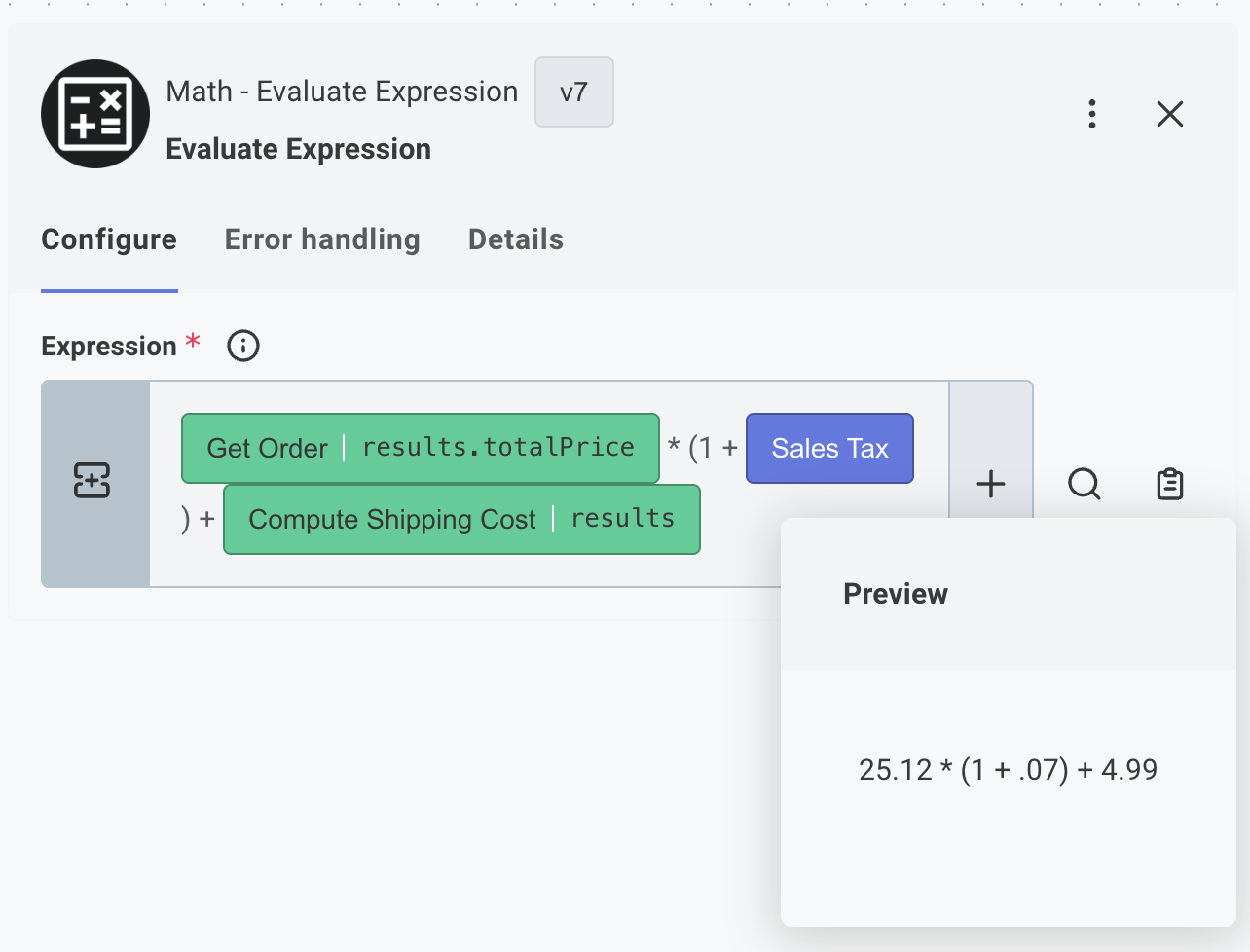
Additionally, you can use JavaScript bitwise operators to do things like 5 << 2 and get a result of 20.
Float-round
Returns the nearest single precision float representation of the input number. | key: fround
| Input | Notes | Example |
|---|---|---|
| Number | A number to provide to the math function |
Floor
Returns the largest integer less than or equal to the input number. | key: floor
| Input | Notes | Example |
|---|---|---|
| Number | A number to provide to the math function |
Hyperbolic Arccosine
Returns the hyperbolic arccosine of the input number. | key: acosh
| Input | Notes | Example |
|---|---|---|
| Number | A number to provide to the math function |
Hyperbolic Arcsine
Returns the hyperbolic arcsine of a number. | key: asinh
| Input | Notes | Example |
|---|---|---|
| Number | A number to provide to the math function |
Hyperbolic Arctangent
Returns the hyperbolic arctangent of the input number. | key: atanh
| Input | Notes | Example |
|---|---|---|
| Number | A number to provide to the math function |
Hyperbolic Cosine
Returns the hyperbolic cosine of the input number. | key: cosh
| Input | Notes | Example |
|---|---|---|
| Number | A number to provide to the math function |
Hyperbolic Sine
Returns the hyperbolic sine of the input number. | key: sinh
| Input | Notes | Example |
|---|---|---|
| Number | A number to provide to the math function |
Hyperbolic Tangent
Returns the hyperbolic tangent of the input number. | key: tanh
| Input | Notes | Example |
|---|---|---|
| Number | A number to provide to the math function |
Hypotenuse
Returns the square root of the sum of squares of an array of numbers. | key: hypot
| Input | Notes | Example |
|---|---|---|
| Numbers |
Logarithm
Returns the logarithm of a given input base of an input number. | key: log
| Input | Notes | Example |
|---|---|---|
| Exponent Base | 10 | |
| Number | A number to provide to the math function |
Maximum
Returns the largest of zero or more numbers. | key: max
| Input | Notes | Example |
|---|---|---|
| Dynamic Numbers | Use this input to provide numbers in JSON format, rather than using the default 'Numbers' input. Please note that using this input takes precedence over said input. | |
| Numbers |
Minimum
Returns the smallest of zero or more numbers. | key: min
| Input | Notes | Example |
|---|---|---|
| Dynamic Numbers | Use this input to provide numbers in JSON format, rather than using the default 'Numbers' input. Please note that using this input takes precedence over said input. | |
| Numbers |
Multiply Numbers
Returns the result of multiplying the numbers | key: multiply
| Input | Notes | Example |
|---|---|---|
| Numbers |
Natural Log
Returns the natural logarithm (log e; also, ln) of the input number. | key: naturalLog
| Input | Notes | Example |
|---|---|---|
| Number | A number to provide to the math function |
Power
Returns base x to the exponent power y (that is, x^y). | key: pow
| Input | Notes | Example |
|---|---|---|
| Base | A number to provide to the math function | |
| Exponent | A number to provide to the math function |
Random Integer
Returns a pseudo-random integer between min and max. | key: randomInt
| Input | Notes | Example |
|---|---|---|
| Max | A number to provide to the math function | |
| Min | A number to provide to the math function |
Random Number
Returns a pseudo-random number between min and max. | key: random
| Input | Notes | Example |
|---|---|---|
| Max | A number to provide to the math function | |
| Min | A number to provide to the math function |
Round
Returns the value of the input number rounded to the nearest integer. | key: round
| Input | Notes | Example |
|---|---|---|
| Number | A number to provide to the math function |
Sine
Returns the sine of the input number. | key: sin
| Input | Notes | Example |
|---|---|---|
| Number | A number to provide to the math function |
Square Root
Returns the positive square root of the input number. | key: sqrt
| Input | Notes | Example |
|---|---|---|
| Number | A number to provide to the math function |
Subtract Numbers
Returns the result of subtracting the numbers | key: subtract
| Input | Notes | Example |
|---|---|---|
| Numbers |
Tangent
Returns the tangent of the input number. | key: tan
| Input | Notes | Example |
|---|---|---|
| Number | A number to provide to the math function |
Truncate Number
Returns the integer portion of the input number, removing any fractional digits. | key: trunc
| Input | Notes | Example |
|---|---|---|
| Number | A number to provide to the math function |
Changelog
2026-03-31
Various modernizations and documentation updates
2025-07-07
Added remainder (modulus) action for mathematical calculations and data processing