Changelog

Prismatic Changelog

Stay up to date with the latest changes and improvements to our product.

14 posts tagged with "Workflow Builder"

The embedded workflow builder, including workflow templates, contexts, and the AI copilot.

View All Tags

Concurrent Editing Notifications

The Embedded Workflow Builder and low-code designer now warn you when someone else saves a newer version while you're editing. You'll see a banner with the option to reload to see the saved changes, overwrite the draft anyway, or copy the workflow. The same protection applies across multiple tabs and to Copilot.

Embedded Workflow Builder Copilot Improvements

The copilot in the embedded workflow builder has been re-architected from the ground up:

  • Faster builds: The copilot now handles many build actions at once instead of one at a time, so workflows come together with fewer round trips.
  • More reliable results. Purpose-built agents handle research, planning, building, and testing behind the scenes for more predictable behavior.
  • Context about your product. You can now give the copilot context about your product and API through the SDK, so your users get workflows built for your platform, not generic ones. Read about providing context to the copilot for details.

Nothing changes on your end. The upgrade applies automatically, the canvas stays the source of truth, and everything your users build today carries forward.

Large data syncs in the low-code designer and embedded workflow builder

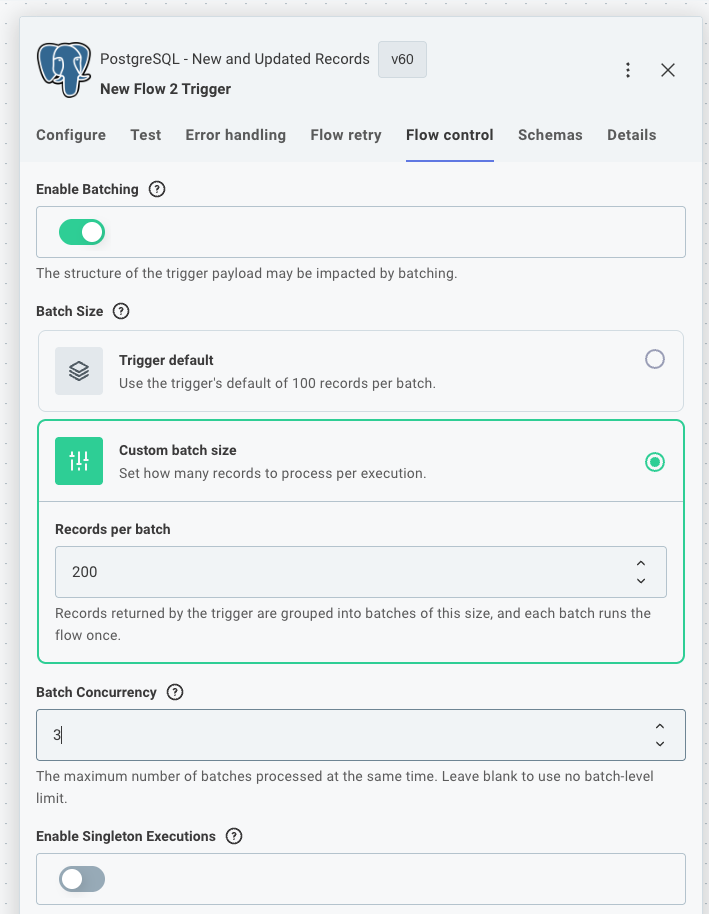
Enable batching in the flow control tab

Custom connector triggers can now split the records they fetch into batches, so a flow in the low-code designer or embedded workflow builder can sync large datasets without one long-running execution doing all the work. This brings the code-native batchFlowTrigger pattern to low-code flows and embedded workflows.

This is useful when polling for new records from a third-party API, or when efficiently backfilling existing records on instance deployment.

See large data syncs in custom triggers for usage and code examples.

We've updated polling triggers in our Salesforce, HubSpot, and PostgreSQL connectors to use this new pattern, with more to come!

Improved step outputs and references in EWB and low-code

When you reference a previous step in the Embedded Workflow Builder or low-code designer, you can now see the real data that step would return, without running a test of your whole workflow. The reference panel has also been redesigned so the payload data you reference most is front and center, with less common properties tucked out of the way.

Update your custom connectors to take advantage of new step output options - read more at Step Outputs.

Workflow Contexts for Embedded Workflow Builder

You can now define workflow contexts to give your customers a guided starting point when they create workflows in the embedded workflow builder.

A context pre-configures the trigger and its inputs and accepts runtime data from your application. For example, a "Create automation" button on a ticket page can create a workflow that is already wired to your "Ticket updated" trigger and scoped to that ticket's project - no blank-canvas decisions required.

Use the new prismatic.createWorkflow SDK method to create a workflow from a context, and prismatic.queryWorkflows to list workflows by context or external ID.

Additionally, you can dictate which components and actions are available to your customers when building workflows from a context, giving you more control over the experience and ensuring customers only use components that are relevant to the workflow they're building.

See Workflow contexts for setup instructions, SDK usage, and TypeScript typing support.
AI Copilot for Embedded Workflow Builder

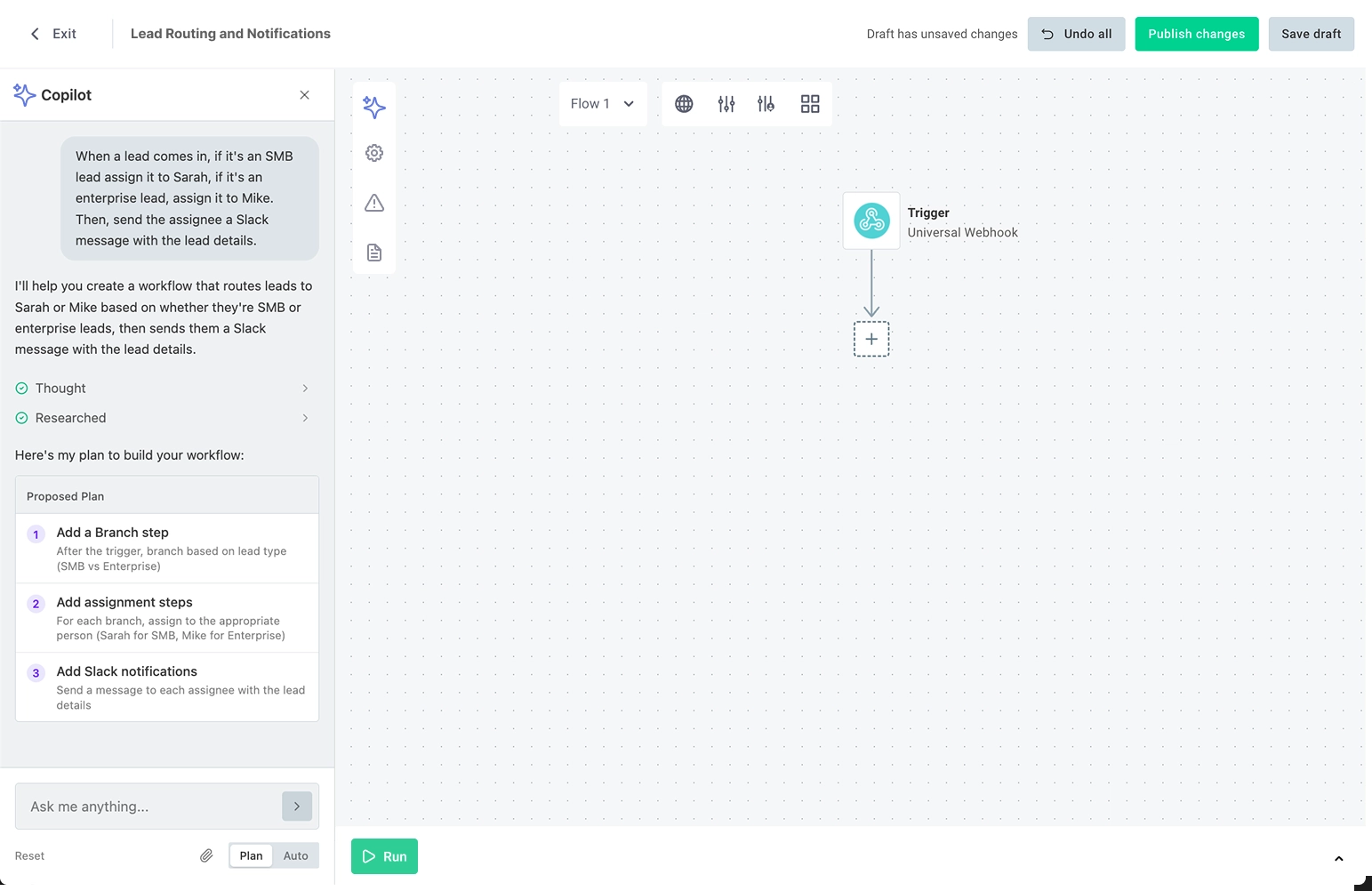
You can now enable an AI copilot in the embedded workflow builder to assist your customers as they build their own workflows. The copilot can configure connections, triggers, actions, branches, loops and more based on natural language instructions from your customers.

See our announcement blog post.

The copilot feature is in "Early Access" and will be generally available soon. If you'd like early access to the copilot, please reach out to your Prismatic account manager.

New Feature - Support visibility for Workflows

Organizations can now see valuable insights into customer-built workflows through the Prismatic admin

Highlights:

  • See the number of customer-built workflows separately from organization-built integrations
  • View and filter Instances pages, logs, and execution history by their instance type (integration or workflow)
  • Gain insights on workflow creation and enablement separately from integration instances on customer utilization pages

New Feature - Workflow Templates for Embedded Workflow Builder

You can now create Workflow Templates for Embedded Workflow Builder and publish them to your organization's workflow template library.

Highlights:

  • New Workflow Templates option available under the Build section of the Prismatic sidebar
  • Create and edit templates directly in the Workflow Builder low-code canvas
  • Save drafts separately from published templates