Changelog

Prismatic Changelog

Stay up to date with the latest changes and improvements to our product.

19 posts tagged with "Custom Connectors"

Building your own connectors - triggers, data sources, input types, step outputs, and the component development toolchain.

View All Tags

Large data syncs in the low-code designer and embedded workflow builder

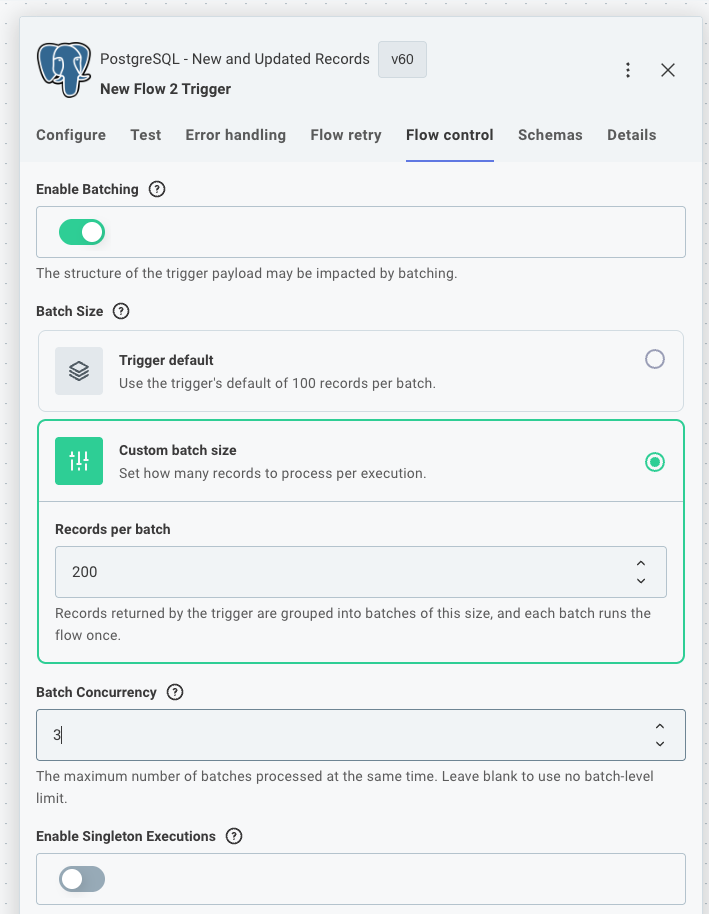
Enable batching in the flow control tab

Custom connector triggers can now split the records they fetch into batches, so a flow in the low-code designer or embedded workflow builder can sync large datasets without one long-running execution doing all the work. This brings the code-native batchFlowTrigger pattern to low-code flows and embedded workflows.

This is useful when polling for new records from a third-party API, or when efficiently backfilling existing records on instance deployment.

See large data syncs in custom triggers for usage and code examples.

We've updated polling triggers in our Salesforce, HubSpot, and PostgreSQL connectors to use this new pattern, with more to come!

Improved step outputs and references in EWB and low-code

When you reference a previous step in the Embedded Workflow Builder or low-code designer, you can now see the real data that step would return, without running a test of your whole workflow. The reference panel has also been redesigned so the payload data you reference most is front and center, with less common properties tucked out of the way.

Update your custom connectors to take advantage of new step output options - read more at Step Outputs.

New default toolchain for components and code-native integrations

prism components:init and prism integrations:init now scaffold new projects with a new, modern toolchain for building, testing, linting, and formatting your code.

If you run into issues with the modern toolchain, you can scaffold with the previous toolchain by passing --toolchain legacy - and please contact support so we can address it.

This change ships in a new major version of the prism CLI.

Want to update an existing code-native integration or custom connector to use our new recommended toolchain? See the Spectral 10.22 Upgrade Guide for instructions.

Structured and dynamic object inputs for custom connectors

Custom connector actions now support two new input types that let you represent complex data directly on the canvas - no code step required.

Structured object inputs group related sub-inputs into a single named object. For example, a "Mailing Address" input can expose individual street, city, state, and zip fields rather than forcing builders to construct the object manually. In your action's perform function, the value is a plain object accessible by field name (e.g. inputs.address.city).

Dynamic object inputs show a different set of sub-inputs depending on which record type or configuration the builder selects. For example, a "Create Record" action can present Account, Lead, or Contact input fields based on the builder's choice, with inputs.record.configuration identifying the selection and inputs.record.values holding the corresponding field values.

See structured object inputs and dynamic object inputs for usage and code examples.

Open Source Public Components

The source for Prismatic-built components is now on GitHub. When one of our components is close but not quite what your customers need, you no longer have to rebuild from scratch. Fork it, add the behavior you want, and publish it as your own private component. You can also use our components as a reference for building net-new ones, or just read the source to see exactly how something works.

Check it out in GitHub.

Webhook Lifecycle Handlers and Listening Mode

Two new instance lifecycle events are now available for custom connector triggers: webhookLifecycleHandlers.create and webhookLifecycleHandlers.delete. These functions run when an instance is deployed or disabled, and also when you enter or exit listening mode.

Listening mode is a new feature in the integration designer and embedded workflow builder that allows you to quickly test webhook triggers without deploying an instance. When you or your customers enter listening mode, the webhookLifecycleHandlers.create function is executed to create a temporary webhook in the third-party application that points to your integration designer's test instance. When you exit listening mode, the webhookLifecycleHandlers.delete function is executed to remove the temporary webhook. While in listening mode, you can see incoming webhook requests in real-time and save webhook payloads to use as test data for your trigger.

Templated connection inputs

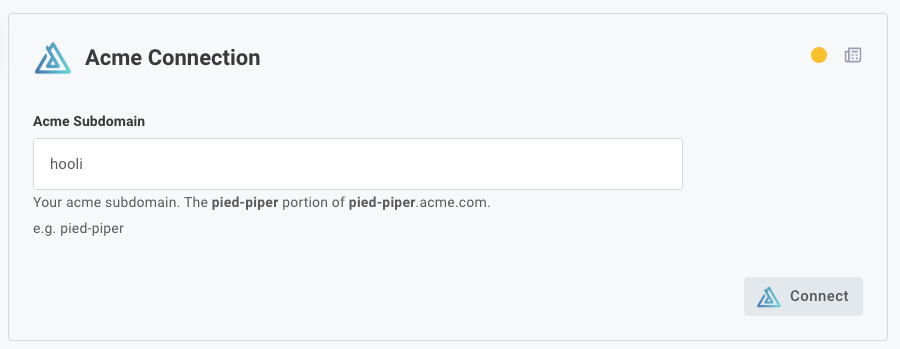
If your users need to enter the same information in several connection input fields - for example, if they need to enter their third-party custom domain in an OAuth authorization URL input, and token input, and API base URL input - templated connection inputs can help.

Our custom connector SDK has been updated so you can now prompt your customer to enter a single value, and other inputs for that connection can be generated automatically using that value.

Screenshot of templating connection inputs

Additionally, comments you provide for inputs on your connections now support markdown, so you can bold or otherwise highlight important instructions for your customers.

The built-in Shopify connector has been updated to use this new templated connection input logic, as Shopify issues unique OAuth 2.0 endpoints for each Shopify store.

Polling Triggers

Many apps offer webhooks which notify you when something changes in their system. Not all apps support webhooks, though.

When an app doesn't offer webhooks, you need to poll their API periodically for new data. Today, we're releasing Polling Triggers - triggers that poll for new records and start an execution if new data is available to process.

We've added polling triggers to our Dropbox and Google Drive components, with more on the way!

You can read more about polling triggers here, or write your own.

New Trigger Events

Custom triggers can now handle the following events:

  • onInstanceDeploy - when an instance is deployed, all triggers with an onInstanceDeploy function will execute that function. These functions are handy for setting up webhooks in third-party apps, or for updating your own API to let your team know that a customer has deployed an instance.
  • onInstanceDelete - when an instance is deleted, all triggers with an onInstanceDelete function will execute that function. These functions are handy for cleaning up configuration in third-party apps, or for updating your own API to let your team know that a customer has deleted an instance.

Read more about these new events in our docs.