Changelog

Prismatic Changelog

Stay up to date with the latest changes and improvements to our product.

14 posts tagged with "Connections"

Connections and authentication - OAuth, connection templates, user-level config, and reusable connections.

View All Tags

Reusable User Connections

You can now create reusable connections that are scoped to individual users, so your customers' users can connect their own accounts to third-party apps and services without needing to share credentials.

This brings together two existing concepts: User-Level Config and reusable Connections. User-level connections can now be defined outside of the scope of an integration.

Read more about user connections and how to use them in your code-native and low-code integrations.

Connection management has been streamlined

New connections experience in the Components section

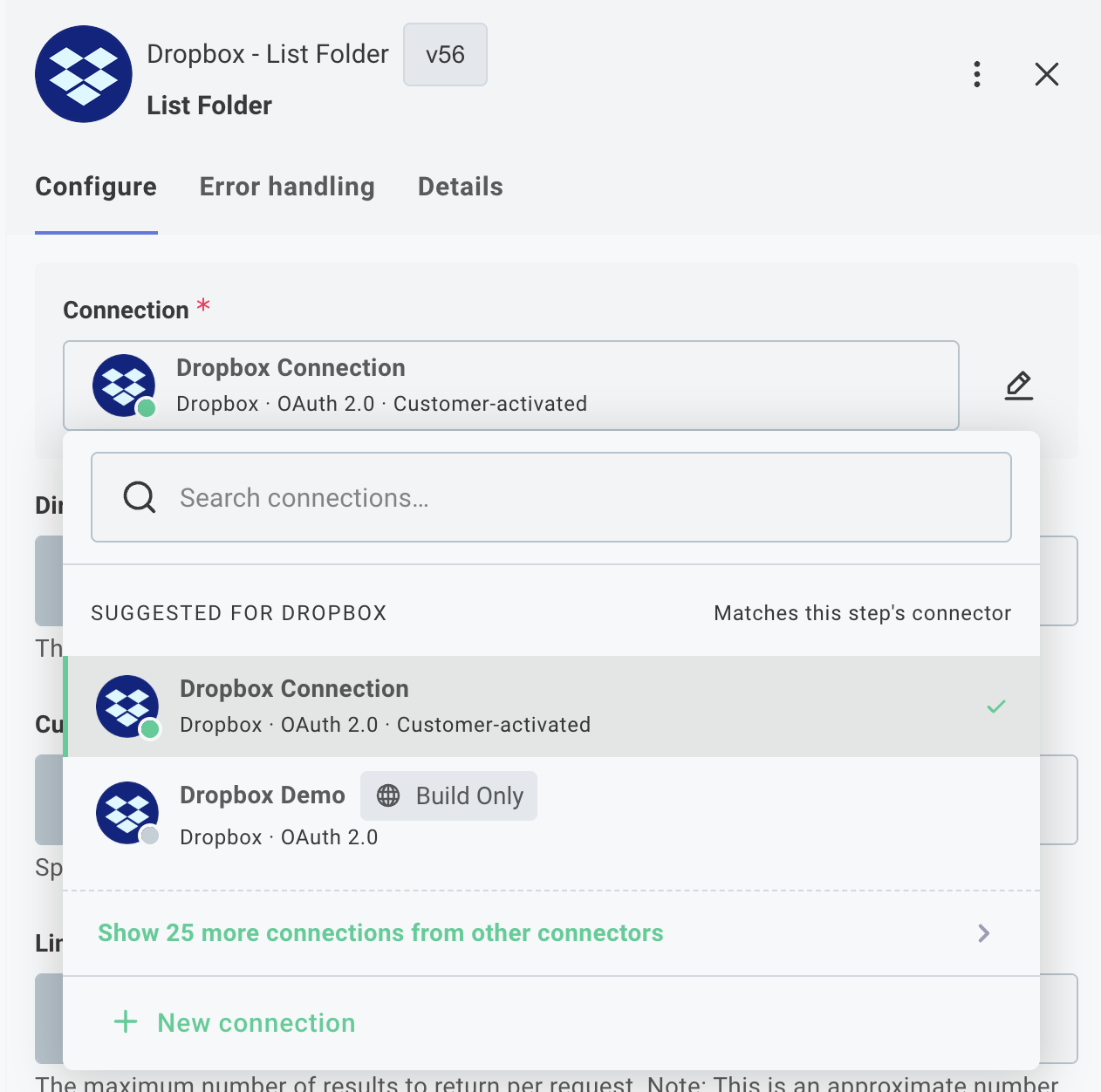
We've refreshed how connections are set up and managed to make reusable connections a first-class part of building an integration.

A few things to know about the new experience:

  • Reusable connections are now created and managed from the Components section. Search for a component, open its Connections tab, and click + Add Connection.
  • You can also create reusable connections directly from the canvas - when picking a trigger, adding a step, or from a step's connection input field.
  • A pencil icon next to a step's connection lets you edit it without leaving the canvas.

Existing connections, integrations, and instances continue to work without changes.

Embedded Connections Management Screen

You can now embed a dedicated connections management screen in your application using the new prismatic.showConnections() function. This screen provides your customers with a centralized location to view and manage all of their reusable customer connections for both marketplace integrations and custom workflows.

What's new:

  • Unified connections view: Display all reusable connections in one place with the prismatic.showConnections() function
  • Connection details: Customers can click on any connection to view which instances and workflows use it
  • Full management capabilities: Edit or delete connections directly from the embedded screen
  • Seamless experience: Consistent connection management whether customers are working with marketplace integrations or custom workflows

Benefits:

  • Simplified connection management for customers who use the same credentials across multiple integrations
  • Better visibility into where connections are being used
  • Reduced need for custom connection management UI in your application

This feature requires @prismatic-io/embedded version 4.2.0 or later. See the embedding the connections screen documentation for implementation details.

Reusable Customer Connections

Customer connections are now easier to use. Your customers can now save their credentials once and reuse them across multiple marketplace integrations and custom workflows, eliminating the need to re-enter credentials they've already provided.

What's new:

  • Save and reuse credentials: When customers configure a marketplace integration or build a workflow, they can save their connection credentials and select from existing saved connections in future configurations
  • Cross-environment reusability: Connections created in the embedded workflow builder can be reused in marketplace integrations, and vice versa
  • Unified experience: Customers see a consistent connection management experience whether they're configuring an integration or building a custom workflow
  • Test credential support: Organizations can configure test credentials to preview the end-customer experience during development

Benefits:

  • Faster integration activation for customers who use the same third-party services across multiple integrations
  • Reduced friction in the configuration experience
  • Better alignment between marketplace and embedded workflow builder experiences

To enable this feature for your integrations, assign a customer connection to your marketplace integration and ensure you're using @prismatic-io/embedded version 4.2.0 or later.

Templated connection inputs

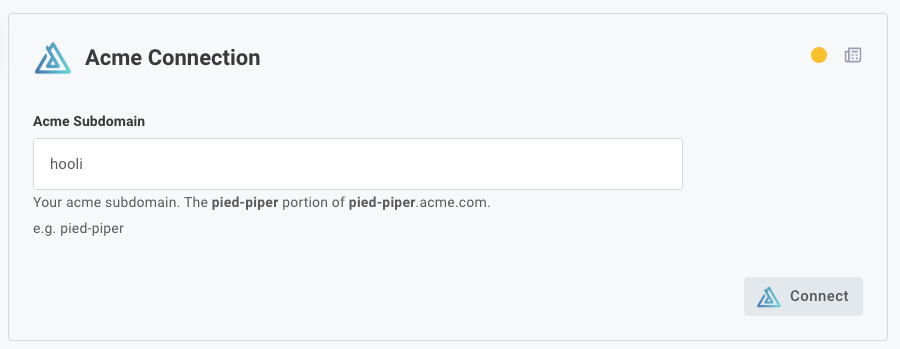
If your users need to enter the same information in several connection input fields - for example, if they need to enter their third-party custom domain in an OAuth authorization URL input, and token input, and API base URL input - templated connection inputs can help.

Our custom connector SDK has been updated so you can now prompt your customer to enter a single value, and other inputs for that connection can be generated automatically using that value.

Screenshot of templating connection inputs

Additionally, comments you provide for inputs on your connections now support markdown, so you can bold or otherwise highlight important instructions for your customers.

The built-in Shopify connector has been updated to use this new templated connection input logic, as Shopify issues unique OAuth 2.0 endpoints for each Shopify store.

Introducing Additional Connection Types

We've enhanced our connection capabilities to give you better control over authentication across your integrations.

What's new:

  • Updated: Organization (customer) connections capabilities have been expanded to include support for connections that use OAuth 2.0 Client Credentials. This improves your organization's ability to establish a connection on behalf of your customers.
  • New Organization (global) connections allows your organization to configure and establish a central live connection that's invisible to customers at deploy time and works across multiple instances.
  • New Customer connections creates a centralized system for managing connections that customers enable themselves.
  • Updated General UI/UX improvements. Head to the Connections tab in your organization's settings to set up a new integration-agnostic connection, and manage your connections and test credentials from there.

These enhancements enable you to deliver a frictionless, customer-friendly authentication experience tailored to your integration needs, while also making connections easier to manage and reuse across multiple integrations.

Organization (Customer) Connections

If you rely on connections that are customer-specific, and the same connection is used in multiple integrations, organization (customer) connections can help. Organization (customer) connections let you define a connection once for a customer, and then use that connection in multiple instances that are deployed for that customer.

This is especially handy when interacting with your own app in integrations. Each of your customers likely has a unique API key for your API. You can set an API key for each of your customers once, and when an instance is deployed to a customer, that instance will use that customer's API key that you set.

Write-Only Connection Inputs

In some situations, it can be helpful to make a connection input write-only (e.g. a user can enter an API key, password, etc, but cannot retrieve it later). You can now mark any connection input as write-only.

Read more about write-only connection inputs in our docs.

On-Prem Agent

The on-prem agent allows you to connect your integrations to resources that are on private networks or behind firewalls. This is handy if you want to integrate with a database, file system, or other resource that is not accessible from the public internet.

Read more about how the on-prem agent works in docs.