Changelog

Prismatic Changelog

Stay up to date with the latest changes and improvements to our product.

10 posts tagged with "Code-Native"

Code-native integrations, the TypeScript SDK, and building integrations with a dev-first approach.

View All Tags

New Executions Experience

Executions are now split into two dedicated views to make troubleshooting faster:

  • List view: Filter executions by trigger payload data with AND/OR conditions, select custom date ranges within the 14-day retention window, and replay failed executions in bulk.
  • Detail view: See a plain-language error message, a step-by-step timeline, and step logs, outputs, and the trigger payload in one place.

Log search now covers the full 14-day retention window (previously 48 hours), and the default search window is now 24 hours.

Additionally, the step logs and step result experience you love from the low-code designer is now available in code-native. Code-native integrations can use logger.section() to split onExecution logic into named sections, each with its own status, timing, and logs in the detail view. Execution sections require the latest version of @prismatic-io/spectral. Read more in the Code-Native Logging and Sections documentation.

New default toolchain for components and code-native integrations

prism components:init and prism integrations:init now scaffold new projects with a new, modern toolchain for building, testing, linting, and formatting your code.

If you run into issues with the modern toolchain, you can scaffold with the previous toolchain by passing --toolchain legacy - and please contact support so we can address it.

This change ships in a new major version of the prism CLI.

Want to update an existing code-native integration or custom connector to use our new recommended toolchain? See the Spectral 10.22 Upgrade Guide for instructions.

Large data sync with batchFlowTrigger

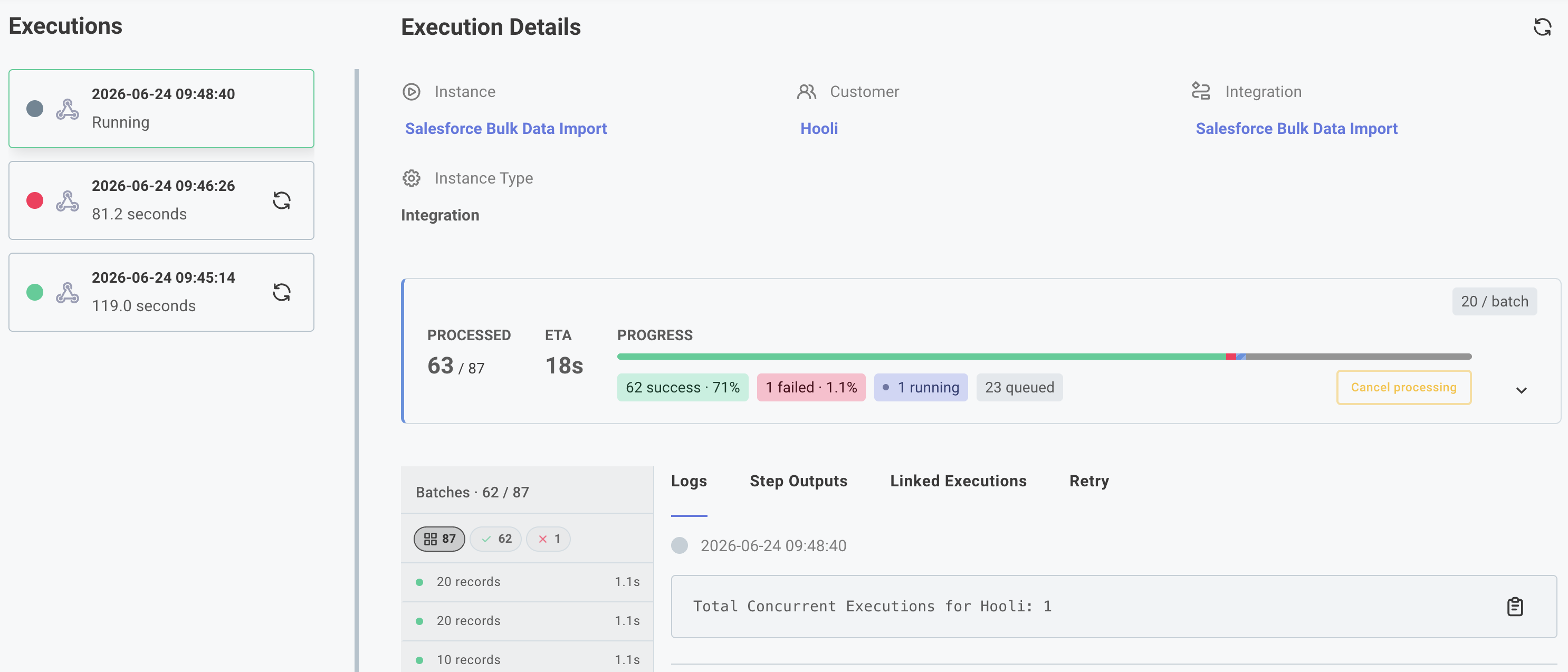
Code-native integrations can now use batchFlowTrigger to backfill large datasets on deploy and process real-time events through the same execution path - no manual recursion required.

Define an onDeploy function to page through your source API on instance deployment, returning a paginationState cursor so each invocation picks up where the last one left off. Define an onTrigger function to handle incoming webhooks after the initial sync completes. Both funnel records into a single onExecution function, and batchConfig controls how many records arrive per call and how many batches run concurrently.

Large data sync execution results

See Large Data Sync for usage and examples and here for a video walkthrough.

In-app Low-Code to Code-Native Converter

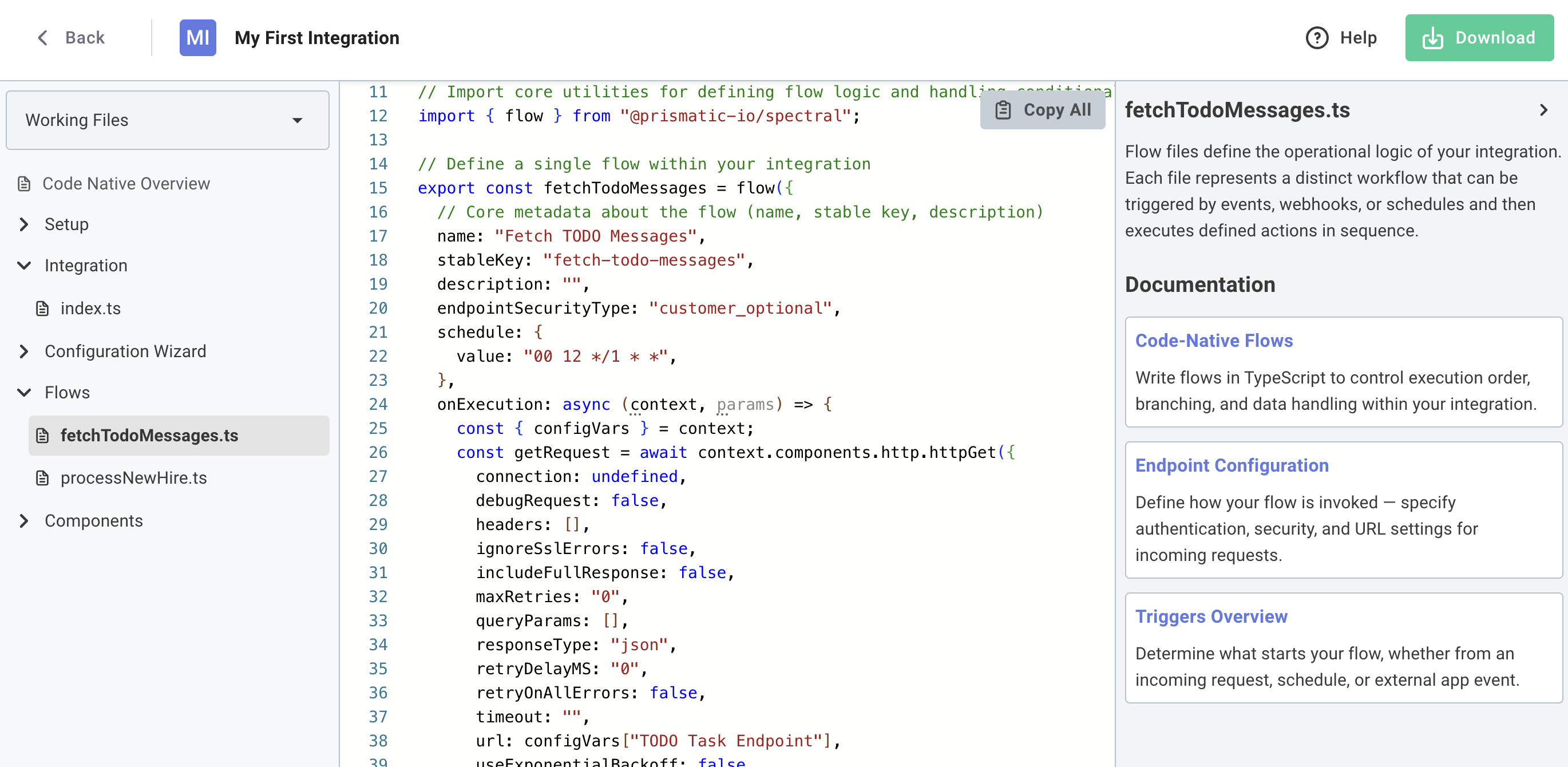
You can now convert low-code integrations to code-native directly within the Prismatic UI. This allows you to prototype a new integration quickly using the low-code designer, and then switch to code-native when you need more flexibility or control.

To get started, open any low-code integration and click Convert to Code. You'll get a preview of the generated code, and can choose to download a zip file containing the code-native TypeScript project.

Screenshot of low-code to code-native converter in app

Code-Native Development Updates

Today we're releasing updates that significantly improve the code-native development experience on Prismatic. Build, test, and deploy integrations entirely in code with AI assistance, streamlined component management, and enhanced TypeScript support.

Prism MCP Server

  • Enable AI coding assistants (Claude, Cursor) to understand Prismatic's SDK and generate integration flows, components, and test configurations using natural language

VS Code Extension

  • Run test executions with detailed logs, pull existing integrations from your Prismatic instance, configure instances through embedded config wizard, and manage authentication - all without leaving your IDE

Improved Component Manifest Generation

  • Generate component manifests with a single command npx cni-component-manifest <component-name> and use components without installing npm packages

Enhanced Component Referencing

  • Full TypeScript support with real-time validation for defining connections, data sources, and triggers in configuration wizards

Check out the code-native development updates blog post for additional info and quick start demo videos.

Low-code / code-native converter and testing code-native from the CLI

Two significant improvements to code-native integrations are now out of beta:

  1. You can now convert a low-code integration to code-native. This is ideal if you've built a proof-of-concept in the low-code designer, but would like the flexibility to build the rest of the integration in pure TypeScript. Learn how to convert low-code integrations to code-native.
  2. As a developer, you probably want to remain in your IDE as you build and test your integration. With the prism integrations:flows:test command, you can now invoke a test of your code-native integration's flow from your terminal. Learn about testing code-native integrations from the CLI.

Code-Native Integrations - Reference components

You can now reference triggers, connections, and data sources of existing components when building code-native integrations. Both public and private components can be used in your code-native integrations. By leveraging an existing component, you can save time and effort by reusing existing functionality.

To reference existing components you will need to upgrade to Prism 6.0.0 and Spectral 8.1.0. Prism 6.0.0 requires Node 18 or higher. For those of you that have already started building code-native integrations, note that type definitions now use strings rather than enums to minimize the number of imports required.

Check out the code-native documentation and the video below to learn more.

Code-Native Integrations

We've introduced a new option for building integrations called code-native! This is the perfect building experience for integration builders who prefer to write code rather than use a low-code designer.

Code-native highlights:

  • Build integrations completely within your IDE rather than in the low-code designer.
  • Define triggers, connections, integration logic, and the customer-facing configuration experience all in code.
  • Define integration logic however you see fit rather than leveraging predefined logic steps.
  • More easily incorporate integrations into your existing CI/CD process and code repositories.

Check out this blog post as well as the video below for more information about the benefits of code-native integrations. Our code-native documentation is an excellent place to start when you're ready to start building your first code-native integration.