Changelog

Prismatic Changelog

Stay up to date with the latest changes and improvements to our product.

New Components - April 2025

We are pleased to announce the following components have been recently added to the Prismatic library:

  • Goto Webinar - Goto Webinar is a platform for hosting, managing, and attending live or pre-recorded webinars. This component allows you to schedule, manage, and subscribe to webinars, registrants, attendees, and more.
  • Oracle Database - Oracle Database is a popular relational database system. This component allows you to query an Oracle database.

Templated connection inputs

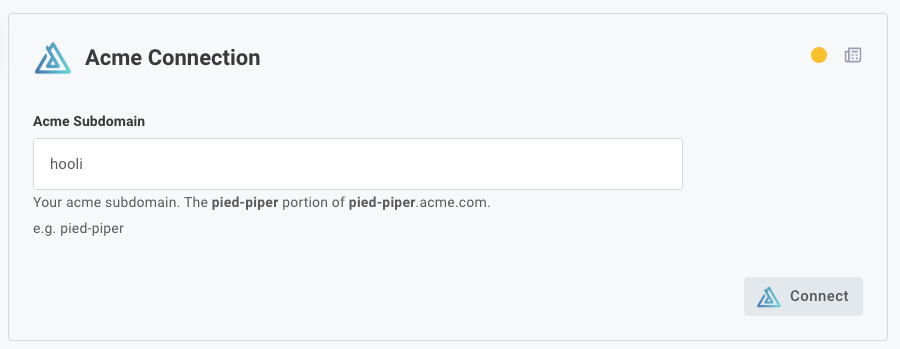
If your users need to enter the same information in several connection input fields - for example, if they need to enter their third-party custom domain in an OAuth authorization URL input, and token input, and API base URL input - templated connection inputs can help.

Our custom connector SDK has been updated so you can now prompt your customer to enter a single value, and other inputs for that connection can be generated automatically using that value.

Screenshot of templating connection inputs

Additionally, comments you provide for inputs on your connections now support markdown, so you can bold or otherwise highlight important instructions for your customers.

The built-in Shopify connector has been updated to use this new templated connection input logic, as Shopify issues unique OAuth 2.0 endpoints for each Shopify store.

Resetting JSON Forms on Input Change

You can now configure your JSON Forms config variables to reset data to defaults if inputs to the config variable change. This is useful if your JSON Form generates default data that is derived from other config variables on previous pages, and the defaults should change if the user selects different values on previous config pages. Learn about resetting JSON Forms data when inputs change.

Recursive Flow Trigger

Flows can run for up to 15 minutes. But, sometimes you have more than 15 minutes of work to do. Maybe you have 100,000 records to import when an instance is deployed, and you know that it'll take you 4 hours to process them.

The Recursive Flow component helps you chain a series of executions together, so you can process a set of data for more than 15 minutes. See the Processing Data with Recursive Flows article for examples of how you can process large sets of data across several executions.

New Component - March 2025

We are pleased to announce the following component has been recently added to the Prismatic library:

  • WhatsApp - WhatsApp is a messaging app that allows users to send texts, make voice and video calls, and share media.

Debug mode

You can now enable debug mode in the integration designer or for a specific instance, which gives you more insight into time and memory metrics of your running flow.

When debug is enabled, a log line is emitted after each step that details how long the step took and how much memory was consumed.

Additionally, a debug object has been added to the context parameter so that you can optionally emit debug lines, measure how long certain tasks take within a code block or custom action, or measure how much memory is consumed by portions of your custom code when debug mode is enabled.

Learn more about debug mode.

Prismatic's public components will start transitioning to using debug mode rather than action-specific debug toggles.

Introducing Additional Connection Types

We've enhanced our connection capabilities to give you better control over authentication across your integrations.

What's new:

  • Updated: Organization (customer) connections capabilities have been expanded to include support for connections that use OAuth 2.0 Client Credentials. This improves your organization's ability to establish a connection on behalf of your customers.
  • New Organization (global) connections allows your organization to configure and establish a central live connection that's invisible to customers at deploy time and works across multiple instances.
  • New Customer connections creates a centralized system for managing connections that customers enable themselves.
  • Updated General UI/UX improvements. Head to the Connections tab in your organization's settings to set up a new integration-agnostic connection, and manage your connections and test credentials from there.

These enhancements enable you to deliver a frictionless, customer-friendly authentication experience tailored to your integration needs, while also making connections easier to manage and reuse across multiple integrations.

Hiding the initial config wizard page

You can now opt-in to remove the first page of the config wizard, creating a smoother activation process for your customers.

Opt-in by upgrading the embedded SDK to version 2.12.0 and setting the configurationWizard.mode to "streamlined". Read docs for more details.

This is completely optional and won't affect your existing implementations.

Product update: Native cross-flow calling

We've simplified how flows work together in Prismatic. Now you can directly reference and call other flows within the same integration with a simple cross-flow component. This makes it more intuitive to build integrations that need to coordinate between multiple flows.

Add a cross-flow trigger to an integration

Key improvements:

🖥️ Directly call other flows through a simple interface

🔃 Clear visibility of flow relationships in both testing and execution

⏱️ Real-time monitoring of called flow status

Perfect for breaking down complex processes into manageable pieces or creating reusable logic across your integrations.

Want to get started? Check out our docs.

New Components - December 2024

We are pleased to announce the following components have been recently added to the Prismatic library:

  • Active Directory - Active Directory for LDAP (Lightweight Directory Access Protocol) is a protocol for accessing and managing directory information. This component provides tools for operations such as authentication, querying, and managing directory entries.
  • TeamViewer - TeamViewer is support software that allows users to connect and control devices remotely for troubleshooting, collaboration, and management purposes.