Changelog

Prismatic Changelog

Stay up to date with the latest changes and improvements to our product.

New Components - March 2026

We are pleased to announce the following components have been recently added to the Prismatic library:

  • Datadog - Datadog is a monitoring and analytics platform for cloud-scale applications. Use the component to manage monitors, events, metrics, dashboards, and incidents.
  • Salesforce Marketing Cloud - Salesforce Marketing Cloud is a digital marketing platform for managing customer journeys across email, mobile, social, and advertising channels. Use the component to manage contacts, campaigns, data extensions, and automations.
  • SurveyMonkey - SurveyMonkey is a leading online survey platform that enables organizations to create surveys, collect responses, and analyze feedback at scale. Use the component to manage surveys, collectors, responses, contacts, and webhooks.
  • UKG Pro - UKG Pro is a human capital management (HCM) platform. Use the component to manage employees, organizational structures, payroll data, and talent onboarding processes.

AI Copilot for Embedded Workflow Builder

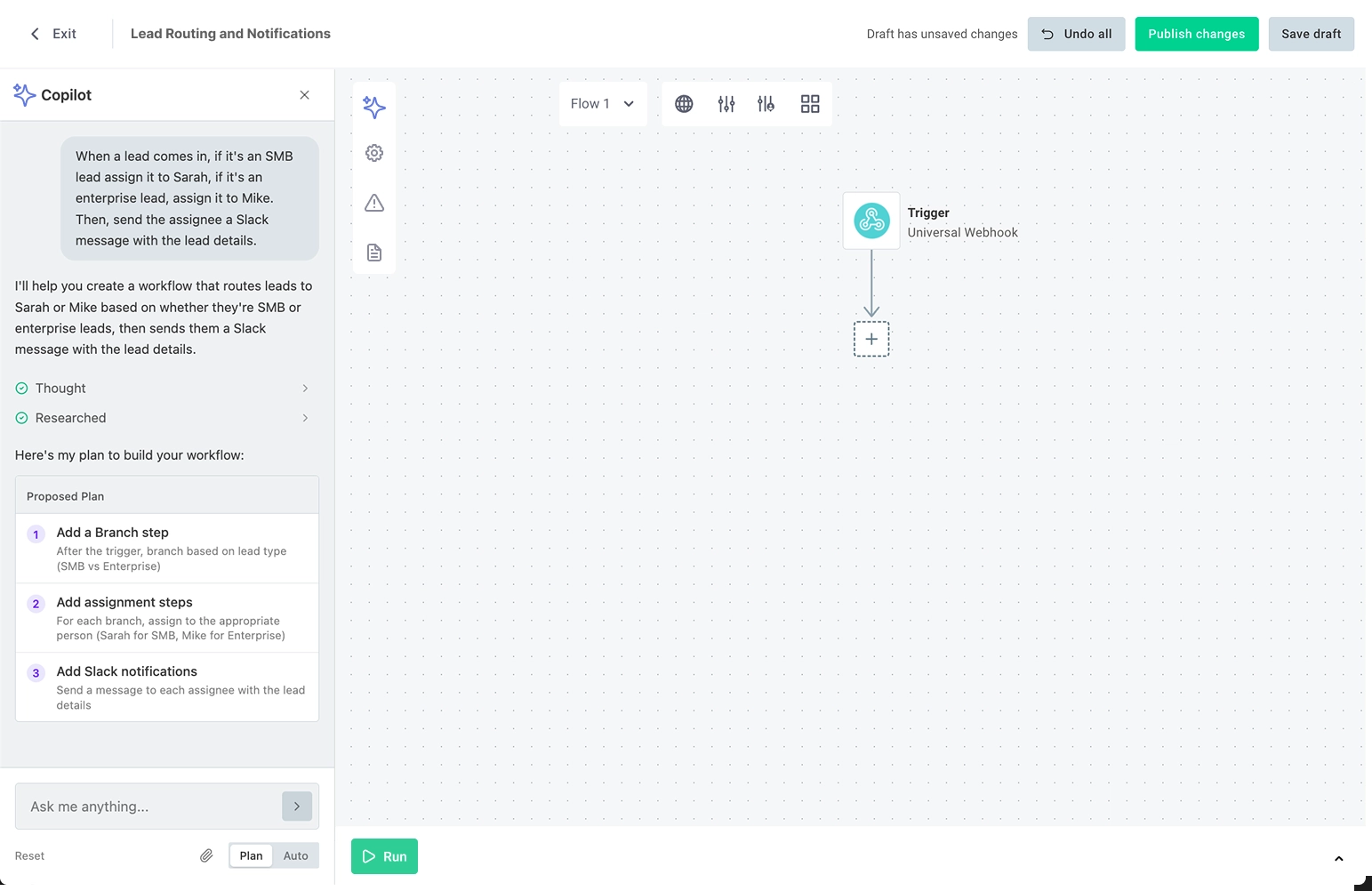
You can now enable an AI copilot in the embedded workflow builder to assist your customers as they build their own workflows. The copilot can configure connections, triggers, actions, branches, loops and more based on natural language instructions from your customers.

See our announcement blog post.

The copilot feature is in "Early Access" and will be generally available soon. If you'd like early access to the copilot, please reach out to your Prismatic account manager.

Per-customer execution concurrency controls

You can now set per-customer execution concurrency limits to prevent a single customer's high-volume integrations from consuming a disproportionate share of your organization's execution capacity.

When a customer reaches their limit, additional execution attempts return a 429 "too many requests" response.

You can configure limits from the Prismatic web app, via the GraphQL API, or via embedded JWT claims. You can also set up a Customer Concurrency Threshold Warning alert monitor to be notified when any customer approaches their limit.

This feature is available on Enterprise plans. See per-customer execution concurrency for more information.

Extended Flow Concurrency Controls

Flow concurrency settings in the integration designer

You can now control how many concurrent executions are allowed for individual flows within an integration. This allows you to prevent overwhelming third-party APIs with too many simultaneous requests, or to limit resource usage for particularly intensive flows.

Previously, you could configure a flow to allow only one execution at a time by enabling FIFO (first in, first out) processing. Now, you can set a specific maximum number of concurrent executions for each flow.

See Flow Concurrency for more information.

Instance Profiles

You can now create and assign instance profiles to customize resource allocations and execution constraints for specific integrations and instances. This allows you to increase memory limits for memory-intensive integrations, control step result and log retention, and enable quickstart to reduce cold start times for synchronous invocations.

New Integration Landing Page

We've redesigned the integration landing page to provide a one-stop shop for all information related to a specific integration. When you as an organization team member opens an integration, you'll see information about deployed instances, recent executions, marketplace configuration, and more.

Screenshot of new integration landing page

Multi-Tenant Switching

Screenshot of multi-tenant switching in Prismatic

You can now switch between Prismatic tenants without logging out.

If you have access to multiple tenants (Dev, Prod, Staging, etc.), you'll see a new Tenant Picker in the left-hand sidebar. It shows which environment you're working in and lets you switch between environments instantly. No more juggling browser sessions or credentials.

Also in this release:

  • Single identity across tenants - Use the same email and password for all your Prismatic environments. No more email aliases.
  • SSO works seamlessly - If you're using SSO, it now works seamlessly across multiple tenants in the same region without workarounds.

Webhook Lifecycle Handlers and Listening Mode

Two new instance lifecycle events are now available for custom connector triggers: webhookLifecycleHandlers.create and webhookLifecycleHandlers.delete. These functions run when an instance is deployed or disabled, and also when you enter or exit listening mode.

Listening mode is a new feature in the integration designer and embedded workflow builder that allows you to quickly test webhook triggers without deploying an instance. When you or your customers enter listening mode, the webhookLifecycleHandlers.create function is executed to create a temporary webhook in the third-party application that points to your integration designer's test instance. When you exit listening mode, the webhookLifecycleHandlers.delete function is executed to remove the temporary webhook. While in listening mode, you can see incoming webhook requests in real-time and save webhook payloads to use as test data for your trigger.