Changelog

Prismatic Changelog

Stay up to date with the latest changes and improvements to our product.

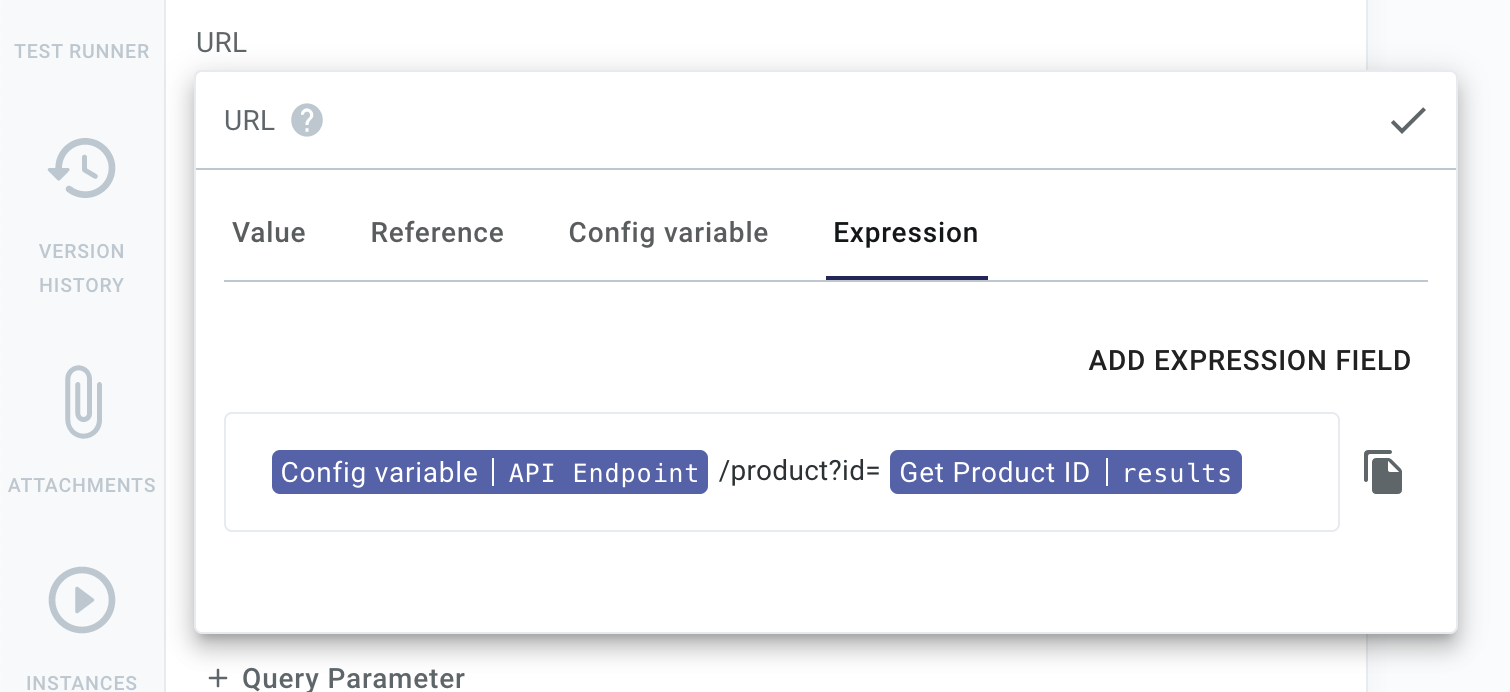
New Step Input: Expressions

You can now reference multiple config variables, step results, and static strings for step input using templated inputs. This lets you concatenate config variables, text, and step results together, without needing an additional step to do the concatenation. It's helpful for dynamically generating URLs, queries, messages, and more.

Expressions for step inputs in Prismatic app

Update: As of 2022-05-25, "Expression inputs" have been renamed "Template inputs"

New Components - October 2021

Our list of built-in components continues to grow. A full catalog is available here. This past month, we added:

  • AWS Glue - Perform data transformation through AWS Glue
  • AWS Lambda - Manage and invoke AWS Lambdas
  • CSV - Build and parse CSV files to and from JavaScript arrays
  • Firebase - Create, read, update, and delete documents in a Firebase Cloud Firestore database collection
  • Google Calendar - Manage calendars and events in Google Calendar
  • Hubspot - Manage objects and associations in the Hubspot CRM platform
  • Jira - Manage Jira issues, comments, projects and users
  • Mailchimp - Interact with email campaign lists and e-commerce resources
  • Microsoft Excel - Parse and build xlsx files (spreadsheets)
  • Microsoft Teams - Manage the teams, groups, channels, and messages associated with your Microsoft Teams account
  • Redis - Manage items in a Redis database

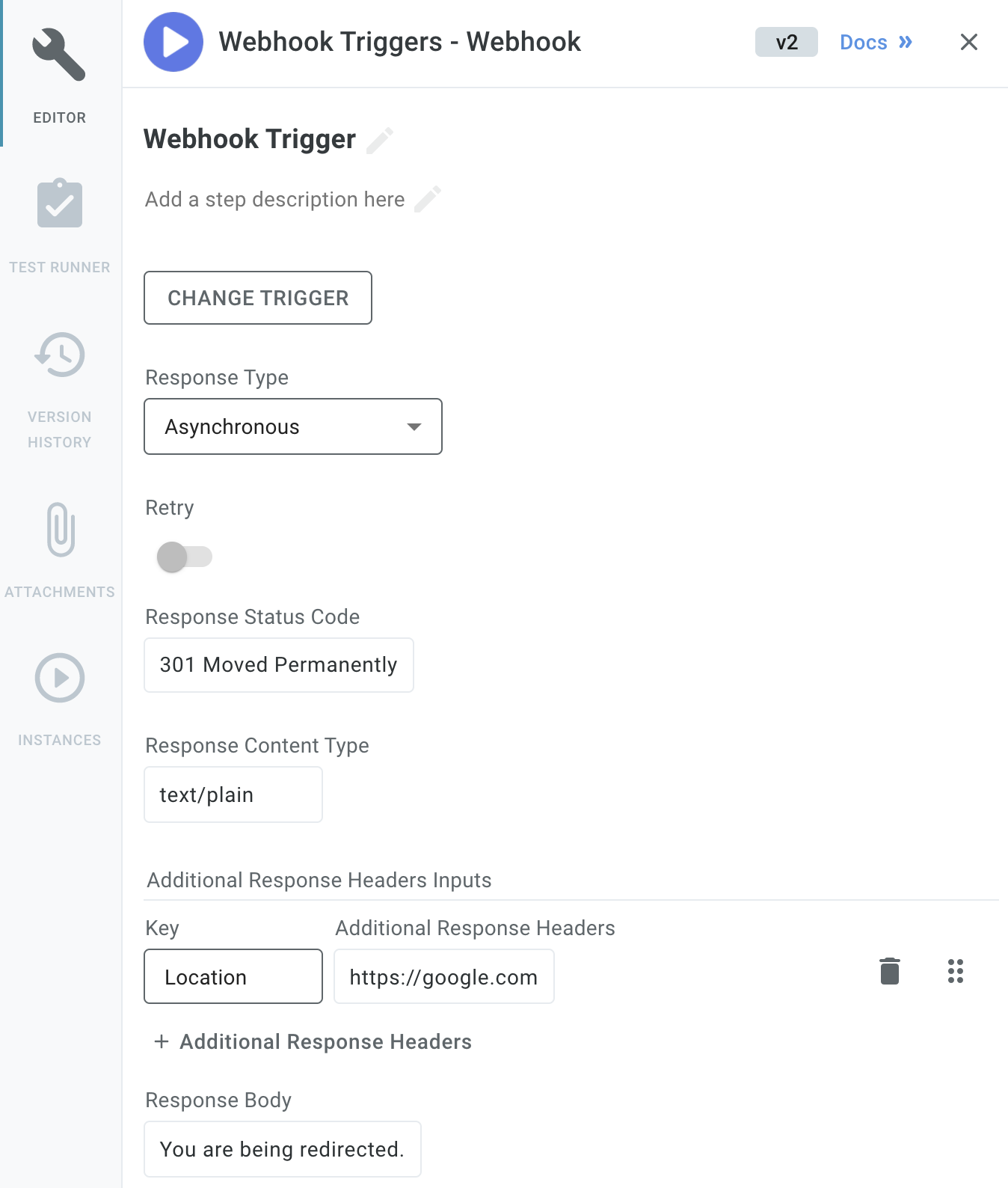
Configurable Webhook Triggers

Configure webhook trigger in Prismatic app

The general webhook trigger is now more configurable. You can now specify the HTTP code, headers, response type, and response body that the webhook trigger returns to a webhook caller. This helps you handle APIs that require custom responses, and allows you to redirect webhook callers as needed.

Write Your Own Triggers

The vast majority of integrations are triggered in one of two ways: they either run on a schedule (i.e "At 15 minutes past each hour") or they're invoked by an HTTP request to a webhook.

Not all apps and services that you integrate with are the same, though, and some require additional functionality or validation. For example, Salesforce outbound messages (webhooks) require a special XML-formatted acknowledgement (ACK) response to a webhook request, and Amazon's Simple Notification Service (SNS) requires that integrations send an HTTP POST request to AWS to confirm an SNS subscription.

With those considerations in mind, we've extended our custom component SDK to allow you to write your own triggers for your components. Your triggers can handle things like:

  • Replying to webhook requests with custom responses
  • Validating webhook headers and payload data
  • Transforming and processing XML, CSV, or proprietary data formats so the rest of your integration can easily reference data that comes in

If you've written your own actions, writing a trigger will feel very familiar. Check out our docs on writing triggers to get started.

Improved Embedded Marketplace Experience

We've significantly enhanced Prismatic's embedded marketplace experience, enabling you to provide your customers a seamless, native integration experience with minimal engineering effort.

You can now embed Prismatic's integration marketplace into your application with a few lines of code. You can choose to display the sleek marketplace UX directly within your application or as a popover, and apply custom theming to make your integration marketplace look native to your application.

The embedded marketplace showcases your integration offerings and allows customers to self-activate and configure the integrations they need. As previously, you can specify which integrations appear in your marketplace, which ones can be self-activated, and define each integration's configuration screen.

Your customers do not need to juggle another set of credentials to access your embedded marketplace. Instead, you can sign JSON web tokens (JWTs) for your users, which can be used to automatically authenticate them for the marketplace.

Check out our docs to get started.

Configurable Webhook Endpoints

You now have more control over how webhook endpoints are configured for deployed instances. You already had the option to create a webhook endpoint for each flow of each deployed instance (Instance and Flow-Specific). You can now select two other configuration options:

  • Instance-Specific: Create a single webhook endpoint for each instance. Identify which of the instances' flows should run based on data in the webhook request.
  • Shared: Create a single webhook that is shared by all customers who have a particular integration. Route the webhook request to a flow in a specific customer's instance based on data in the webhook request.

Both of these additional configuration options allows you to route webhook requests to a particular customer and flow based on the data that comes in to the webhook. If the data that comes in needs additional processing, or if you need to look up a flow's name or customer's ID, you can assign one of your integration's flows to be a Preprocess Flow - a flow that's run when a webhook is invoked and aids in making sure the request gets to the right place.

For more information, check out our webhook docs.

Granular Permissions for Third Parties

You can now invite third-party vendors to log in to Prismatic with limited access to your integrations, custom components, and customers. This is helpful if you need to collaborate on a new integration with a third-party vendor. You can grant them view or edit access to a particular integration or set of custom components, which allows them to test the integration against their app or service. You can debug and iterate faster on integration and custom component development, and can have one central place to view logs and test runs. You can also view logs of each test a third-party vendor performs to give you a sense of how their side of the integration development is progressing.

Permissions are granular - third-party users only see what they've been given permissions to see. So, if you're integrating with two competing companies, or even with one of your competitors, they are not given insight into the other integrations, custom components, or customers you have in your Prismatic account.

Read more about the third-party user role in our docs.

Integration Categories and Icons

You can now assign a category and icon to each of your integrations. This helps your team manage and filter integrations and improves the way you present them to customers.

Assign integration to category in Prismatic app

Filter integrations by category in Prismatic app

Check out our docs on categorizing integrations and assigning an icon for more info.

Deploy-Time Triggers

You can now configure integration flows with triggers that are invoked when an instance is deployed to a customer. This is helpful if you have a set of "initialization" tasks that need to be completed once to set up a customer's instance.

A deploy-time flow could enable features in a third-party app, set up third-party users or permissions, create a directory structure in a file storage system, or even set up webhooks in a third-party application to point to the instance's other flows.

Check out our deploy trigger docs for more info.

Multi-Flow Integrations

Prismatic now provides full support for multi-flow integrations!

Integrations can now include multiple flows. (A flow is a trigger and a series of steps.) This enables you to provide your customers with a complex third-party integration that performs multiple related tasks, but is packaged and deployed as a single integration.

For example, you might integrate with an ERP that sends a variety of data via webhooks to your application (a webhook when inventory is updated, a webhook when customer info is updated, and so on). Rather than constructing integrations with complex branches or assembling multiple integrations, you can now create a single integration with flows that handle each type of webhook payload. You would create a flow to handle inventory updates, another flow to handle customer updates, and deploy all of those flows together as a single instance to a customer.

Each flow has its own trigger (so it gets its own webhook URL), and flows are tested and run independently of one another.

When customers or customer-facing teams deploy a multi-flow integration, they configure and deploy all of the flows at once using a single configuration screen.

Your existing integrations will continue to operate as expected. Please note:

  1. The Selected Test Run dropdown has been moved to the input reference selector. When configuring an input for a step, you can select which test run to preview outputs for within the Reference tab. Select test run in Prismatic app
  2. Prismatic's CLI, Prism, has been updated to version 3.0.0 to account for this change. To install the latest Prism, run:
    npm install --global @prismatic-io/prism
  3. The YAML that defines integrations has been updated.

Check out our building integrations page for more information.