MCP Endpoints
Prismatic offers a hosted MCP flow server that you can use to connect your AI agent to your agent flows. This article describes the available MCP endpoint scopes and URLs.
Global MCP endpoints
The global MCP endpoints give your AI agent access to all agent flows across all integrations. Below are the global endpoints for Prismatic's public regions. If your organization uses a private stack, contact support for your MCP endpoint.
| Region | MCP Endpoint |
|---|---|
| US Commercial (default) | mcp.prismatic.io/mcp |
| US GovCloud | mcp.us-gov-west-1.prismatic.io/mcp |
| Europe (Ireland) | mcp.eu-west-1.prismatic.io/mcp |
| Europe (London) | mcp.eu-west-2.prismatic.io/mcp |
| Canada (Central) | mcp.ca-central-1.prismatic.io/mcp |
| Australia (Sydney) | mcp.ap-southeast-2.prismatic.io/mcp |
| Africa (Cape Town) | mcp.af-south-1.prismatic.io/mcp |
| Private Stack | mcp.<your-prismatic-domain>/mcp |
Integration-scoped MCP endpoints
If you have a Salesforce integration among dozens of other integrations and want to connect only to its agent flows, open the MCP tab of your Salesforce integration and take note of the custom MCP endpoint.
It will look like https://mcp.prismatic.io/SW5...../mcp (depending on your region).
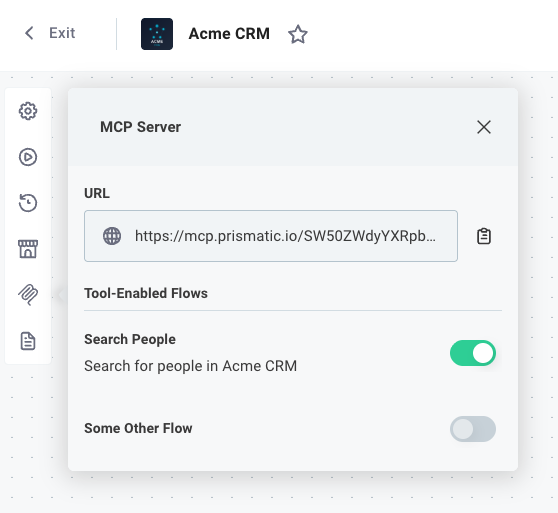
If your customers have instances of this integration deployed to them, they can also connect to the agent flows associated with their instance by using the same MCP endpoint.
Instance-scoped MCP endpoints
If a customer has multiple instances of the same integration deployed, each instance exposes agent flows with identical tool names. This causes a "duplicate tool name" error when querying the global or integration-scoped MCP URL, since LLMs require unique tool names.
To target a specific instance's agent flows, use the instance-scoped URL:
https://mcp.prismatic.io/instances/<instanceId>/mcp
This lets you connect to a single instance's agent flows when multiple instances of the same integration exist for a customer.