Data Enrichment with AI
This article provides practical examples and patterns for using AI to enrich data flowing through your integration. For new code-native integrations, use components installed from npm where available, or call a service SDK directly. Legacy TypeScript examples are linked from each scenario so you can refer to them when maintaining an existing integration.
CRM Lead Enrichment
Automatically research incoming leads and enrich them with company information, scoring, and insights before adding to your CRM. This example demonstrates researching a lead's company, analyzing fit criteria, and creating an enriched record in Salesforce.
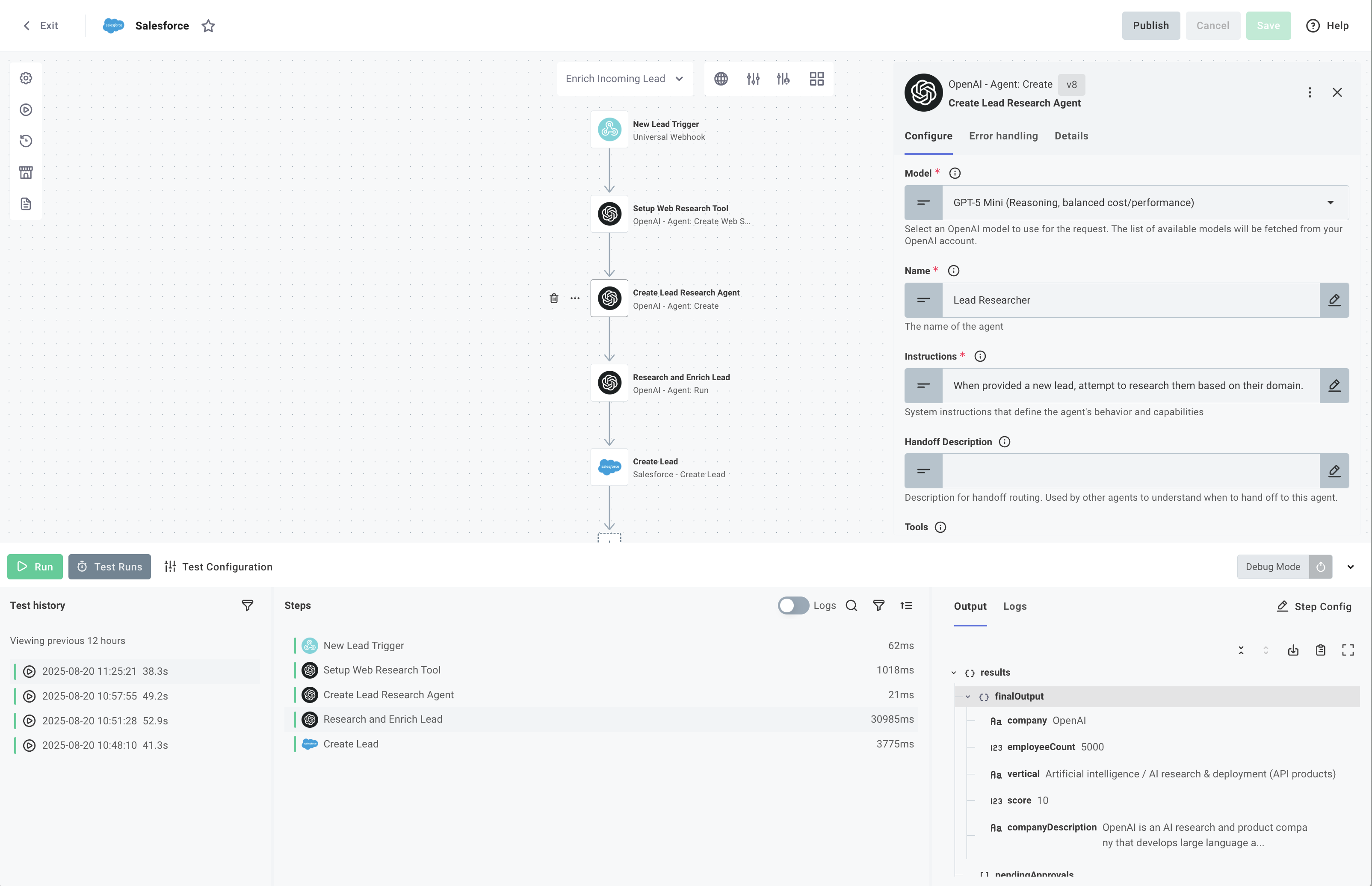
The legacy TypeScript example is available in the compatibility reference.
AI Routing and Classification
Use AI to analyze incoming data and make intelligent decisions. The AI evaluates content against defined criteria, classifies it, and produces a structured output to enable branching and intelligent routing.
Duplicate Record Detection
Prevent duplicate records by using AI to analyze and compare incoming data against existing records. This example queries for potential matches and uses AI classification to determine if an account already exists, with confidence thresholds to ensure accuracy.
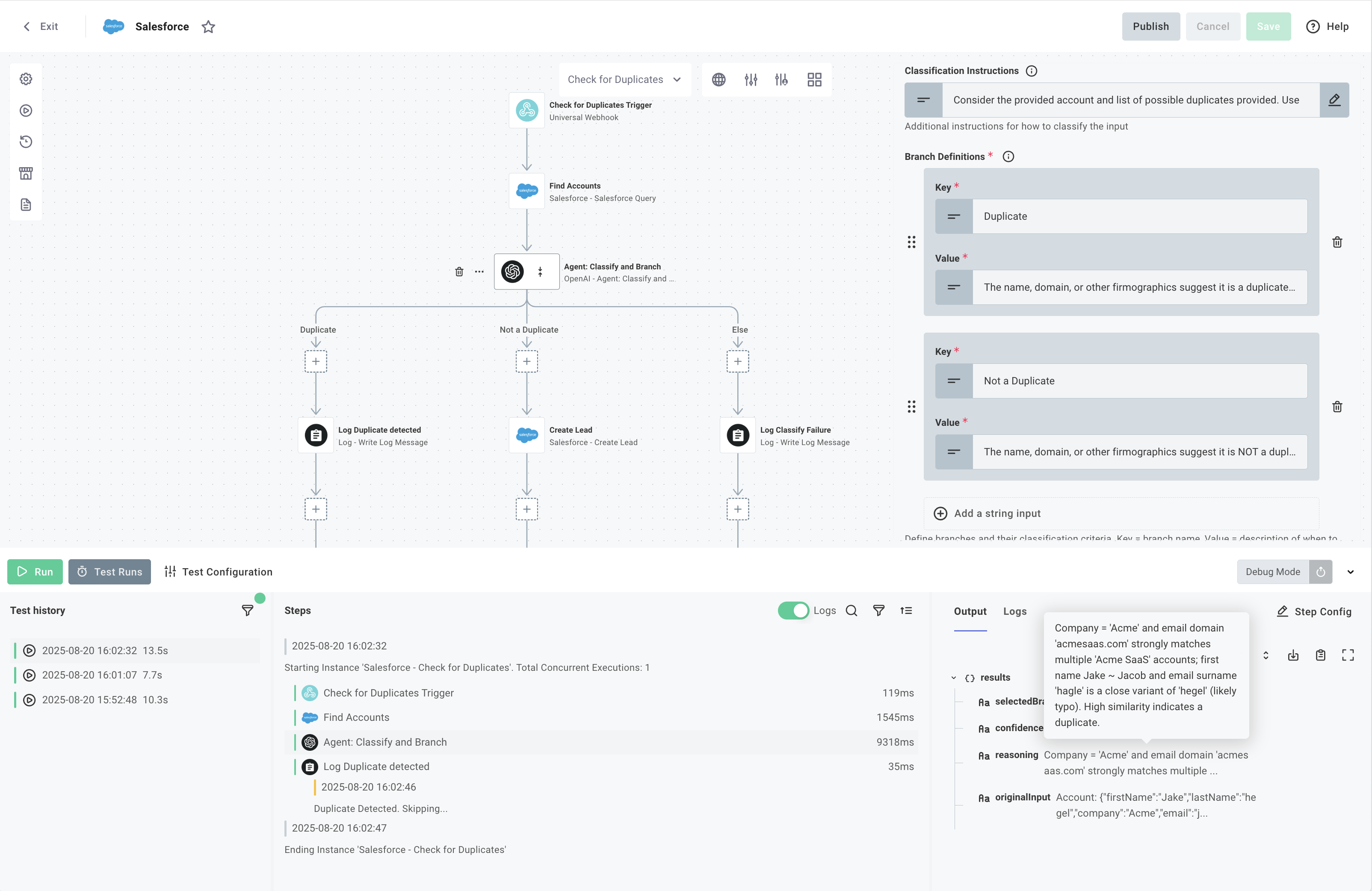
The legacy TypeScript example is available in the compatibility reference.
Smart Data Extraction
Transform unstructured content into structured data by defining JSON schemas that enforce consistent output formats. AI agents use these schemas to parse documents, logs, and other content into predictable, validated structures
Error Logs to Jira Issues
Convert application logs into structured Jira issues by extracting error details, severity, and priority. This example uses a JSON schema to enforce output structure, ensuring the AI returns data in the exact format needed for ticket creation.
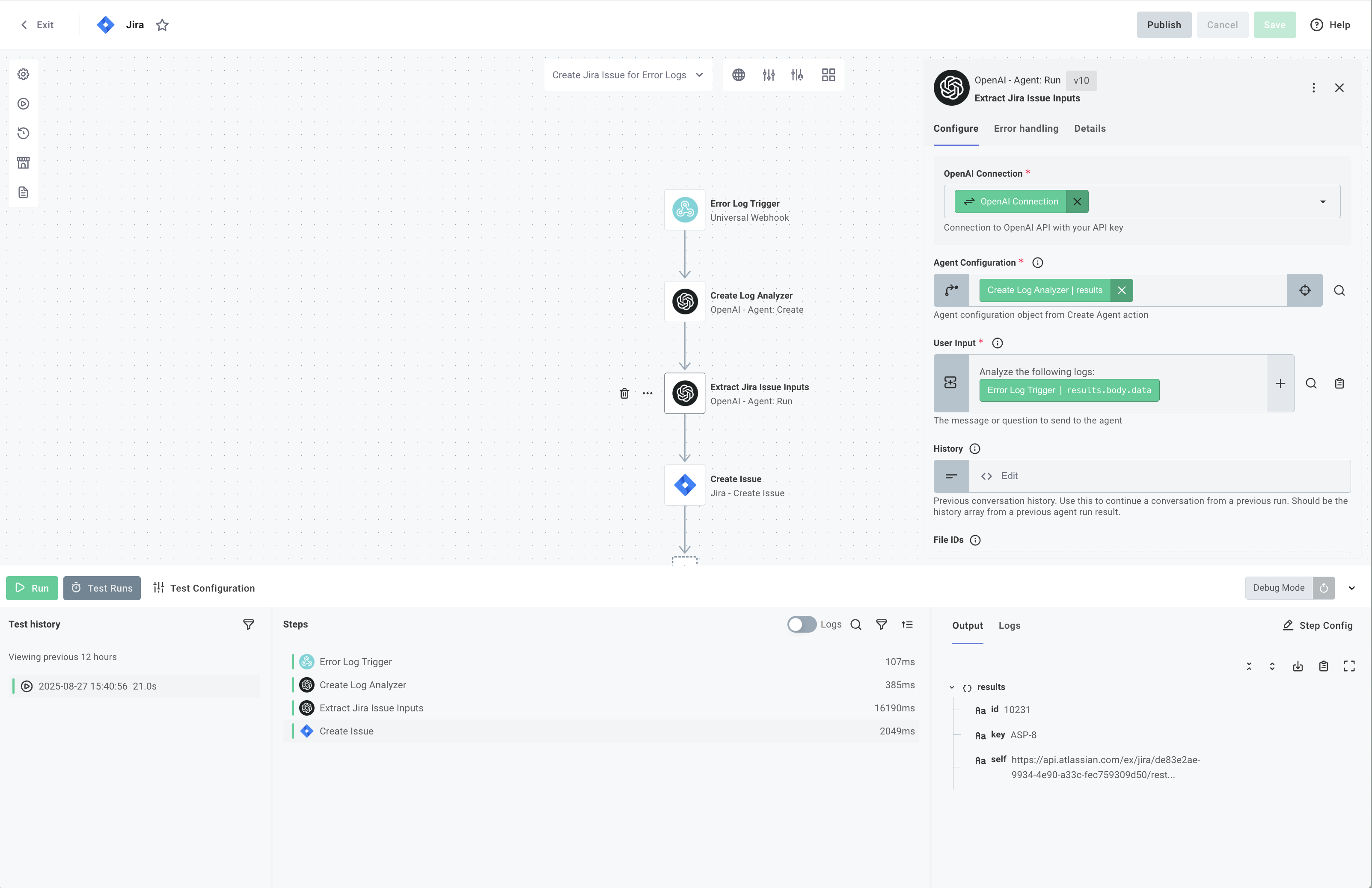
The legacy TypeScript example is available in the compatibility reference.
Extract Invoices from PDFs in Dropbox
Automatically process PDF invoices from a Dropbox folder by extracting structured data and creating records in your accounting system. This example shows how to combine file monitoring, PDF parsing, and AI extraction with schema validation.
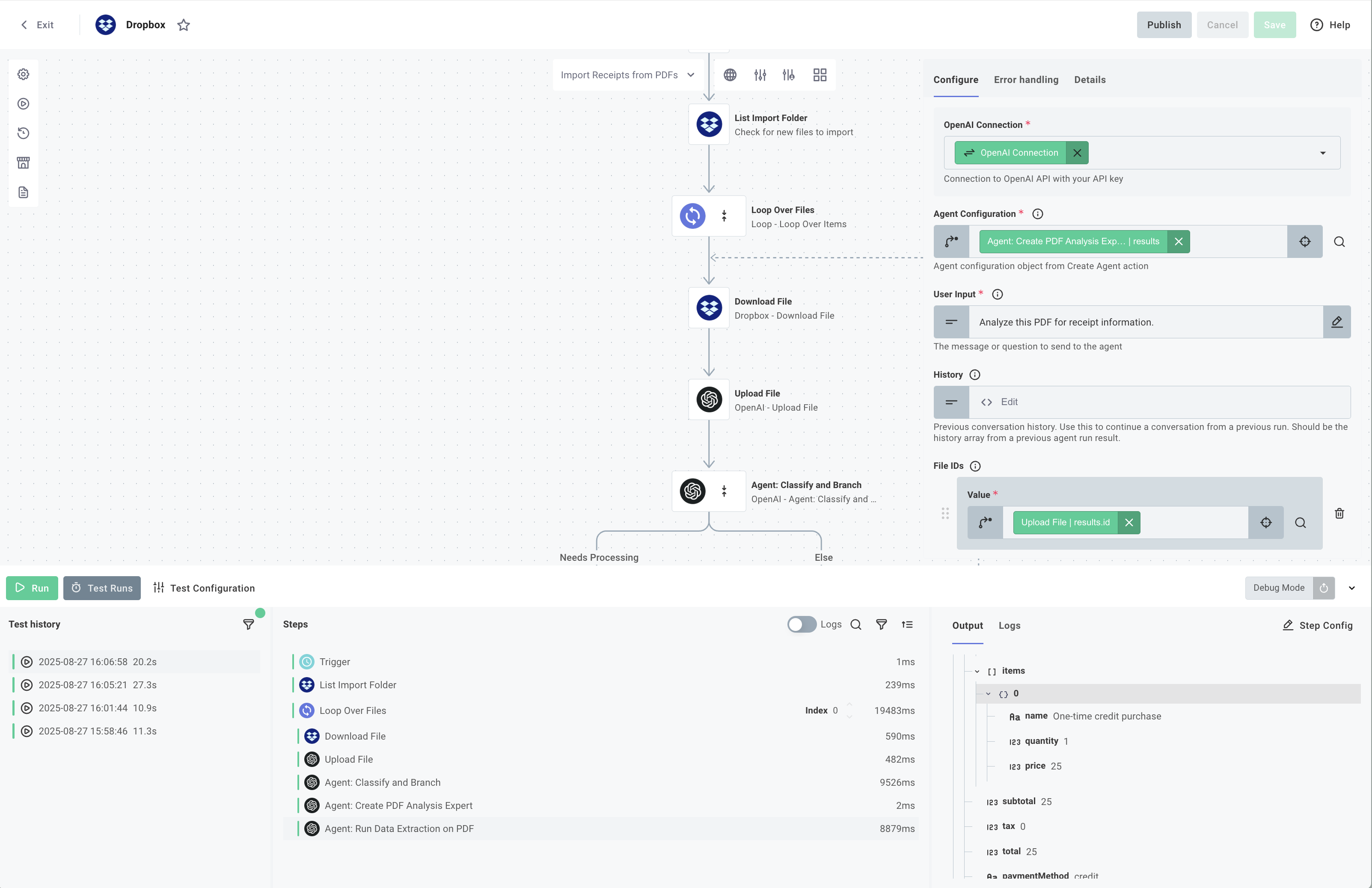
The legacy TypeScript example is available in the compatibility reference.
AI-Enhanced Field Mapping
Use AI to automatically generate intelligent field mappings between different systems. This is particularly useful when integrating with CRMs like Salesforce, where field names may vary between organizations or when mapping to your own application's fields.
Salesforce Field Mapper with AI
Automatically generate field mappings between Salesforce Account fields and your destination system using OpenAI. The AI analyzes field names and suggests semantic matches, pre-populating the mapping form so users can verify and adjust before deploying.
- Code-Native
- Low-Code
// This example field mapper uses OpenAI to generate intelligent field mappings
// between Salesforce Account fields and destination system fields.

const getAiDefaultMapping = async (sourceFields, destinationFields, apiKey) => {
  try {
    const prompt = `
      You are a field mapping expert. Given two lists of fields from different systems, suggest intelligent mappings based on field name similarities and common naming conventions.

      Source fields: ${JSON.stringify(
        sourceFields.map((f) => f.title || f.const || f),
      )}
      Destination fields: ${JSON.stringify(
        destinationFields.map((f) => f.title || f.const || f),
      )}

      Return a JSON array of mappings in the format:
      [
        {"source": "SourceFieldName", "destination": "DestinationFieldName"},
        ...
      ]

      Only map fields that have clear semantic matches. Return only valid JSON without any markdown formatting or explanations.
    `;

    const response = await fetch("https://api.openai.com/v1/chat/completions", {
      method: "POST",
      headers: {
        "Content-Type": "application/json",
        Authorization: `Bearer ${apiKey}`,
      },
      body: JSON.stringify({
        model: "gpt-4",
        messages: [
          {
            role: "system",
            content:
              "You are a helpful assistant that creates field mappings between different data systems. Respond only with valid JSON.",
          },
          {
            role: "user",
            content: prompt,
          },
        ],
        temperature: 0.3,
        max_tokens: 2000,
      }),
    });

    if (!response.ok) {
      throw new Error(
        `OpenAI API error: ${response.status} ${response.statusText}`,
      );
    }

    const data = await response.json();
    const mappingText = data.choices[0].message.content.trim();

    // Parse the JSON response, removing any markdown code blocks if present
    const cleanedText = mappingText
      .replace(/```json\n?/g, "")
      .replace(/```\n?/g, "");

    const mappings = JSON.parse(cleanedText);

    // Create lookup maps to convert titles back to const values
    const sourceTitleToConst = new Map(
      sourceFields.map((f) => [f.title || f.const || f, f.const || f]),
    );
    const destTitleToConst = new Map(
      destinationFields.map((f) => [f.title || f.const || f, f.const || f]),
    );

    // Convert AI's title-based mappings to const-based mappings
    const constMappings = mappings
      .map((mapping) => ({
        source: sourceTitleToConst.get(mapping.source) || mapping.source,
        destination:
          destTitleToConst.get(mapping.destination) || mapping.destination,
      }))
      .filter((mapping) => mapping.source && mapping.destination);

    return constMappings;
  } catch (error) {
    console.error("Error getting AI mapping:", error);
    return [];
  }
};

module.exports = async (context, { connection, contextValue }) => {
  const {
    token: { access_token, instance_url },
  } = connection;

  const openAiApiKey = context.configVars["OpenAI Connection"].fields.apiKey;

  // Fetch Salesforce Account fields
  const response = await fetch(
    `${instance_url}/services/data/v60.0/sobjects/Account/describe`,
    { headers: { Authorization: `Bearer ${access_token}` } },
  );

  const { fields } = await response.json();

  const salesforceAccountFields = fields
    .map((field) => ({ title: field.label, const: field.name }))
    .sort((a, b) => (a.title < b.title ? -1 : 1));

  // Destination fields from your target system
  const acmeAccountFields = [
    { title: "Account Name", const: "accountName" },
    { title: "Account Identifier", const: "accountID" },
    { title: "Email Address", const: "email" },
    { title: "Phone Number", const: "phone" },
    { title: "Street Address", const: "street" },
    { title: "City", const: "city" },
    { title: "State/Province", const: "state" },
    { title: "Postal Code", const: "zipCode" },
    { title: "Country", const: "country" },
    { title: "Company Website", const: "website" },
    { title: "Industry Type", const: "industry" },
    { title: "Annual Revenue", const: "revenue" },
    { title: "Employee Count", const: "employees" },
    { title: "Created Date", const: "createdAt" },
    { title: "Last Modified", const: "updatedAt" },
  ];

  const schema = {
    type: "array",
    items: {
      type: "object",
      properties: {
        source: {
          type: "string",
          oneOf: salesforceAccountFields,
        },
        destination: {
          type: "string",
          oneOf: acmeAccountFields,
        },
      },
      required: ["source", "destination"],
    },
  };

  const uiSchema = {
    type: "Control",
    label: "Salesforce / Acme Account Field Mapper",
    scope: "#",
    options: {
      detail: {
        type: "HorizontalLayout",
        elements: [
          {
            type: "Control",
            scope: "#/properties/source",
            options: { autocomplete: true },
            label: "Salesforce Field",
          },
          {
            type: "Control",
            scope: "#/properties/destination",
            options: { autocomplete: true },
            label: "Acme Field",
          },
        ],
      },
    },
  };

  // Get AI-generated default mapping
  const data = await getAiDefaultMapping(
    salesforceAccountFields,
    acmeAccountFields,
    openAiApiKey,
  );

  context.logger.info(`AI-generated default mapping: ${JSON.stringify(data)}`);

  return {
    schema,
    uiSchema,
    data,
  };
};
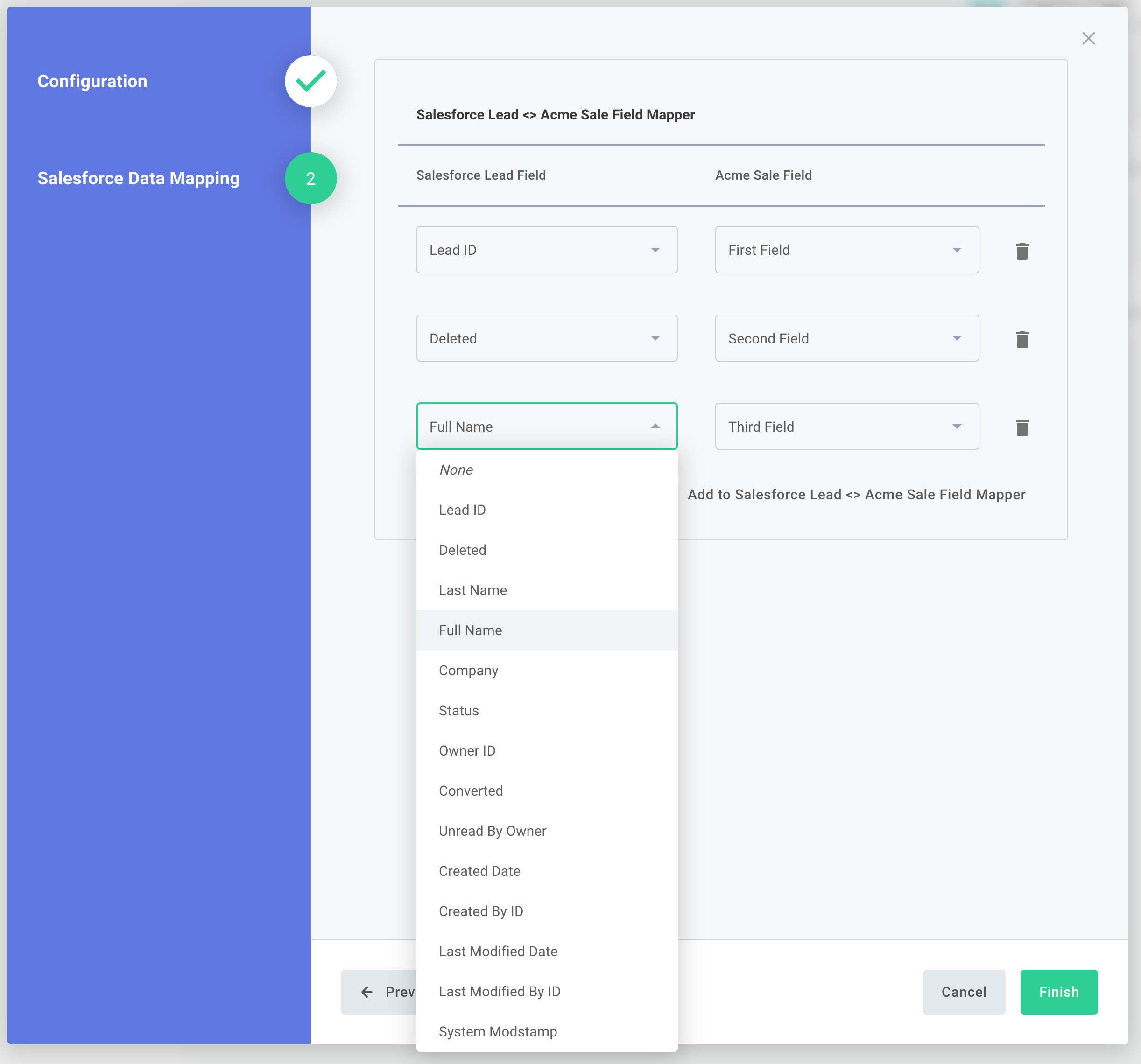
Prerequisites
- OpenAI Connection: Must be named exactly
"OpenAI Connection"and set toorganizationvisibility (not customer-visible) - Salesforce Connection: Already configured in your integration (created automatically when you add a Salesforce step)
Learn more about field mapping →
Conversational Interfaces
Build AI-powered chat interfaces that maintain conversation context across multiple interactions. Agents store and retrieve chat history to understand context, process natural language, and execute workflows based on user intent.
Slack Assistant
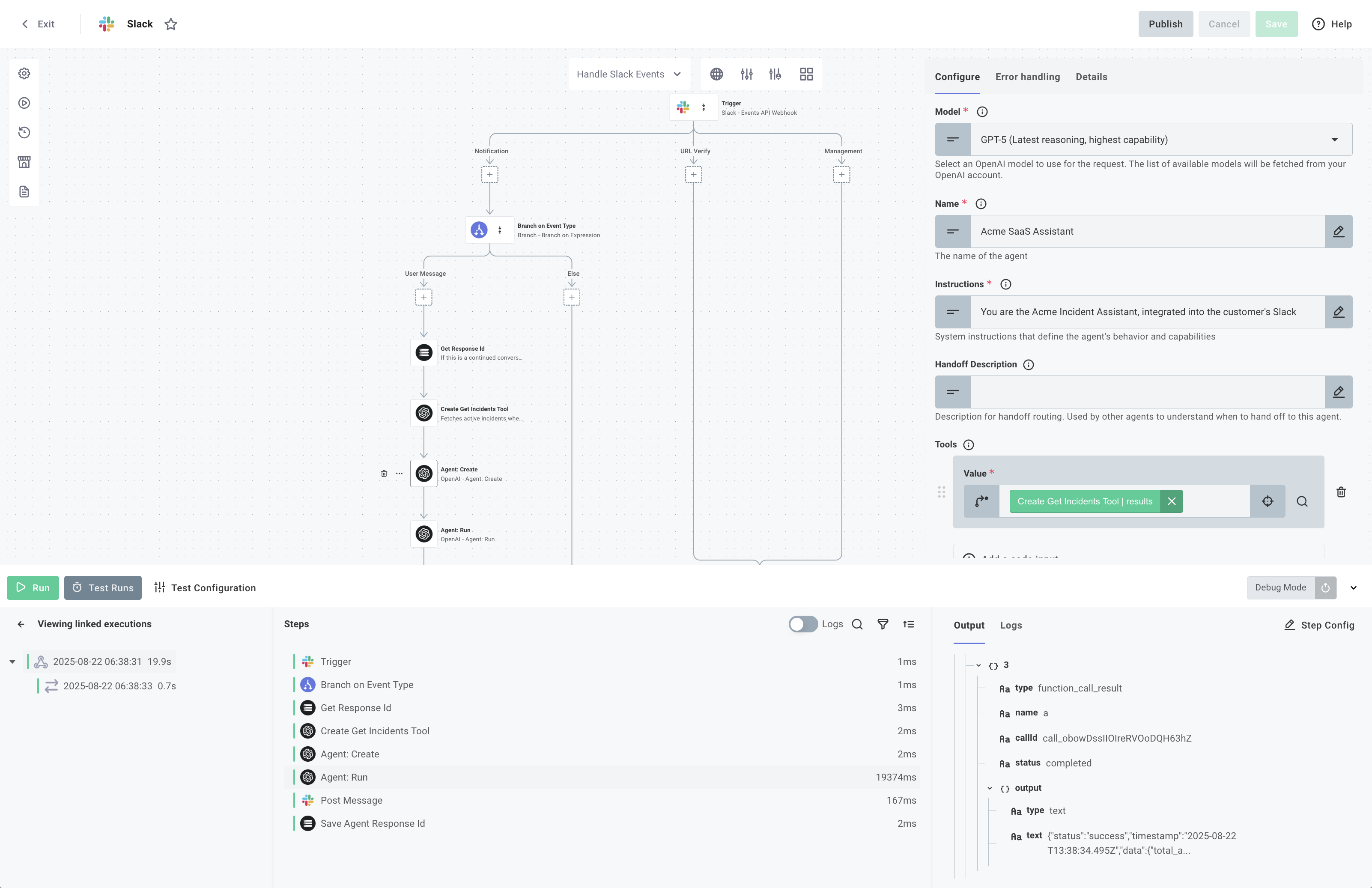
Create an AI assistant that responds to user messages in Slack threads, providing application intelligence directly in the customer's Slack.
- Code-Native
- Low-Code
export const eventHandler = flow({
  name: "Slack Message Handler",
  description:
    "Handles Slack Events and generates responses with OpenAI Assistant SDK",
  onExecution: async (context, params) => {
    const { configVars, customer, integration, instanceState } = context;

    const connection = configVars["Slack Connection"];
    const openaiKey = util.types.toString(
      configVars.OPENAI_API_KEY.fields.apiKey,
    );
    const prismaticRefreshToken = util.types.toString(
      configVars.PRISMATIC_REFRESH_TOKEN,
    );

    // Set OpenAI API key globally
    setDefaultOpenAIKey(openaiKey);

    // Build agent tools
    const tools = await buildTools(
      customer.externalId !== "testCustomerExternalId" ? customer : undefined,
      prismaticRefreshToken,
      integration.id,
    );

    const agent = new Agent({
      name: "Slack Assistant",
      instructions: configVars.SYSTEM_PROMPT,
      tools,
    });

    const executionId = params.onTrigger.results.executionId;

    // Create slack assistant
    const assistant = new Assistant({
      userMessage: async (args) => {
        const { client, message, logger, setStatus } = args;
        if (
          !("text" in message) ||
          !("thread_ts" in message) ||
          !message.text ||
          !message.thread_ts
        ) {
          return;
        }

        setStatus("is typing...");

        const conversationId = message.thread_ts;
        const userInput = message.text;

        try {
          // Get stored state for this conversation
          const convState = instanceState[conversationId];
          const lastResponseId = convState.lastResponseId;

          // Run the agent with the message
          const result = await run(agent, [user(userInput)], {
            previousResponseId: lastResponseId,
          });

          // Handle interruptions
          if (result.interruptions && result.interruptions.length > 0) {
            const firstInterruption = result.interruptions[0];

            // Store state in instanceState
            instanceState[conversationId] = {
              state: result.state.toString(),
              lastResponseId: result.lastResponseId,
              pendingInterruption: {
                functionId: firstInterruption.rawItem.id!,
                name: firstInterruption.rawItem.name,
                arguments: firstInterruption.rawItem.arguments,
              },
            };

            // Post approval block
            await client.chat.postMessage({
              channel: message.channel,
              thread_ts: message.thread_ts,
              blocks: createApprovalBlocks(
                firstInterruption.rawItem.name,
                firstInterruption.rawItem.arguments,
                executionId,
              ),
              text: `Approval required for tool: ${firstInterruption.rawItem.name}`,
              metadata: {
                event_type: "tool_approval",
                event_payload: { conversationId },
              },
            });
          } else {
            // Store lastResponseId for next message
            instanceState[conversationId] = {
              lastResponseId: result.lastResponseId,
            };

            // Post response
            await client.chat.postMessage({
              channel: message.channel,
              thread_ts: message.thread_ts,
              text: result.finalOutput || "I couldn't generate a response.",
              metadata: {
                event_type: "execution_id",
                event_payload: { execution_id: executionId },
              },
            });
          }
        } catch (e) {
          await args.say({
            text: "I encountered an error processing your request. Please try again.",
          });
        }
      },

      threadStarted: async (args) => {
        await args.say("Hi! I'm your AI assistant. How can I help you today?");
        await args.saveThreadContext();
      },
    });

    const actionHandlers: ActionHandlers = {
      onToolApproval: async ({
        approved,
        previousExecutionId,
        userId,
        conversationId,
        channelId,
        client,
        updateMessage,
      }) => {
        // Get stored state for this conversation
        const convState = instanceState[conversationId] as ConversationState;

        // Deserialize and apply users decision
        let agentState = await RunState.fromString(agent, convState.state);
        const interrupts = agentState.getInterruptions();
        const interrupt = interrupts[0];

        if (approved) {
          agentState.approve(interrupt);
        } else {
          agentState.reject(interrupt);
        }

        // Update message to show decision
        await updateMessage(
          approved
            ? `✅ Tool execution approved by <@${userId}>`
            : `❌ Tool execution denied by <@${userId}>`,
        );

        // Continue execution
        const result = await run(agent, agentState);

        instanceState[conversationId] = {
          lastResponseId: result.lastResponseId,
        } as ConversationState;

        // Post final response
        await client.chat.postMessage({
          channel: channelId,
          thread_ts: conversationId,
          text: result.finalOutput || "Task completed.",
          metadata: {
            event_type: "execution_id",
            event_payload: {
              execution_id: executionId,
            },
          },
        });
      },
    };

    const app = App(connection, { assistant, actionHandlers });
    const handler = await app.start();
    await handler(params.onTrigger.results);

    return {
      data: {
        result: "Event processed successfully",
      },
    };
  },
});
Human-in-the-Loop Approval Flows
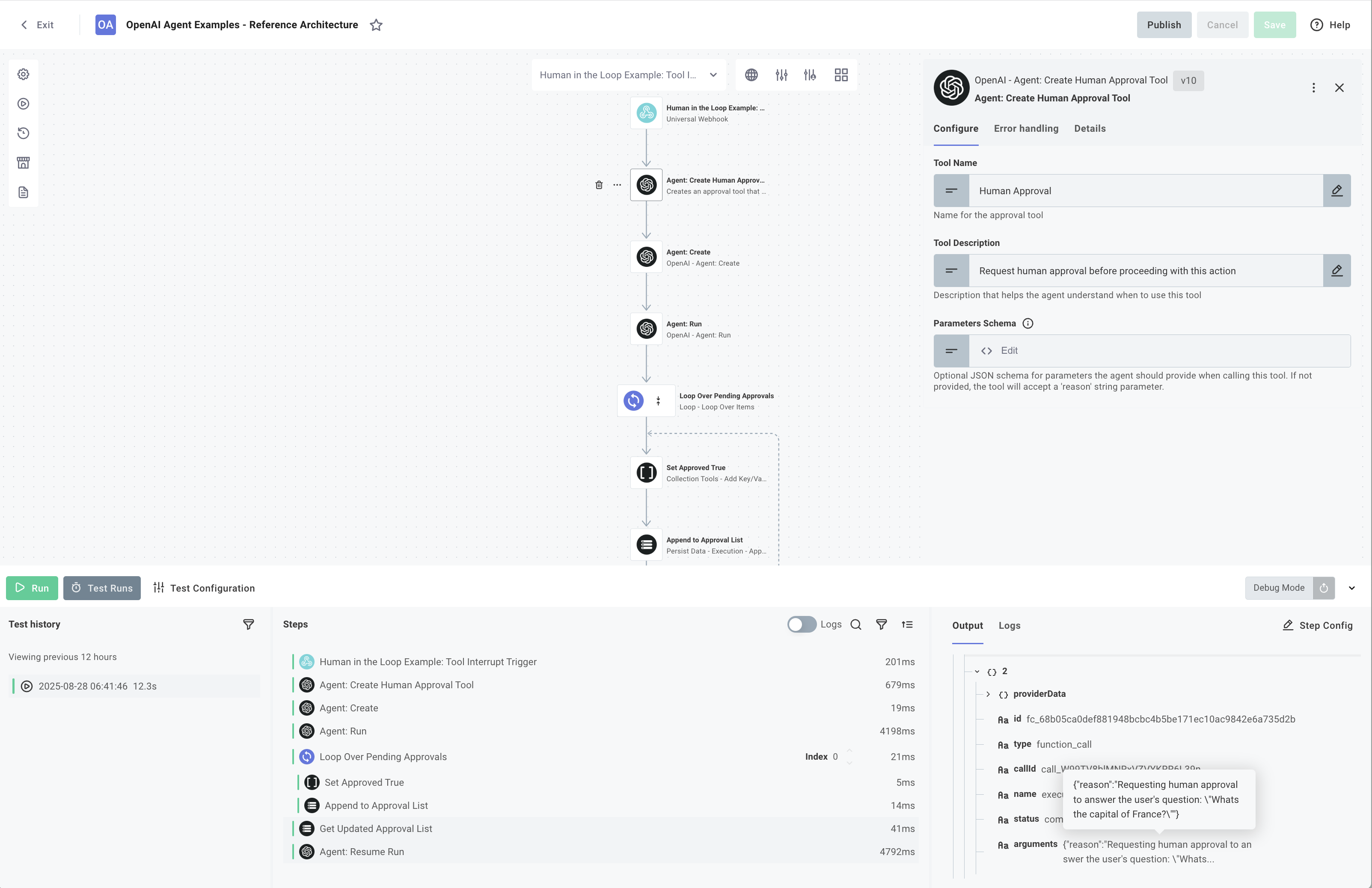
Combine AI automation with human oversight by restricting tool access and implementing approval gates for sensitive operations. Define permission levels (read vs. write), create approval workflows that pause execution for human review, and maintain audit logs.
API Operation Tools Requiring Approval
Gate sensitive API operations behind human approval workflows. This example shows how to differentiate between read-only operations (no approval needed) and write operations (approval required), with a mechanism to pause execution and resume after human review.
- Code-Native
- Low-Code
export const approvalFlow = flow({
  name: "Approval Flow",
  description: "Demonstrates wrapping REST APIs as AI tools for interaction",
  onExecution: async ({ configVars }, params) => {
    const openaiKey = util.types.toString(
      configVars.OPENAI_API_KEY.fields.apiKey,
    );

    // Set the OpenAI API key
    setDefaultOpenAIKey(openaiKey);

    // Create agent with API tools
    const agent = new Agent({
      name: "API Assistant",
      instructions: `You are an API assistant that helps users interact with their data.
        Use the available tools to fulfill user requests.`,
      tools: [
        // Read-only tools
        apiTools.getCurrentUserInfo,
        apiTools.getPosts,
        apiTools.getPost,
        apiTools.getPostComments,

        // Write tools
        apiTools.createPost, //needsApproval: true
        apiTools.updatePost, //needsApproval: true
      ],
    });

    // Get the message from the payload
    const {
      message,
      conversationId,
      lastResponseId,
      state,
      interruptions: userResponses,
    } = params.onTrigger.results.body.data as ChatRequest;

    if (userResponses && state) {
      let agentState = await RunState.fromString(agent, state);
      agentState = updateStateWithUserResponse(
        agentState,
        agentState.getInterruptions(),
        userResponses,
      );

      const result = await run(agent, agentState);
      const interruptions: Interruption[] = handleInterrupt(
        result.interruptions,
      );
      return {
        data: {
          response: interruptions.length > 0 ? undefined : result.finalOutput,
          interruptions,
          lastResponseId: result.lastResponseId,
          conversationId,
          state: result.state.toString(),
        },
      };
    } else {
      if (!message) {
        throw new Error("Message is required to run the agent");
      }

      // Run the agent with the message
      const result = await run(agent, [user(message)], {
        previousResponseId: lastResponseId,
      });

      const interruptions: Interruption[] = handleInterrupt(
        result.interruptions,
      );
      return {
        data: {
          response: interruptions.length > 0 ? undefined : result.finalOutput,
          interruptions,
          lastResponseId: result.lastResponseId,
          conversationId,
          state: result.state.toString(),
        },
      };
    }
  },
});

function updateStateWithUserResponse(
  state: RunState<unknown, Agent<unknown, "text">>,
  interrupts: RunToolApprovalItem[],
  userResponses: Interruption[],
) {
  for (const userResponse of userResponses) {
    const interrupt = interrupts.find(
      (i) => i.rawItem.id === userResponse.functionId,
    );
    if (interrupt) {
      if (userResponse.approved) {
        state.approve(interrupt);
      } else {
        state.reject(interrupt);
      }
    }
  }
  return state;
}

function handleInterrupt(interrupts: RunToolApprovalItem[]): Interruption[] {
  if (interrupts.length === 0) {
    return [];
  }
  const userApprovalItems = interrupts.map((intr) => ({
    functionId: intr.rawItem.id!,
    name: intr.rawItem.name,
    approved: false,
    arguments: intr.rawItem.arguments,
  }));
  return userApprovalItems;
}
Incident Monitoring Slackbot
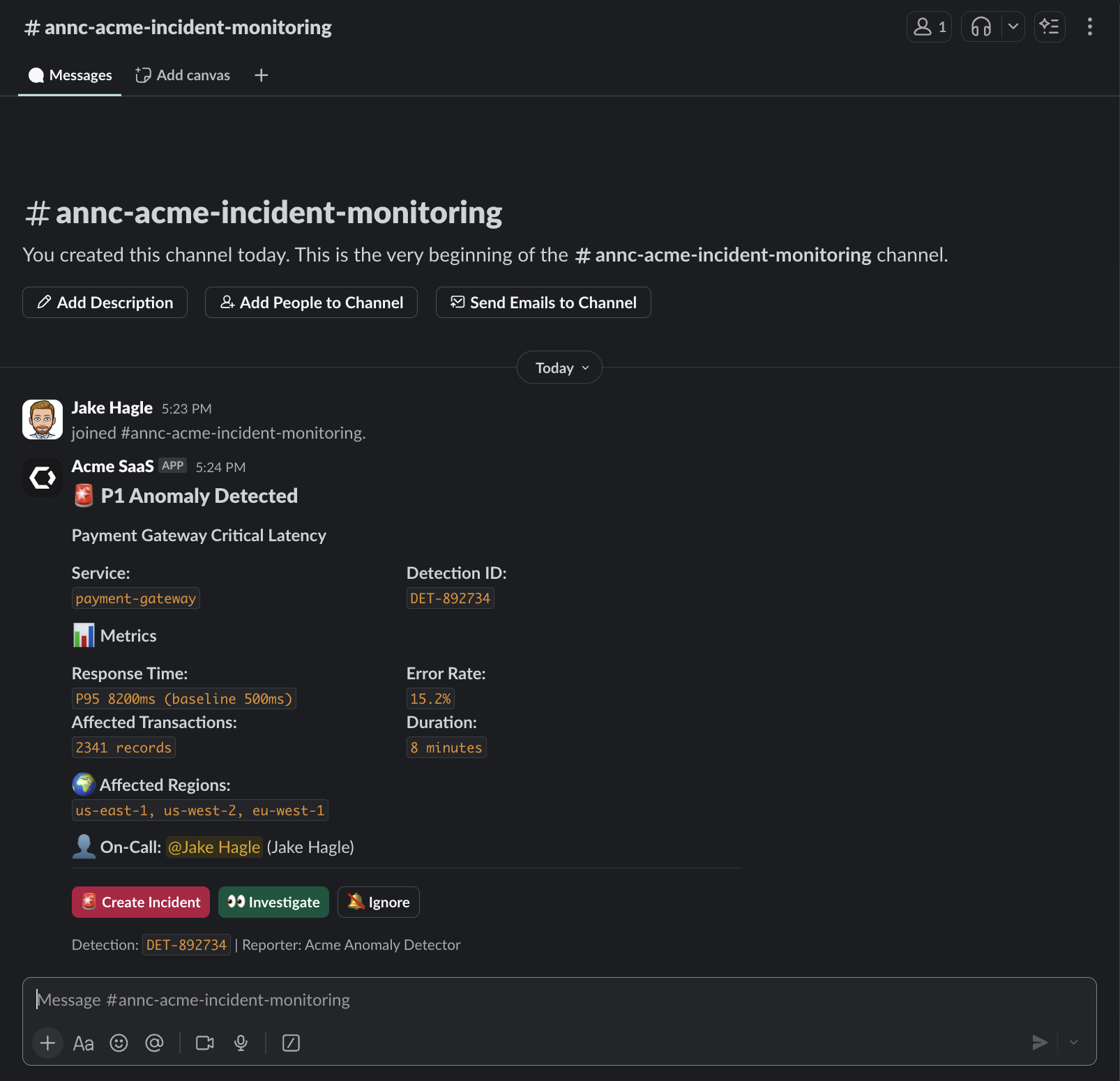
Monitor backend services for errors and automatically alert your team via Slack with AI-generated summaries. Enable operators to trigger deeper investigation or create incidents directly from Slack, combining automated detection with human decision-making.
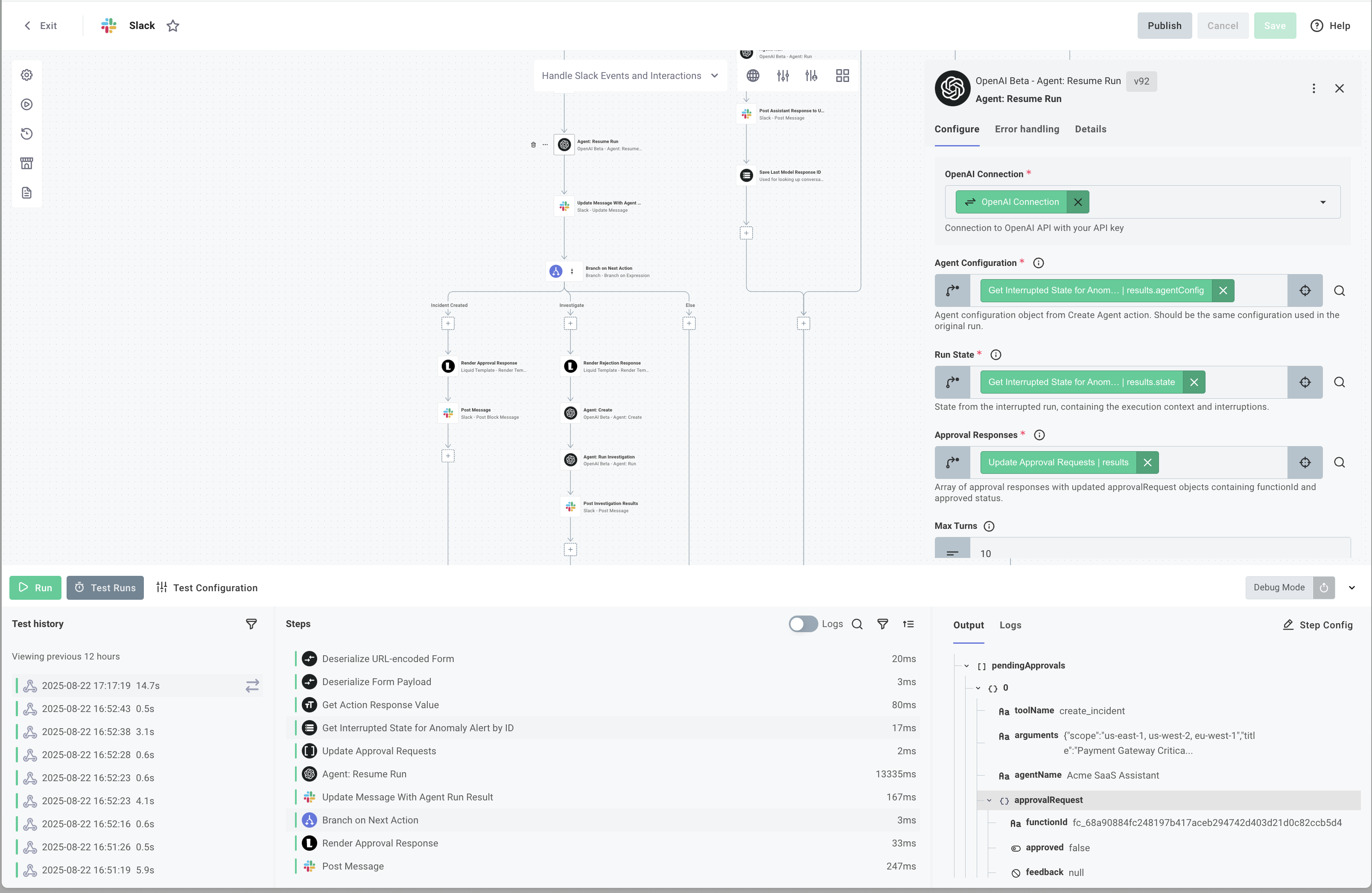
The legacy TypeScript example is available in the compatibility reference.
- Code-Native
- Low-Code
/*
Handles Slack events and interactions for the incident management system.
This flow processes approval actions from Slack buttons when users decide
whether to create an incident from an anomaly alert.

Integration flow:
1. newIncidentAlert flow detects anomaly and requests approval
2. User clicks approve/investigate/ignore button in Slack
3. This flow processes the interaction and resumes the AI agent
4. Agent completes the incident creation or rejection
5. Result is posted back to Slack
 */

export const handleSlackEventsAndInteractions = flow({
  name: "Handle Slack Events and Interactions",
  onExecution: async (context, params) => {
    const triggerResults = params.onTrigger.results.body;

    // Decode the URL-encoded payload from Slack
    const rawBody = util.types.toString(triggerResults.data);
    const formData = new URLSearchParams(rawBody);
    const payloadString = formData.get("payload");

    if (!payloadString) {
      console.log("No payload found in request body");
      return { data: { error: "No payload found" } };
    }

    // Parse the JSON payload
    const interactionPayload = JSON.parse(payloadString) as any;

    // Build response data
    const responseData = {
      type: interactionPayload.type,
    };
    // Add common fields
    if (interactionPayload.trigger_id) {
      responseData.trigger_id = interactionPayload.trigger_id;
    }

    if (interactionPayload.user) {
      responseData.user = interactionPayload.user;
    }

    // Process different interaction types
    switch (interactionPayload.type) {
      case "block_actions": {
        const blockAction = interactionPayload as BlockAction;
        responseData.actions = blockAction.actions;
        responseData.response_url = blockAction.response_url;
        responseData.container = blockAction.container;

        // Process approval action
        const action = blockAction.actions[0];

        // Parse the action value
        const approvalAction = parseApprovalAction(action);
        const { anomalyId, functionId, approved } = approvalAction;

        try {
          const storedState = retrieveStoredAgentState(context, anomalyId);
          const pendingApprovals = storedState.pendingApprovals || [];

          const matchingApproval = findMatchingApproval(
            pendingApprovals,
            functionId,
          );

          // Create approval response
          const approvalResponses = createApprovalResponse(
            functionId,
            approved,
            action.action_id,
          );

          // Resume the agent with approval response
          const resumeResult = await resumeAgent(
            context,
            storedState,
            approvalResponses,
          );

          // Handle the agent's final output
          const finalOutput = resumeResult.data.finalOutput;
          await postIncidentResult(context, finalOutput);

          // Update the original approval message
          await updateApprovalMessage(
            context,
            blockAction,
            approved,
            action.action_id,
          );

          // Clean up stored state
          await cleanupStoredState(context, anomalyId);

          responseData.handled = true;
          responseData.anomalyId = anomalyId;
          responseData.finalOutput = finalOutput;
        } catch (error) {
          console.error("Error handling approval:", error);
          responseData.error =
            error instanceof Error ? error.message : String(error);
        }

        break;
      }

      default:
        console.log("Unsupported interaction type:", interactionPayload);
        responseData.raw = interactionPayload;
    }

    return { data: responseData };
  },
});